|
* TinkerDifferent *
Retro Computing Community |
| Home | Forums | What's New | Search | Settings |
| Color Classic VGA Woes |
Forums > Vintage Apple > Macintosh > Compact Macs
|
JDW Administrator Japan -------- Joined: Sep 2, 2021 Posts: 2,534 Likes: 1,982 |
Jul 29, 2025 - #41
Oh, wow! And only $2.79 too... That's really amazing. Thank you for convincing Console5 to add that kit!
I'm still filming my video on the CC Analog Board parts swap. Having to deal with some lifted pads right now. Not torn-off pads, just lifted. Not too surprising in light of how hot those areas got through the years. I'm also pondering the implications that raising the parts off the PCB will have. That better cools them, but it also puts more stress on the pads. I tried the original gray-colored JB-Weld under one pad today. Takes 24 hours to cure. I'll then see what happens when I solder the component leg to it. If it holds, I'll probably add UV solder mast atop that to further keep it down. I originally thought about heat-shrink tubing on the legs, especially to prevent shorting, because I am lifting the new components up and off the PCB. I soldered in my DL21 diode replacement that way. And I think that's fine because that part isn't too big and heavy. But the resistors are pretty massive. I then remembered that I have some transparent silicone tubing that I bought to repair the rollers on my Macintosh Portable's trackball. Silicone is pretty heat resistant and thicker than heat-shrink tubing, so I will try to add some of that tonight after work to see if it better supports those big replacement resistors. Ceramic stand-offs would work too, but I can't find those on Amazon and prices on Mouser are pretty crazy. So my Silicone tubing idea is probably best in the end. Again, my thinking here is to prevent a heavy component that sits on its legs from pushing out the pads on the solder side of the PCB over time. Liked by jibsaramnim |
|
JDW Administrator Japan -------- Joined: Sep 2, 2021 Posts: 2,534 Likes: 1,982 |
Aug 5, 2025 - #42
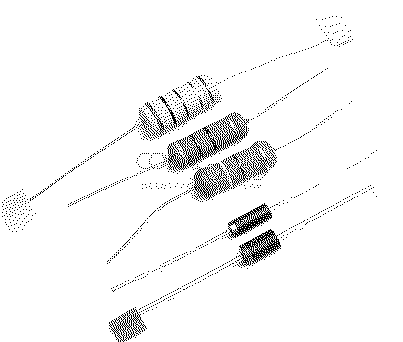
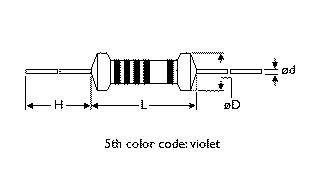
Could you please measure resistance on the light green resistor shown in the Console5 kit below? I only just now noticed it is 5-band, and unless my eyes are deceiving me, that means it is the wrong value... BRN-BLK-BRN-GLD-BLU = 10.1Ω, 0.25% tolerance The correct resistor for RL22 is 100Ω, not 10.1Ω. And it needs to be 5W. In fact, all 3 resistors really need to be 5W. They probably are, but if you find the green resistor is wrong, when you speak to Luke about it, you should re-confirm the wattage. I would also recommend he put the resistance values and the wattage values on his web page for that kit.
|
|
jibsaramnim Tinkerer South Korea -------- Joined: Mar 16, 2024 Posts: 36 Likes: 25 |
Aug 12, 2025 - #43
Apologies for the belated response. I was able to measure the resistance of the resistor yesterday, and can happily report that it does measure correctly at ~100Ω. I was working on the analog board of my CC I too was scratching my head, as as I couldn't make sense of its value based on its color bands. I even asked my wife if I was perhaps seeing the wrong colors, but she confirmed seeing the same colors. I do agree it would be helpful for Luke to add a bit more description to the listing, and update their wiki page to list these too. I was referencing your (very helpful, thank you!) images/gifs when working on my board, as I like to have a visual companion when doing these types of things. I can also happily report that my second Color Classic seems to be working very nicely so far after recapping its analog board and replacing these resistors and diodes with Console5's kit(s). I must admit that the included 1N5344B diode has legs that feel way too thick, so it's not actually possible to install it without increasing the hole sizes a bit. That's a bit of a scary undertaking especially as these components that run super hot already seem to increase the odds of lifted/loose pads. Still, the CC has been running like a champ for 3-4 hours yesterday and about the same today so far, which I'm very happy about. Liked by JDW |
|
JDW Administrator Japan -------- Joined: Sep 2, 2021 Posts: 2,534 Likes: 1,982 |
Aug 12, 2025 - #44
@jibsaramnim
I'm both pleased and shocked that resistor measures 100Ω. Great you don't need a replacement, but that Blue or Violet 5th band at the end is unusual. It's not unheard of for high precision resistors like 0.1% tolerance ones, but those are expensive and your kit was cheap, so it can't be that. Again, this is why having more detail specs on each part is helpful. Anyone with a good eye for resistor color bands may be misled into thinking that 100Ω resistor is only 10Ω. But again, thanks for confirming it's correct. It was interesting to hear you couldn't get that one diode installed through the holes in the PCB. Does that mean you drilled them out? Thick wires are actually a good thing because the heat will flow from the super hot body into the legs and eventually into the pad and copper PCB traces too. All will dissipate that heat on some level. The thinner the legs, the less surface area and less heat dissipation they would offer. Current flow is another benefit of having thicker legs. But obviously, if they are too thick, you have problems with some PCB pads (holes too narrow). |
|
jibsaramnim Tinkerer South Korea -------- Joined: Mar 16, 2024 Posts: 36 Likes: 25 |
Aug 12, 2025 - #45
Same here, I'm glad it measured correctly. I've reached out to Luke to ask about this (and to ask if he's able to put detailed specs in his product listing as-well as update the Console5 wiki), I'll follow up with any updates I might get pertaining this!
Indeed I did yes. I understand that thicker wires (or, legs) can be helpful, but as they were they just couldn't fit through the board. Some hole expansion did the trick though, but I do feel like this helps push the whole process of replacing these diodes to a slightly higher difficulty level. Not impossible though, as even amateur-hour I was able to get it done I suppose :). Liked by JDW |
|
JDW Administrator Japan -------- Joined: Sep 2, 2021 Posts: 2,534 Likes: 1,982 |
Aug 12, 2025 - #46
I agree though that drilling isn't something most people would want to do, especially when most people probably wouldn't even have the right sized drill bit. On top of that, you run the risk of loosening the pad from the solder side of the board. Glad to hear that didn't happen to you though. I lifted some pads simply by using my FR-301 desoldering gun while removing the stock components! All that heat through the years makes some pads quite weak and there's little that keeps them clinging to the board other than the green UV solder mask on them. |
|
jibsaramnim Tinkerer South Korea -------- Joined: Mar 16, 2024 Posts: 36 Likes: 25 |
Aug 13, 2025 - #47
Liked by JDW |
|
jibsaramnim Tinkerer South Korea -------- Joined: Mar 16, 2024 Posts: 36 Likes: 25 |
Sep 17, 2025 - #48
Slightly belated response from me on this, apologies. I had heard back from Luke from Console5 but didn't get around to wading through my inbox until today. Luke from Console5 shared this with me:
The product listing and Wiki page have also been updated to include the relevant information. This should hopefully help anyone else who down the road might be looking at picking up a set from Console5 for their CC :)
Liked by JDW |
|
JDW Administrator Japan -------- Joined: Sep 2, 2021 Posts: 2,534 Likes: 1,982 |
Sep 19, 2025 - #49
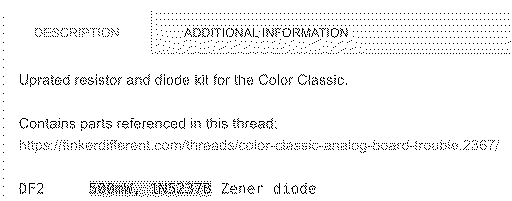
In other words... Because the stock DF2 diode normally doesn't burn, replacing it with the same exact low-wattage 0.5W part gets you nothing beneficial in terms of heat dissipation. You would need to use the 5W part mentioned above to gain a benefit. DF2Beefier part: 8.2V Zener 5W (Izt=150mA): 1N5344B-TPStock part: 8.2V 0.5W Izt=20mA 1N5237B
|
|
jibsaramnim Tinkerer South Korea -------- Joined: Mar 16, 2024 Posts: 36 Likes: 25 |
Sep 24, 2025 - #50
Great catch, and done! I will follow-up here when I hear back from Luke from Console5 on this. Liked by JDW |
|
jibsaramnim Tinkerer South Korea -------- Joined: Mar 16, 2024 Posts: 36 Likes: 25 |
Sep 25, 2025 - #51
Follow-up; It was indeed an oopsie in the description, the part being sold is a 1N5344B / 5W diode. Luke has updated the product description already, with the wiki update being imminent too I believe.
Thanks again for catching this! It could have been rather confusing for potential buyers otherwise. Liked by JDW |
|
Marconelly Tinkerer -------- Joined: May 2, 2025 Posts: 53 Likes: 38 |
Oct 2, 2025 - #52
Recently my Color Classic has started misbehaving again :( Same thing as before - works for some time, then I can hear a high pitched electrical hiss and a few seconds later it shuts down. Lately this has started happening only a few minutes after powering it on, and I've noticed that the hissing sound is coming right from the spot where the power plug is located. This got me thinking that I should try a different power cord to ensure it makes a good contact. Turns out the new cord didn't make a difference, but it got me to tinker around this area, and I discovered something very encouraging: When I apply some pressure onto power switch (push it inwards towards the computer) I could modulate the hissing sound, and with enough pressure make it disappear completely, which made the computer work fine for as long as I was applying the pressure onto the switch. After letting go of the switch, the hiss would return and the computer would shut down.
I'm fairly sure I've already reflowed all the switch and power plug contacts on the board, but I'll double check that tomorrow. Right now my suspicion is that the switch internals need cleaning. Either that, or there's a problem with the connection between the AB and the case - because when applying the pressure onto the switch, I'm also pushing in the AB towards the case. I'll have to experiment some more with this to try and see where it's losing the connection, but it seems the problem is simply something of mechanical nature. If I need to replace this switch, is there a modern drop-in replacement for it? |
|
JDW Administrator Japan -------- Joined: Sep 2, 2021 Posts: 2,534 Likes: 1,982 |
Oct 2, 2025 - #53
Those are large solder pads under the power switch, and to better reflow mine, I used a soldering iron just after heating the area with a hot air station. I used flux to better ensure good solder flow. Very well could be that even if you've desoldered before.
Also note there is one extremely hot component in close proximity to the power switch that stays at about 100*C all the time (while the power switch is set to ON). Not sure if that is making the sound, but it's worth listening too...
|
|
Marconelly Tinkerer -------- Joined: May 2, 2025 Posts: 53 Likes: 38 |
Oct 2, 2025 - #54
|
|
JDW Administrator Japan -------- Joined: Sep 2, 2021 Posts: 2,534 Likes: 1,982 |
Oct 2, 2025 - #55
Watch my video from 3:13 to 4:08 for all the details on that component:
|
|
Marconelly Tinkerer -------- Joined: May 2, 2025 Posts: 53 Likes: 38 |
Oct 4, 2025 - #56
I pulled all those black rectangular components around the power plug from LC575 board, and transplanted them onto the CC board that I'm troubleshooting - it changed nothing :( I did however notice that pushing and slightly twisting the analog board does change or eliminate the electrical hiss that precedes the computer shutting itself down.
I have eventually noticed that it seems to be that specifically pushing/poking the flyback onto one side is what causes this to happen. Pushing it from the other side tends to shut the computer off instantly. This is only the case once the hissing starts however. If it happens to be working normally, I can push the flyback all I want and nothing happens. Still this suggests that something inside the flyback is losing contact or otherwise failing intermittently. As a last ditch effort, I'll try desoldering the flyback and soldering it back into place firmly placing it onto the board. But its solder points have already been touched up, so I'm not at all confident this will accomplish anything. I guess that's the end of the road for this board, I'll keep it for parts, convert my other board into VGA and use that. |
|
JDW Administrator Japan -------- Joined: Sep 2, 2021 Posts: 2,534 Likes: 1,982 |
Oct 4, 2025 - #57
Yes. Desolder the flyback. Remove it. Examine it. Put it back. Resolver it. Test. If the flyback is bad, you're dead in the water without a replacement because the LC575 A.B. Flyback cannot be used. @Kay K.M.Mods confirmed that in the past.
Now if pushing on the analog board creates something to happen, it means one of two things: 1. Hairline cracked trace or solder joint somewhere, or. 2. The Motherboard's GROUNDING LOOPS may not be making good contact with the metal shield. That's big. Other people have reported it. Normally pushing on the Analog Board won't also push on the motherboard, but who knows. Motherboard grounding is important. Very important. And the way it achieves that is by the grounding loops on the bottom of the motherboard. The pieces of metal that protrude downward and look like half loops. |
|
Marconelly Tinkerer -------- Joined: May 2, 2025 Posts: 53 Likes: 38 |
Oct 4, 2025 - #58
I was thinking about the cracked trace, but the thing is, once the hissing starts, even the light push onto flyback modulates it. I guess it could still be a trace on the board somewhere (although, I've looked it over under magnification many times over now), but it seems more likely that something inside the flyback itself has come loose and pushing it slightly changes it. I could prove it conclusively by transplanting the flyback from the working board, but I'm not sure if I want to start dismantling the working board just to prove this. Liked by JDW |
|
ArjenCNX Tinkerer -------- Joined: Oct 20, 2025 Posts: 63 Likes: 55 |
Nov 10, 2025 - #59
|
|
ArjenCNX Tinkerer -------- Joined: Oct 20, 2025 Posts: 63 Likes: 55 |
Nov 10, 2025 - #60
|
| << First | < Prev | Page 3 of 4 | Next > | Last >> |
| Home | Forums | What's New | Search | Bookmarks | RSS | Original | Settings |
| XenForo Retro Proxy by TinkerDifferent.com |