|
* TinkerDifferent *
Retro Computing Community |
| Home | Forums | What's New | Search | Settings |
| Using HFS disk directly on a modern computer |
|
-------- |
Nov 9, 2021
There are lot of ways nowadays to move files between vintage Macintosh and modern OSes like the actual, unix based macOS 12, Monterey. You can use lot of different solution to use SD cards like harddisks (SD2SCSI, MacSD, blueSCSI, RaSCSI, etc) or use the SD card like a floppy (e.g.: Floppy Emu) but for these solutions you have to invest sometime more sometime less money.
If you just want to kick-start your ever-first-just-arrived vintage Mac, and you have a cheap USB Floppy, then here is a solution for you. To create your first Mac floppy disk. This solution works with any Mac from the SE up to the latest model with floppy drives, before the iMac G3. (Sadly it won't help you to read/write 400/800KB MFS disks for the very early Macintoshes. Topic discussed here bellow, in this thread) Of course you can use some emulator (Sheepshaver or Basilisk II) to create a full size diskimage, and copy this disk image to the USB-connected floppy disk. This command in Unix-like system could look like this:
You can modify on your vintage Mac, then copy back into your favorite emulator, do some changes there, copy into the diskimage and then the diskimage again to the floppy. But there is a solution to access to the HFS formated floppy disk directly from your modern computer: This is the hfsutils package from Robert Leslie. The original website is here: https://www.mars.org/home/rob/proj/hfs/ The downloadables are available on FTP as well: ftp://ftp.mars.org/pub/hfs/ ...and here is one of the many HTML based documentation. https://linux.die.net/man/1/hfsutils HFSUtils is old. The latest version is 3.2.6, it is from 02-Nov-1998! The easiest way is to install over HomeBrew:
It will create the hfsutils folder into the /opt/homebrew/Cellar but installing with brew not need to configure more. In the Terminal you can use immediately. Connect your USB floppy disk drive to your computer. Put any 1.44MB disk into and wait till the macOS 12, Monterey (or your modern Macintosh OS) reports the disk is not readable on your computer. The window will ask you to "Eject", "Cancel" or "Format" the disk. Don't do anything irreversible, click to cancel. The disk is in the floppy disk drive and connected over USB to you computer. If the disk was formated to FAT12 or exFAT then the modern Mac will be able to mount it, then "drop to the trash", but don't remove from the drive! Open the Terminal and type:
You should see something similar:
Search the disk with the (external, physical) 1.5 MB size. Remember for its Unix path: /dev/disk4 - in this example. First need to mount the disk content into the Unix(macOS) environment with the hfsutils - hmount command:
It will ask a sudoer's password (probably your user's password), and then you should see similar content:
Remember for the volume name, now is "Transfer" yet. If you want to format the disk, or previously was not HFS formated, use the following command: !!! IT WILL ERASE ALL DATA !!!
To copy files to the newly formated disk, use the hcopy command:
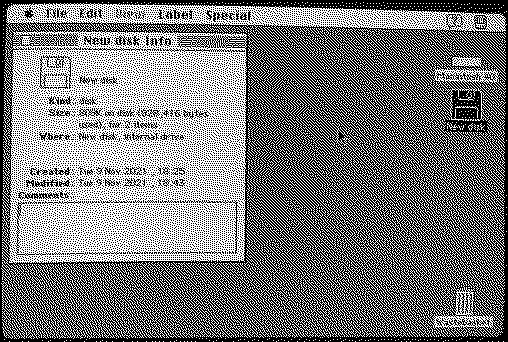
There is no progress indicator, when the copy procedure finished, you'll get back your prompt. You can check the contet of your floppy:
Copy one more file to the disk:
But we're not ready yet, INIT/thds is not that want we want, have to set the Type and Creator code, otherwise the old Macintosh System will not recognise the Thread Manager as a HQX. Use the hattrib command to set the correct Type and Creator codes:
To check which file has what Type/Creator code, check this website of Pierre Duhem: https://www.macdisk.com/macsigen.php With this easy, few Terminal command you can create the very first disk for your Macs and possible to use HFS formated disk to transfer files directly from the modern Mac to the vintage Macintosh.
Liked by -SE40-,aradiogurl,Patrickand 5 others |
|
Kai Robinson TinkerDifferent Board President 2023 Worthing, UK -------- Joined: Sep 2, 2021 Posts: 1,322 Likes: 1,313 |
Nov 9, 2021 - #2
This is some excellent content, and i'm stickying this to make sure it remains visible!
Liked by Mr. Fahrenheit,fehervariaandJDW |
|
OXTPaul New Tinkerer -------- Joined: Nov 12, 2021 Posts: 5 Likes: 6 |
Nov 12, 2021 - #3
How "Modern"? I believe up until support was dropped in Mac OS X 10.6 it could still mount HFS disks / images.
There was an HFS FUSE filesystem project that could reenabled that in later OS versions but I believe it stopped being worked on some time ago. Liked by Kai Robinsonandfehervaria |
|
fehervaria Tinkerer North Germany -------- Joined: Sep 23, 2021 Posts: 160 Likes: 171 |
Nov 12, 2021 - #4
Of course if you have a G4 iMac or PowerMac G4 then the same USB floppy disk drive will work as fine for HFS disks under Mac OS 9.2.2. Liked by retr01andOXTPaul |
|
OXTPaul New Tinkerer -------- Joined: Nov 12, 2021 Posts: 5 Likes: 6 |
Nov 12, 2021 - #5
Looks like no one has updated FuseHFS filesystem for OSXFUSE since 2014, but OSXFUSE says it supports macOS 12:
GitHub - macfuse/macfuse: macFUSE umbrella repositorymacFUSE umbrella repository. Contribute to macfuse/macfuse development by creating an account on GitHub.
[Image: github.com]
github.com
|
|
Mu0n Active Tinkerer Quebec -------- Joined: Oct 29, 2021 Posts: 649 Likes: 606 |
Nov 12, 2021 - #6
A very useful alternative while using a modern Windows machine (applicable from Windows XP to at least Win10 and in all probability, Win11 as well) is:
HFVExplorer - a standalone virtual HFS disk image creator/editor. It also loads and interacts with 1.44 mb real physical disks just fine through a USB floppy drive, which is my own favorite no-fuss method to bring small enough files to my Classic, SE/30 or PB180. it can be used to aid you in the chicken and the egg problem when you set up your very first emulator. You can use it to poke disk images and add & delete files without needing a working vintage OS environment at all. Liked by RetroViator |
|
Patrick Tinkerer -------- Joined: Oct 26, 2021 Posts: 435 Likes: 226 |
Nov 15, 2021 - #7
Thanks for writing this up! i'm def gonna try it out.
Would it be easier to say that this only works with 1.44MB disks? A lot of my Mac SE's are the non-superdrive version. (they only do 400k/800k) and as such. i don't think this will work. Liked by fehervaria |
|
fehervaria Tinkerer North Germany -------- Joined: Sep 23, 2021 Posts: 160 Likes: 171 |
Nov 17, 2021 - #8
The 400KB or 800KB drives are completly different - they're changing the rotation speed based on the sector where the read/write head is. In this was they can keep the sector phisical size equal on the whole surface of the disk. (Inner region has less sectors, outer regions have more sectors (because of the longer diameter of the disk)). The SuperDrives and PC floppy drives are fix rotation speed disk drives. That disk what is 400KB (or 800KB) in a Mac that is 360KB (or 720KB) in a PC drive. It has greater sector's lenght at the outside regions and shorter sectors inside. BUT: DO NOT FORMAT a disk in a PC drive if you want to use in a Macintosh floppy drive. It is more important for the very early 400KB disk drives arrived in the original Macintoshes. Very good sources about the topics: 400k and/or 800k Floppies with an External USB Floppy Drive Apple and the Floppy Drive Liked by Patrick |
|
retr01 Senior Tinkerer Utah, USA -------- Joined: Jun 6, 2022 Posts: 2,474 Likes: 810 |
Jul 11, 2022 - #9
Hi @fehervaria! :) [wave]
AWESOME guide! [grinning-face-with-s] Thank you. [person-with-folded-h] I want to clarify. After a 1.44 MB 3.5" disk is formatted in HFS following your guide in OS X on a USB 1.44 drive, can the disk be read and written to on a Mac with a 400k or 800k disk drive? That those Macs only can see up to 400k or 800k? Liked by fehervaria |
|
fehervaria Tinkerer North Germany -------- Joined: Sep 23, 2021 Posts: 160 Likes: 171 |
Jul 11, 2022 - #10
Only the Apple SuperDrive able to handle "modern" floppy formats (PC and Mac) because the data storage way is similar: fix rotation speed. The "old" Apple drives are changing their rotation based on the sector (the head position over the disk surface). Please read my previous post: Post 8 If your question was about the disk formatted with 1.44 drive possible to use in an 400k or 800k drive, than the answer is "no" again, because you have to cheat and cover the HD slot on the 1.44 floppy disk. Then need to reformat in the 800k drive... but it is absolutely not recommended. High Density disks and Double Density disks are - again - very different. If you have a Macintosh 128/512 with 400k disk drive, please use only 400k low density disks (400k in Apple's names and 360k for the PCs). Don't format them in other drives (like PC floppy drive or modern Mac's floppy drives)! The magnetic field generation power is very different for high density disks and for their drives than for the low density disks and those drives. |
|
retr01 Senior Tinkerer Utah, USA -------- Joined: Jun 6, 2022 Posts: 2,474 Likes: 810 |
Jul 11, 2022 - #11
Ah. Thank you for clarifying. :)(y)
Right.
Nice to know. Thank you. :)[person-with-folded-h] Liked by fehervaria |
| Page 1 of 1 |
| Home | Forums | What's New | Search | Bookmarks | RSS | Original | Settings |
| XenForo Retro Proxy by TinkerDifferent.com |

![[Image: github.com]](/proxy_image?url=https://github.githubassets.com/favicons/favicon.svg)
