* TinkerDifferent *
Retro Computing Community
Home | Forums | What's New | Search | Settings
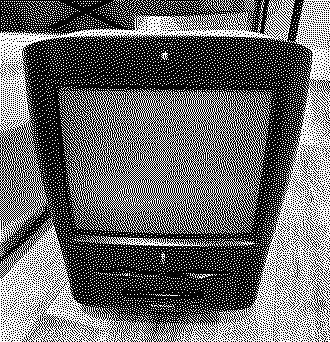
The black Mac no one asked for (Powermac G3 All-In-One Molar)

Forums > Vintage Apple > Macintosh > PowerPC G3, G4 & G5 (New World ROM) > PowerMac G3 & iMac G3

wottle
Active Tinkerer
Fort Mill, SC
--------
Joined: Oct 30, 2021
Posts: 841
Likes: 577
Jan 1, 2024 - #1


So, I had picked up a pair of G3 AIO machines recently. Unfortunately on one the right side of the case was badly scratched with terrible black marks. On the other, the left panel had damage. So I took the two good sides, retro-brighted them and took the best internal parts and made a good stock unit.

For the bad panels, I didn't feel like I could get a great finish with retrobrighting , so I used the paint I had used to match my Mac TV that was missing a mouse. I used a DupliColor Flat Black Vinyl and Carpet Paint (https://www.amazon.com/Dupli-Color-...nce-Fabric/dp/B00098PO3G?ref_=ast_sto_dp&th=1). I removed all the transparent pieces (volume control, Power LED light tunnel, and CD eject button, as well as the transparent Apple logos from the sides. This required cutting the melted plastic pegs that were holding them in place. I then painted all the panels (inside and outside because I wasn't sure how it would show through the translucent top. After painting, I reinstalled all the translucent pieces using hot glue to hold in place. We'll see how well it holds up, but I didn't want to use super clue in case I decided to paint all the translucent pieces if I didn't like the look.

Finally, I wanted to make sure it had the model label with white text on black. I ended up using a Brother D610BT label maker. I created the label in Pixelmator Pro using Apple Garamond Light font, turned into an image with white text on a black background. I then added the image to the label in the iPrint&Label app, took a couple tries printing to get the sizing right. Once I had it, I cut it to the size of the model badge location. I also used a sharpie on the cut edges of the label, which showed white, so that you wouldn't see the white border around the sticker.

All said, I think it looks a lot better than the banged up case would have, even if I had given it a good cleaning.

So, the question is, is it still the ugliest Mac ever made?

Attachments:
IMG_1905.jpeg [View]
IMG_1909.jpeg [View]
IMG_1908.jpeg [View]
IMG_1910.jpeg [View]

Liked by HardwareHacker,Dave928,Trekintoshand 10 others

3lectr1c
Active Tinkerer
the United States
--------
Joined: May 15, 2022
Posts: 669
Likes: 336
Jan 1, 2024 - #2
Looks great :)

akator
New Tinkerer
--------
Joined: Aug 25, 2023
Posts: 30
Likes: 11
Jan 2, 2024 - #3
Agreed, that looks good. It might even looks better than the original, I think the black and translucent look better than the beige. (I know, sacrilege.)

Liked by HardwareHacker

wottle
Active Tinkerer
Fort Mill, SC
--------
Joined: Oct 30, 2021
Posts: 841
Likes: 577
Jan 2, 2024 - #4
>> akator said:
Agreed, that looks good. It might even looks better than the original, I think the black and translucent look better than the beige. (I know, sacrilege.) Click to expand...
Yeah, I was worried the black would really make the yellowing in of the translucent parts stand out (versus the beige making it look whiter), but it actually isn't too bad. If it was pristine white translucent, I think it would look really good. Overall, I'm happy with it. I'll need to get a family picture of the Mac TV, my Black PowerMac 5500, the black Molar, and my black MacBook.

Liked by eric

Nixontheknight
Tinkerer
--------
Joined: Nov 3, 2021
Posts: 190
Likes: 34
Jan 2, 2024 - #5
>> akator said:
Agreed, that looks good. It might even looks better than the original, I think the black and translucent look better than the beige. (I know, sacrilege.) Click to expand...
I feel like blue with the translucent would look better. Might make it look like a high(er) end version of the iMac

Liked by wottle

wottle
Active Tinkerer
Fort Mill, SC
--------
Joined: Oct 30, 2021
Posts: 841
Likes: 577
Jan 3, 2024 - #6
>> Nixontheknight said:
I feel like blue with the translucent would look better. Might make it look like a high(er) end version of the iMac Click to expand...
Making the solid platinum beige sides blue translucent is beyond my level of expertise. Also, you'd just be looking at metal shielding.

StevieC
New Tinkerer
Grand Rapids, Kent County, Michigan, United States
--------
Joined: Aug 12, 2022
Posts: 11
Likes: 1
Feb 11, 2024 - #7
>> wottle said:
View attachment 14381 So, I had picked up a pair of G3 AIO machines recently. Unfortunately on one the right side of the case was badly scratched with terrible black marks. On the other, the left panel had damage. So I took the two good sides, retro-brighted them and took the best internal parts and made a good stock unit. For the bad panels, I didn't feel like I could get a great finish with retrobrighting , so I used the paint I had used to match my Mac TV that was missing a mouse. I used a DupliColor Flat Black Vinyl and Carpet Paint ( https://www.amazon.com/Dupli-Color-...nce-Fabric/dp/B00098PO3G?ref_=ast_sto_dp&th=1 ). I removed all the transparent pieces (volume control, Power LED light tunnel, and CD eject button, as well as the transparent Apple logos from the sides. This required cutting the melted plastic pegs that were holding them in place. I then painted all the panels (inside and outside because I wasn't sure how it would show through the translucent top. After painting, I reinstalled all the translucent pieces using hot glue to hold in place. We'll see how well it holds up, but I didn't want to use super clue in case I decided to paint all the translucent pieces if I didn't like the look. Finally, I wanted to make sure it had the model label with white text on black. I ended up using a Brother D610BT label maker. I created the label in Pixelmator Pro using Apple Garamond Light font, turned into an image with white text on a black background. I then added the image to the label in the iPrint&Label app, took a couple tries printing to get the sizing right. Once I had it, I cut it to the size of the model badge location. I also used a sharpie on the cut edges of the label, which showed white, so that you wouldn't see the white border around the sticker. All said, I think it looks a lot better than the banged up case would have, even if I had given it a good cleaning. So, the question is, is it still the ugliest Mac ever made? View attachment 14382 View attachment 14383 View attachment 14384 Click to expand...
Ebony & Ivory!

Liked by wottle

6507
New Tinkerer
--------
Joined: Feb 15, 2024
Posts: 10
Likes: 7
Aug 15, 2024 - #8
Apologies for bumping the thread, but jeez that looks snazzy! I almost wanna say the black finish makes it look better, but I suppose i do adore the look of both. I also like the touch of having the Macintosh TV and it's case counterpart in the back. B3

Liked by wottle

wottle
Active Tinkerer
Fort Mill, SC
--------
Joined: Oct 30, 2021
Posts: 841
Likes: 577
Aug 15, 2024 - #9
I've since upgraded the black AIO to a G4 from a Yikes machine, because that CPU is pin compatible with the G3 CPU in this machine. I figure if I was going to go away from stock, might as well make some more drastic changes.

I have been thinking I may have missed an opportunity to match the oddity of the Macintosh TV by leaving the CD Rom tray front beige. I may have a spare CD-ROM I could swap in to give it the "Apple really wanted to make a black Mac, but not enough to pay Sony to make a black bezeled CD ROM drive" look,

Liked by PL212and6507

akator
New Tinkerer
--------
Joined: Aug 25, 2023
Posts: 30
Likes: 11
Aug 15, 2024 - #10
>> wottle said:
I have been thinking I may have missed an opportunity to match the oddity of the Macintosh TV by leaving the CD Rom tray front beige. I may have a spare CD-ROM I could swap in to give it the "Apple really wanted to make a black Mac, but not enough to pay Sony to make a black bezeled CD ROM drive" look, Click to expand...

I think it looks batter, more professional, and far more original with it as it is in all black.

6507
New Tinkerer
--------
Joined: Feb 15, 2024
Posts: 10
Likes: 7
Aug 15, 2024 - #11
>> akator said:
I think it looks batter, more professional, and far more original with it as it is in all black. Click to expand...
I can certainly see both sides to the argument. On one hand, keeping the CD-ROM door black makes it actually look like a professional product, rather than an oversight or cheap modification; on the other hand, making it beige would ironically match with actual Macs of the time, and also be really funny. Personally I think either would look pretty good (outside of the humor factor, having something that breaks up the monotony of black does fit the theme of the mod and it's mis-match of black-solid and white-translucent plastic), those were just my two cents on it.

Also, congrats on the upgrade! I'm very glad to hear it was a (likely) painless endeavor, that's always good to hear about mod-work.

Liked by wottle

Trash80toG4
Active Tinkerer
Bermuda Triangle, NC USA
--------
Joined: Apr 1, 2022
Posts: 1,131
Likes: 329
Aug 15, 2024 - #12
>> 6507 said:
Apologies for bumping the thread . . . Click to expand...
Thanks for the bump, missed it. Besides, there's so little discussion here the place seems dead.

Be that as is may, the black makes it the second ugliest Mac ever shipped. ;) I say go ahead and paint the translucent fugliness black as well. Might help to camouflage its horrid rumpled bed throw design misinterpretation.

The only time I've seen one of those monstrosities IRL was in the library at Stuyvesant High School in NYC on parent's day. I thought the "Hackers" pranksters had rebadged that herd of horridness.

Liked by wottle

RetroTechTom
New Tinkerer
Quebec
--------
Joined: Oct 31, 2021
Posts: 10
Likes: 13
Aug 20, 2024 - #13
>> wottle said:
View attachment 14381 So, I had picked up a pair of G3 AIO machines recently. Unfortunately on one the right side of the case was badly scratched with terrible black marks. On the other, the left panel had damage. So I took the two good sides, retro-brighted them and took the best internal parts and made a good stock unit. For the bad panels, I didn't feel like I could get a great finish with retrobrighting , so I used the paint I had used to match my Mac TV that was missing a mouse. I used a DupliColor Flat Black Vinyl and Carpet Paint ( https://www.amazon.com/Dupli-Color-...nce-Fabric/dp/B00098PO3G?ref_=ast_sto_dp&th=1 ). I removed all the transparent pieces (volume control, Power LED light tunnel, and CD eject button, as well as the transparent Apple logos from the sides. This required cutting the melted plastic pegs that were holding them in place. I then painted all the panels (inside and outside because I wasn't sure how it would show through the translucent top. After painting, I reinstalled all the translucent pieces using hot glue to hold in place. We'll see how well it holds up, but I didn't want to use super clue in case I decided to paint all the translucent pieces if I didn't like the look. Finally, I wanted to make sure it had the model label with white text on black. I ended up using a Brother D610BT label maker. I created the label in Pixelmator Pro using Apple Garamond Light font, turned into an image with white text on a black background. I then added the image to the label in the iPrint&Label app, took a couple tries printing to get the sizing right. Once I had it, I cut it to the size of the model badge location. I also used a sharpie on the cut edges of the label, which showed white, so that you wouldn't see the white border around the sticker. All said, I think it looks a lot better than the banged up case would have, even if I had given it a good cleaning. So, the question is, is it still the ugliest Mac ever made? View attachment 14382 View attachment 14383 View attachment 14384 Click to expand...
It's so beautiful and I love the custom paint job on it

Liked by wottle

Arbystpossum
Tinkerer
USA
--------
Joined: Jan 8, 2024
Posts: 65
Likes: 39
Aug 20, 2024 - #14
That thing is sweet.

Liked by wottle

Trekintosh
New Tinkerer
--------
Joined: Dec 31, 2024
Posts: 15
Likes: 6
Mar 6, 2025 - #15
Gorgeous. I really don't want to deal with retrobriting mine, so I might go this route. I wonder if some stained glass paint on the translucents could make them bondi blue-ish?

Nixontheknight
Tinkerer
--------
Joined: Nov 3, 2021
Posts: 190
Likes: 34
Mar 6, 2025 - #16
>> Trekintosh said:
Gorgeous. I really don't want to deal with retrobriting mine, so I might go this route. I wonder if some stained glass paint on the translucents could make them bondi blue-ish? Click to expand...
believe it or not, and I tested this on my own hardware, just leaving the yellowed plastic outside in the sun can de-yellow it. Yes, it's slower than using peroxide, but I've seen the results with my own eyes, and taken photos

Trekintosh
New Tinkerer
--------
Joined: Dec 31, 2024
Posts: 15
Likes: 6
Mar 6, 2025 - #17
>> Nixontheknight said:
believe it or not, and I tested this on my own hardware, just leaving the yellowed plastic outside in the sun can de-yellow it. Yes, it's slower than using peroxide, but I've seen the results with my own eyes, and taken photos Click to expand...
Are you talking specifically about the transluscent plastic, the beige, or all of it? We don't really have sun here this time of year, I doubt it'll be effective.

Nixontheknight
Tinkerer
--------
Joined: Nov 3, 2021
Posts: 190
Likes: 34
Mar 6, 2025 - #18
>> Trekintosh said:
Are you talking specifically about the transluscent plastic, the beige, or all of it? We don't really have sun here this time of year, I doubt it'll be effective. Click to expand...
the beige, and to be fair, I conducted the test in the middle of the summer

wottle
Active Tinkerer
Fort Mill, SC
--------
Joined: Oct 30, 2021
Posts: 841
Likes: 577
Mar 6, 2025 - #19
>> Trekintosh said:
Gorgeous. I really don't want to deal with retrobriting mine, so I might go this route. I wonder if some stained glass paint on the translucents could make them bondi blue-ish? Click to expand...
I wondered about this as well, but was too nervous to try. Let me know if you do it. My translucent area was yellowed, but it stands out less against the black than I thought, so I left it. But bondi blue might be pretty cool.

Liked by Trekintosh

Trekintosh
New Tinkerer
--------
Joined: Dec 31, 2024
Posts: 15
Likes: 6
Mar 6, 2025 - #20
>> wottle said:
I wondered about this as well, but was too nervous to try. Let me know if you do it. My translucent area was yellowed, but it stands out less against the black than I thought, so I left it. But bondi blue might be pretty cool. Click to expand...
I figure if it doesn't work out I can always use paint thinner.

Page 1 of 2 | Next > | Last >>

Home | Forums | What's New | Search | Bookmarks | RSS | Original | Settings
XenForo Retro Proxy by TinkerDifferent.com