|
* TinkerDifferent *
Retro Computing Community |
| Home | Forums | What's New | Search | Settings |
| MicroMac SE Prototypes Video Out Troubleshooting |
Forums > Vintage Apple > Macintosh > Clones & Conversions
|
Elemenoh Active Tinkerer Bay Area -------- Joined: Oct 18, 2021 Posts: 428 Likes: 415 |
May 15, 2022 - #41
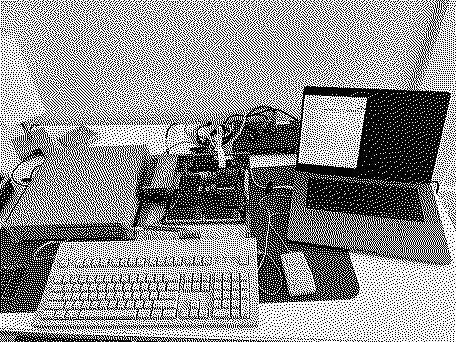
@Trash80toG4 I might not understand your questions but I posted the connectors I'm using in the previous post which included photos. Another post established that there's a header for TTL (the one I'm using) and a smaller one presumably for ECL. I got the scaler at the suggestion of someone else in the thread and so far it seems like a great solution.
|
|
Trash80toG4 Active Tinkerer Bermuda Triangle, NC USA -------- Joined: Apr 1, 2022 Posts: 1,131 Likes: 329 |
May 15, 2022 - #42
That would be the answer to my question, which was badly put. Looked, but didn't see a picture or diagram of the PCB with the physical location of the connector types labeled last night. I was the one who suggested the Extron Scaler. ;)
TTL would need to be converted to an analog signal, no? Guessing here, but a digital feed to the analog scaler might explain those crazy lined patterns showing up at crazy settings you needed to get them to display through the Extron? Not awake, but a quick peek seems to point to ECL being an analog circuit/interface? From the little I had time to read, it seems strange to be used for video? Might it have made for inexpensive boards on the monitor side of things? WAG would be that, if analog, it'll be a simple thing to use the ECL interface? TTL digital signal can be converted to analog, but seems like an unnecessary extra step if a clean analog feed is available. Low signal to noise ration of an ECL circuit should be better in every way but power consumption from my quick read. Gotta get ready for work . . . edit: if that's not ECL, I'd bet it's a proprietary analog output as were some of the several graphic card interfaces on DE-9 for early compacts IIRC. |
|
Elemenoh Active Tinkerer Bay Area -------- Joined: Oct 18, 2021 Posts: 428 Likes: 415 |
May 15, 2022 - #43
I probed all of the ECL header pins but couldn't make good sense of them. From experimentation, I mapped the following so far.
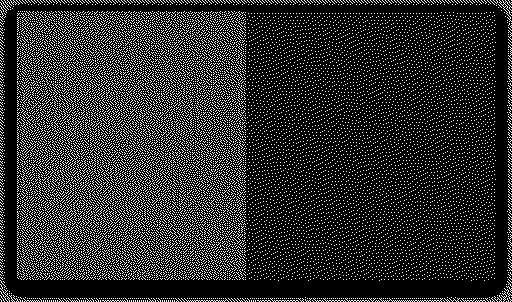
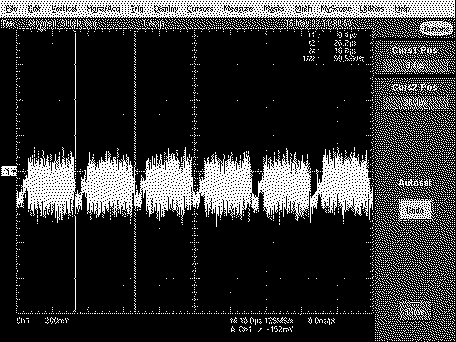
When connecting any of the pins marked 'Video' to any of the VGA color channels I get a very dark and noisy image. When connecting pin 2 I get an inverted dark and noisy image. If I connect ECL pin 1 to a VGA color channel and pin 2 to that color channel's return, nothing changes. I've tried various combos, but nothing has improved the image so far. I'm probably not understanding something fundamental about how ECL video works. Any thoughts @Trash80toG4 ? ECL pin 1 connected to VGA green pin. ECL Pin 2 Connected to VGA green pin (inverted) Scopeshots... ECL IDC Header Pin 1 ECL IDC Header Pin 2 ECL IDC Header Pin 3 ECL IDC Header Pin 4 ECL IDC Header Pin 5 ECL IDC Header Pin 6 ECL IDC Header Pin 7 ECL IDC Header Pin 8 ECL IDC Header Pin 9 |
|
Trash80toG4 Active Tinkerer Bermuda Triangle, NC USA -------- Joined: Apr 1, 2022 Posts: 1,131 Likes: 329 |
May 15, 2022 - #44
Sorry, visual thinker here, so sillyscope experimentation results and conventional shematic diagraming only compute with much too much effort if and when they do in my noggin. I can "see" the I/O flow of systems, but it's more like a plumbing/hydraulics blueprint the way I process things.
First, is that connector labeled "ECL?" If not, why do we think that's what it might be? I haven't seen ECL listed as any sort of graphics standard, but it sounds like it make a nice pipe between card and the Extron? That's an SE VidCard, so expecting to find more than a single active video signal line would seem to be in error? One analog signal line and one ground line need to be located or converted from a TTL output the way I see it. |
|
Elemenoh Active Tinkerer Bay Area -------- Joined: Oct 18, 2021 Posts: 428 Likes: 415 |
May 16, 2022 - #45
I think I got it pretty much sorted through trial and error. If anyone can shed light on why this config works, please let me know. The table below is the working setup. There's still some tearing, but I think that's a shielding issue I'll tinker with later.
Many thanks to @Trash80toG4 and the others in this thread that gave advice and to @pinot on Twitter who provided links and insight too. I can't believe this thing is finally working on its own! I'll post a beauty shot of it all buttoned up and working once I fix the shielding issue. [party]
|
|
Elemenoh Active Tinkerer Bay Area -------- Joined: Oct 18, 2021 Posts: 428 Likes: 415 |
May 16, 2022 - #46
|
|
Trash80toG4 Active Tinkerer Bermuda Triangle, NC USA -------- Joined: Apr 1, 2022 Posts: 1,131 Likes: 329 |
May 16, 2022 - #47
Congratulations, great to see it coming to life! :)
|
|
ScutBoy Administrator Northfield, MN USA -------- Joined: Sep 2, 2021 Posts: 356 Likes: 342 |
May 16, 2022 - #48
Nice - when you get it all figured out, please write it all up so I can make one for mine! :)
|
|
Trash80toG4 Active Tinkerer Bermuda Triangle, NC USA -------- Joined: Apr 1, 2022 Posts: 1,131 Likes: 329 |
May 16, 2022 - #49
TLDR: Going through the thread I picked up on that bit I had addressed, but a little context never hurts? Radius developed the first version of such a control panel for their FPD Card on the "Killy Klip PDS." That was at the dawn of DTP which brought the stillborn Mac to life. Configuring the two screens visually via Control Panel was hailed as a major achievement IIRC. Apple rolled such into System 7 at its intro as I recall. Fuzzy mode ATM, but think there may be something about this on the "memoirs" site. |
|
Trash80toG4 Active Tinkerer Bermuda Triangle, NC USA -------- Joined: Apr 1, 2022 Posts: 1,131 Likes: 329 |
May 16, 2022 - #50
So many puzzles here . . . playtime! [grinning-face-with-o] |
|
Trash80toG4 Active Tinkerer Bermuda Triangle, NC USA -------- Joined: Apr 1, 2022 Posts: 1,131 Likes: 329 |
May 16, 2022 - #51
Let's start with this curiosity? I see what looks like an ISA Standard Cable for a Multifunction I/O Card's breakout, but it's not and it's seemingly very strange.
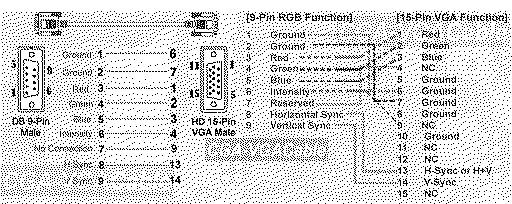
Don't recall a DE-9 cable hookup with 11 IDC signal lines implemented . . . ever? 10th pin on header is for D-Shell ground, but 11 lines implemented on what would be a DA-15 Gameport Setup? Just too strange not to mention. Very interested in seeing what's up with your diagram from earlier? This is how things were supposed to work? Has anyone seen that hybrid DE-9 (ISA Serial) 11 line breakout cable to the center section of DA-15 (ISA Gameport) header setup in use anywhere on anything? Pre-caffeinated WAG of the day: generic Lapis OEM reference design for Mac Standard DA-15 interface was dumbed down to 1-bit support for one of the proprietary DE-9 interfaced displays posted previously? Can't see it from your tables, the Cable Driver IC signal mapping column throws me off. Do the 11 lines in the center of the 2x8 header rows align with Macintosh Video DA-15 signalling/pinout? TTL working with the Extron scaler is making no sense to me?
|
|
Elemenoh Active Tinkerer Bay Area -------- Joined: Oct 18, 2021 Posts: 428 Likes: 415 |
May 16, 2022 - #52
I tried swapping in the second card with the three headers, but I did not get video from it. It uses the same Xilinx FPGA and mostly looks similar apart from the extra header, but the scope shots look quite different. Perhaps this one requires different drivers.
I'm attaching the scope shots as zip files to avoid spamming the thread with images.
|
|
Trash80toG4 Active Tinkerer Bermuda Triangle, NC USA -------- Joined: Apr 1, 2022 Posts: 1,131 Likes: 329 |
May 16, 2022 - #53
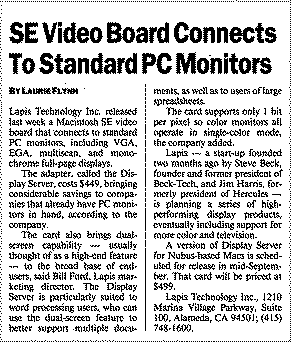
More info from p.44 of the 2019 archive I did of my MLA attachments.*****
So those connectors may not be what you had though? Treat the center section of that 2x8 header as a VGA HD15 breakout to see if the stars align? Don't recall the issue date of that article, but the year of Lapis incorporation will nail it. Hard to imagine anything else used under license on those two MicroMac ZeroSlot VidCards, no? *****PHEW!!!!! Kept most of 'em alive this crash. Burn my pics/links once . . .
|
|
Elemenoh Active Tinkerer Bay Area -------- Joined: Oct 18, 2021 Posts: 428 Likes: 415 |
May 17, 2022 - #54
|
|
Trash80toG4 Active Tinkerer Bermuda Triangle, NC USA -------- Joined: Apr 1, 2022 Posts: 1,131 Likes: 329 |
May 17, 2022 - #55
Very curious to see the differentiation between the two cards. Given the info I posted, I'm willing to bet at least a nickel that the 2x5 header is single bit resolution over an EGA connection as mentioned in that product intro article. [thinking]
|
|
Elemenoh Active Tinkerer Bay Area -------- Joined: Oct 18, 2021 Posts: 428 Likes: 415 |
May 18, 2022 - #56
Small update just so I don't forget.
I got the signal looking much better with light backgrounds by connecting pin 2 of the 16-pin header header to pin 8 VGA (blue return). The remaining interference is more apparent with darker backgrounds. A ferrite shield on the cable did not help. I'm going to keep experimenting. Hopefully it just needs one more ground connection to clean up the image.
Liked by Mac84,cy384,nottomhanksand 2 others |
|
AlexCL Tinkerer -------- Joined: Nov 1, 2021 Posts: 43 Likes: 43 |
Oct 2, 2022 - #57
I have a DisplayServer SE setup to display a Portrait Monitor along with the built in Monitor for the Macintosh SE.
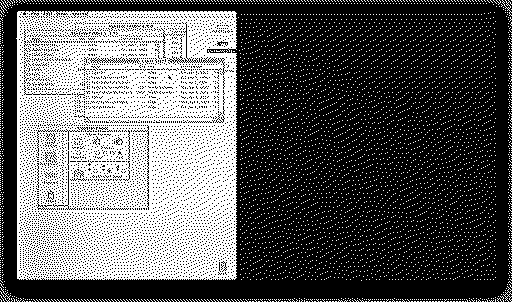
As a first crack at decoding the video I checked the voltages with a Multi-Meter on the DB9: 1. Ground 2. Ground 3. 1.2K Ohm Resistance 4. 1.5K Ohm Resistance 5. 1.5K Ohm Resistance 6. 6.2V DC 7. 3.5V DC 8. 2.3V DC 9. 2.23V DC The pin out kinda looked like CGA so I built a CGA to VGA cable from this guide: I was able to get this image on my monitor over VGA: Connection to Mac:
Liked by LeadedSolder |
|
AlexCL Tinkerer -------- Joined: Nov 1, 2021 Posts: 43 Likes: 43 |
Oct 3, 2022 - #58
Disconnected each wire on the DB9 to test effect on video:
1. Screen brighter...blue cast 2. No Effect 3. Green Cast 4. Orange Cast 5. Maybe Dimmer. 6. Screen Dimms ( i connected to 7 and the screen brightened to same levels as 6) 7. N/A 8. Kills signal 9. Kills signal I also swapped 8 and 9 and it didn't get a video signal. The monitor is detecting 1152 x 870 @ 74Hz. |
| << First | < Prev | Page 3 of 3 |
| Home | Forums | What's New | Search | Bookmarks | RSS | Original | Settings |
| XenForo Retro Proxy by TinkerDifferent.com |