|
* TinkerDifferent *
Retro Computing Community |
| Home | Forums | What's New | Search | Settings |
| Hacking FinderHack: CMD-DEL for System 7.1 |
Forums > Vintage Apple > Software & Operating Systems > Software | System Software (68k)
|
JDW Administrator Japan -------- Joined: Sep 2, 2021 Posts: 2,534 Likes: 1,982 |
Apr 13, 2024 - #1
10/23/2024 UPDATE:
@phipli ultimately provided the final solution: Use a scriptable Finder version 7.1.2, 7.1.3 or 7.1.4, install AppleScript 1.1, write the appropriate script, save as Application, then use Easy Keys to Assign the CMD-DEL keystroke. Perfect for System 7.1! (Start reading this post for details.) Last night, I mentioned the need to hack FinderHack in my FaceBook post here in order to change its CMD-T keyboard shortcut the more commonly known and widely used CMD-DEL. The reason to use FinderHack is to bring the file-delete keyboard shortcut to System 7.1. Matt Sephton (aka Gingerbeardman) chimed in with "CMD-DEL" hack that you can now download from the Garden, which is fantastic! The only thing left to do is to eliminate the bothersome confirmation dialog that appears when you select a file and then press CMD-DEL. The author of FinderHack is Donald M. Brown, which interestingly enough was a programmer and founding partner of CE Software's QuicKeys. Who better, I thought, to eliminate that confirmation dialog box than the creator of FinderHack. I Googled like mad and found the following links to Donald:
REQUEST FOR HELP: If any of you have ideas on how to HACK old Mac software, maybe you could chime in with a proposal about how to eliminate the confirmation dialog that appears after pressing CMD-DEL Thanks!
Liked by Zane KaminskiandNitram78 |
|
Volvo242GT Tinkerer Currently Duvall, WA -------- Joined: Feb 7, 2022 Posts: 365 Likes: 204 |
Apr 13, 2024 - #2
[Image: Screen Shot 2024-04-13 at 1.23.14 AM.jpg]
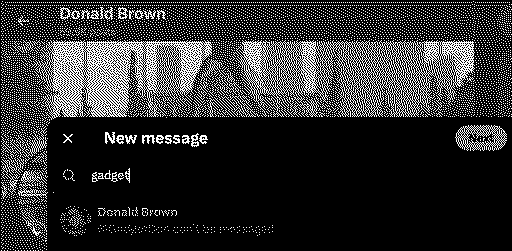
Click on the new message icon in the lower right corner where it says "Messages", then type in his username. Should be able to get ahold of him that way. According to the Eamon Wiki page, he looks to still be alive.
Liked by JDW |
|
JDW Administrator Japan -------- Joined: Sep 2, 2021 Posts: 2,534 Likes: 1,982 |
Apr 13, 2024 - #3
Unfortunately, it's not possible...
|
|
Volvo242GT Tinkerer Currently Duvall, WA -------- Joined: Feb 7, 2022 Posts: 365 Likes: 204 |
Apr 23, 2024 - #4
|
|
JDW Administrator Japan -------- Joined: Sep 2, 2021 Posts: 2,534 Likes: 1,982 |
Apr 23, 2024 - #5
Thankfully, I am having an ongoing conversation with Gingerbeardman over on FaceBook, and he is proposing some solutions via KeyQuencer. We haven't gotten there yet, but if the work does work out, then I can post it here for all to read. I actually much prefer this forum over FaceBook groups. You can post lots of test and inline pics here, whereas FaceBook doesn't lend itself to that. Even so, you've gotta go where the replies are, and that's what I do out of sheer desperation often times. Liked by Volvo242GT |
|
Opualuan New Tinkerer -------- Joined: Oct 10, 2024 Posts: 14 Likes: 5 |
Oct 21, 2024 - #6
I was able to make this work with a script in quickeys (slow) and keyquencer before I found Hidden Finder Features (but I use 7.5.5). I can look to see if my keyquencer script is still around, I don't think it was too complex.
|
|
JDW Administrator Japan -------- Joined: Sep 2, 2021 Posts: 2,534 Likes: 1,982 |
Oct 21, 2024 - #7
@Opualuan
Thank you for your suggestion. Hidden Finder Features does indeed enable CMD-DEL, but only for System 7.5.2 through 7.6.1. The aim set forth in this thread is to find the best way to gain that CMD-DEL functionality in System 7.1. |
|
phipli Tinkerer -------- Joined: Sep 23, 2021 Posts: 309 Likes: 215 |
Oct 21, 2024 - #8
If you only need it in 7.1 and later, you could do this with AppleScript, Finder 7.1.3 or 7.1.4 from System 7 Pro or System 7.1.2 (edited out an error where I said Finder 7.1.2 instead of the Finder versions from System 7.1.2) and... that thing that adds applications to the F-keys.
Finder 7.1.2 is a basically silent upgrade that adds compatibility with a few things like scriptable finder to System 7.1. This is all that is needed once you have Finder 7.1.2 and AppleScript installed : Save as an application and attach to a key combination. https://macintoshgarden.org/apps/easy-keys looks nice? I've not used it before.
Liked by JDW |
|
phipli Tinkerer -------- Joined: Sep 23, 2021 Posts: 309 Likes: 215 |
Oct 21, 2024 - #9
A couple of quality of life updates to stop you accidentally deleting the script itself, and handling nothing being selected.
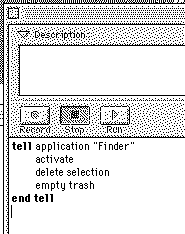
This is still an extremely dangerous script because as requested, it doesn't do any confirmation before emptying the trash. I'd not actually run it like this myself and would comment out (place -- before the line) the "empty trash" line. Edit - updated script screenshot for System 7 compatibility (counting selection doesn't seem to work for some reason, at least not how it did in Mac OS 8) Edit Edit - changed "is" to "contains" so that you can't try to delete the script itself by selecting something else at the same time.
Liked by JDW |
|
phipli Tinkerer -------- Joined: Sep 23, 2021 Posts: 309 Likes: 215 |
Oct 21, 2024 - #10
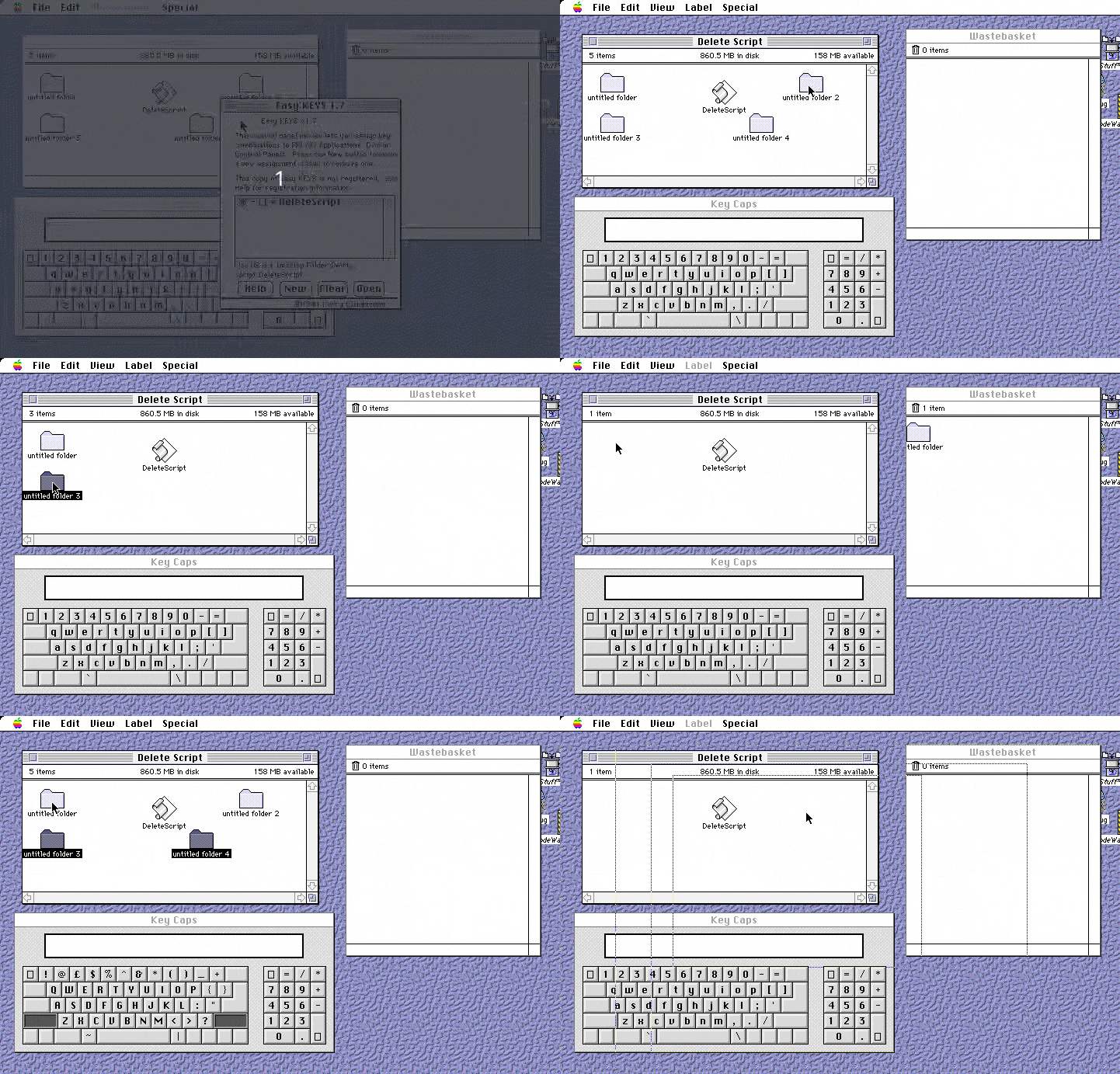
Here is a demo of it in use on System 7.5.x (I don't have System 7.1 installed on my emulator, but it should work find as long as you have applescript and Finder 7.1.3 / 7.1.4 from System 7.1.2 (Edited out an error where I said Finder 7.1.2, instead of the Finder from 7.1.2).
The low framerate is missing most of the times I press delete sorry, but I am pressing it.
Liked by JDW |
|
JDW Administrator Japan -------- Joined: Sep 2, 2021 Posts: 2,534 Likes: 1,982 |
Oct 22, 2024 - #11
I tried typing in your script manually (since the text of your script was not available). I merely left out "empty trash" because I don't need that. CMD-DEL in S7.5.5 works by merely casting your selection into the Trash without emptying the Trash.
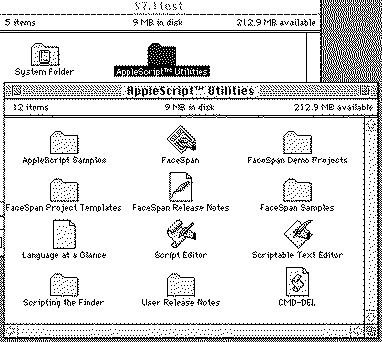
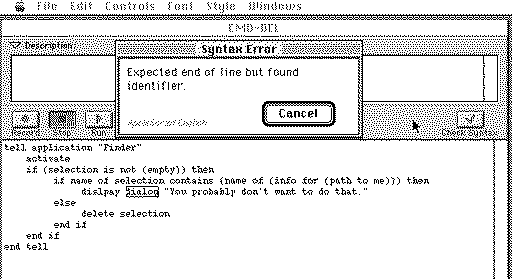
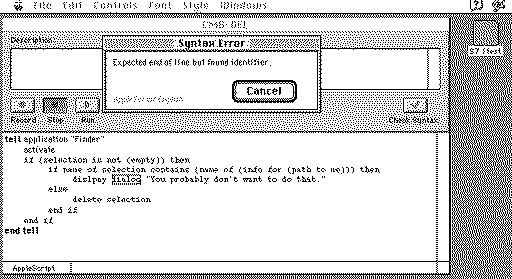
Unfortunately, it won't compile and complains as follows: I installed System 7.1 Pro exactly as I describe here: After that, I installed AppleScript 1.0, which installs Script Editor 1.0.1. Finder version is 7.1.4. Please advise where I went wrong. Thanks.
|
|
phipli Tinkerer -------- Joined: Sep 23, 2021 Posts: 309 Likes: 215 |
Oct 22, 2024 - #12
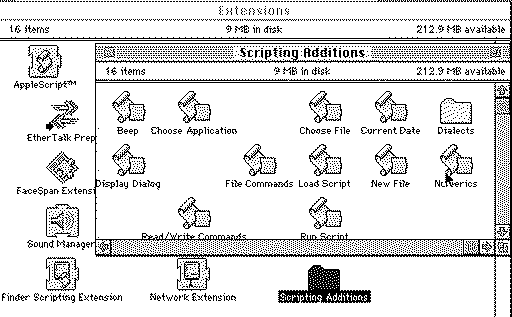
That error looks like you don't have the normal scripting additions installed - they go in a folder in extensions.
Liked by JDW |
|
JDW Administrator Japan -------- Joined: Sep 2, 2021 Posts: 2,534 Likes: 1,982 |
Oct 22, 2024 - #13
@phipli
Thank you. Sadly, there's still trouble. I installed AppleScript 1.1 using these disk images. During the install, it told me that it would install an older version of the Finder. Not sure why AppleScript should even be replacing the Finder, but it did. It installed 7.1.3, overwriting 7.1.4. These are all the files it installed: Sadly, it still complains in the same way when I click the Check Syntax button: You can download my *.dsk containing the System 7.1.2 install and AppleScript 1.1 here: I boot that image using the Mini vMac MacII version.
|
|
phipli Tinkerer -------- Joined: Sep 23, 2021 Posts: 309 Likes: 215 |
Oct 22, 2024 - #14
That isn't the usual AppleScript installer. What about in the Extensions folder, did it install "Scripting Additions"? |
|
JDW Administrator Japan -------- Joined: Sep 2, 2021 Posts: 2,534 Likes: 1,982 |
Oct 22, 2024 - #15
|
|
phipli Tinkerer -------- Joined: Sep 23, 2021 Posts: 309 Likes: 215 |
Oct 22, 2024 - #16
Liked by OpualuanandJDW |
|
JDW Administrator Japan -------- Joined: Sep 2, 2021 Posts: 2,534 Likes: 1,982 |
Oct 22, 2024 - #17
Please accept my humble thanks for spotting my typo! All is well now. I can save it as an Application. But further testing will need to wait until tomorrow because my brain is thoroughly fried right now. o_O
|
|
phipli Tinkerer -------- Joined: Sep 23, 2021 Posts: 309 Likes: 215 |
Oct 22, 2024 - #18
Its worth checking around an error, before and after, when something like this flags up. Errors in code are notoriously cryptic on a good day, and just... well, wrong, other than the fact that there is an error, in many cases. Common example is that if you forget a line ending semicolon in C, you get an error on the next line that doesn't have anything to do with there not being a semicolon (because C doesn't see white space, it treats it like a weird concatenated line). Liked by JDW |
|
JDW Administrator Japan -------- Joined: Sep 2, 2021 Posts: 2,534 Likes: 1,982 |
Oct 23, 2024 - #19
@phipli
Easy Keys works well to invoke the Application saved with AppleScript. CMD-DEL throws the selected file(s) in the Trash without emptying the Trash, which is perfect. I've not tested it on a real vintage Mac yet, but it works perfectly in Mini vMac (Mac II version). By the way, I replaced Finder 7.1.3 (installed by the AppleScript 1.1 installer) with Finder 7.1.4 and rebooted. CMD-DEL still works. So I guess AppleScript isn't installing a modified Finder. It's just installing Finder 7.1.3 because it's "scriptable" and the installer didn't know about Finder 7.1.4 because it's too new so it prompts you to replace it. Interestingly, the filesize (byte size) is exactly the same when you compare those two Finder files. And I spent 20 minutes in ResEdit looking in vain for the differences. Anyway, the short of it is that you can use either Finder version without issue. Thanks again! For those of you following this thread who want to copy/paste the script, below is what you need (no typos either):
UPDATE: I tested on my Mac SE with WarpSE (25MHz 68000) installed, and it takes about 4-5 seconds before the thing you are deleting gets put into the Trash. So I suspect it would take even longer on the stock 8MHz CPU. Probably less time on an 030 or 040. Also keep in mind that AppleScript and EZ-Keys will eat 209kB of RAM. In other words, your CMD-DEL convenience requires 209kB at all times, even when you aren't using AppleScript or invoking anything with EZ-Keys. On Macs with more than 4MB, this won't matter. But 4MB Macs like the SE are RAM constrained, so it's an important point of consideration, over and above the amount of time required to throw your selected item into the Trash. Liked by Opualuan |
|
phipli Tinkerer -------- Joined: Sep 23, 2021 Posts: 309 Likes: 215 |
Oct 23, 2024 - #20
|
| Page 1 of 2 | Next > | Last >> |
| Home | Forums | What's New | Search | Bookmarks | RSS | Original | Settings |
| XenForo Retro Proxy by TinkerDifferent.com |

![[Image: Screen Shot 2024-04-13 at 1.23.14 AM.jpg]](/proxy_image?url=https://tinkerdifferent.com/data/attachments/16/16205-0a7ae7dadba307bf7da330b8f975ad40.jpg)



![[Image: mega.nz]](/proxy_image?url=https://mega.nz/rich-file.png)