|
* TinkerDifferent *
Retro Computing Community |
| Home | Forums | What's New | Search | Settings |
| Disk Jockey, a disk image file maker for your retro stuff - Beta for version 3! |
|
JDW Administrator Japan -------- Joined: Sep 2, 2021 Posts: 2,534 Likes: 1,982 |
Oct 25, 2022 - #61
@OneGeekArmy
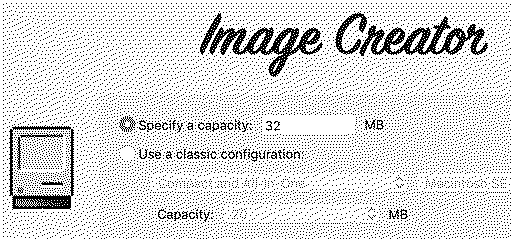
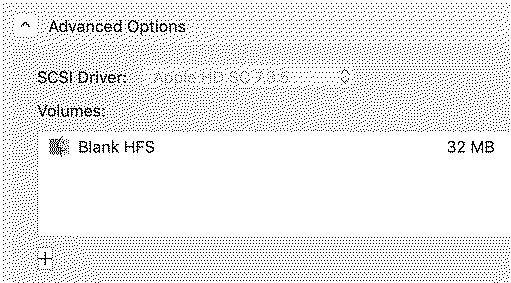
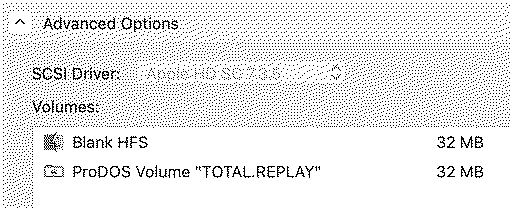
Please forgive my ignorance because I'm most likely overlooking something obvious, but I trying to figure out how to use Disk Jockey 2.5 to create a BlueSCSI compatible version of Total Reply 5, which is a 32MB ProDOS image. I started by setting the capacity to 32MB... Next, I expanded Advanced Options, which reveals a Blank HFS file I cannot delete (the source of my trouble)... I can click the "+" button to add the Total Replay image like this... But that changes the disk image to 64MB because of that Blank HFS I don't want... Again, I just want to convert the Total Replay 32MB image into a BlueSCSI compatible version. That's it. How do I accomplish that with version 2.5 of Disk Jockey? Thank you!
Liked by retr01 |
|
OneGeekArmy Active Tinkerer Belgium -------- Joined: Oct 31, 2021 Posts: 103 Likes: 266 |
Oct 25, 2022 - #62
At this point, you cannot remove the HFS partition. The reason is that, to create a device image (an image that works with BlueSCSI), it must contain at bare minimum a Device Descriptor, an Apple Partition Map and a SCSI device driver (these are automatically created by Disk Jockey). The embedded SCSI driver is a Macintosh driver (HD SC Setup 7.3.5). Therefore, the device image is bound to be used on a Mac, and having at least one HFS partition was a given (to me). ProDOS support originally came when I started looking at images made for the IIe card and my thinking evolved from there, a very Mac-centric starting point. At this point, if you wish to have a ProDOS partition (like Total Replay), you're stuck with having an HFS partition too (you can make it small, but it's going to be there). I'm not an expert of all things SCSI on the Apple II but @Ron's Computer Videos is, and he did a lot of in-depth research during the later stages of testing version 2.5. Thanks to him, I think I have a much better understanding of the way SCSI is implemented on the Apple II. One of my objectives for a next release is to loosen the deep ties that Disk Jockey has with the classic Mac and HFS, and open it up to other computer families. This would include the Apple II as a full-blown citizen (no more Mac shenanigans) and possibly FAT for the PC and some samplers. EDIT: Something that's surprising to some users is that Disk Jockey is an additive partitioner. You can just add partitions and the resulting image size will just be larger. This is the opposite of a traditional partitioner were you start with a space budget that you allocate because the hard drive is constrained by its physical size. |
|
JDW Administrator Japan -------- Joined: Sep 2, 2021 Posts: 2,534 Likes: 1,982 |
Oct 25, 2022 - #63
@eric already very kindly made a BlueSCSI compatible version of Total Replay here: I was thinking about doing a video to show others how to use Disk Jockey to do that. Even so, Eric did not use Disk Jockey to make a BlueSCSI compatible ProDOS file, from what I understand. The uncompressed version of 5.0b1 at the link above is 54.6MB. So it's clear it has the 32MB ProDOS part and then whatever part BlueSCSI needs to understand that ProDOS "partition." On MacSD, it's a simple matter of using the Total Replay as is, because MacSD has a "Composite" feature that works such magic. That feature isn't present on BlueSCSI, hence the need to to some more fiddly work to morph the Total Replay image into what BlueSCSI expects. And because new versions of Total Replay are coming out all the time, it's not realistic to expect Eric will rework all of them, so individual users would need to figure out the best way to rework the 32MB ProDOS image for use on a BlueSCSI. Anyway, thank you for the information.
|
|
OneGeekArmy Active Tinkerer Belgium -------- Joined: Oct 31, 2021 Posts: 103 Likes: 266 |
Oct 25, 2022 - #64
To be clear, BlueSCSI doesn't require anything specific to BlueSCSI to work, just the image of a hard drive as it is physically laid out in the actual hardware. The disk space needed by the computer to recognize and use a hard drive is around 96 blocks of 512 bytes, or a tad less than 50 KB.
Liked by JDW |
|
retr01 Senior Tinkerer Utah, USA -------- Joined: Jun 6, 2022 Posts: 2,474 Likes: 810 |
Oct 25, 2022 - #65
If Eric allowed the Mac to format the unformatted partition, then what? Would the Mac then ignore the ProDOS partition? If the HFS partition is not going to be used, then why is it there? Is it to make sure BlueSCSI doesn't "panic" not seeing a HFS partition?
Point is, it would be nice to set up a ProDOS partition on the same SD and put in BlueSCSI that will just work. Perhaps there could be blank 32 MB ProDOS images that will work in BlueSCSI and just download from Eric's MEGA area and put it on the SD as a stop gap solution until @OneGeekArmy will be able to have the ProDOS or DOS 3.3 option for Apple II computers on Disk Jockey? |
|
eric Administrator MN -------- Joined: Sep 2, 2021 Posts: 1,151 Likes: 1,930 |
Oct 25, 2022 - #66
The only "issue" is there's a hfs partition there as well - which has no affect besides it existing. I usually just copy the IIe utils to it so you can have everything you need to get started. Liked by Patrick |
|
OneGeekArmy Active Tinkerer Belgium -------- Joined: Oct 31, 2021 Posts: 103 Likes: 266 |
Oct 25, 2022 - #67
As Eric points our, the HFS partition has no effect and does not prevent anything from working. It only exists because DJ (and therefore I) put it there. I see that it's causing some confusion so I'll find a way to present things differently in a future version. Also, there's purposefully nothing specific to BlueSCSI in the way Disk Jockey builds its images. RaSCSI and BlueSCSI use device images that reproduce bit for bit the surface of a hard drive (including all the stuff that's typically hidden from users). This is to be contrasted with the volume images Basilisk II and Floppy Emu expect, for example. This is why they require different image types. I collected some of my notes on this topic here, if you're interested: https://diskjockey.onegeekarmy.eu/help/technicalinfo/ As for your wish of a blank device image with just one or several ProDOS partitions on it, yes, it'll come. @Ron's Computer Videos has done a lot of research and has been kind enough to walk me through it so I think I know exactly what's needed. Although I don't believe that DOS 3.3 is a supported volume type on an Apple II SCSI device. Liked by JDWandretr01 |
|
Drake TinkerDifferent Board Vice-President 2023 -------- Joined: Sep 23, 2021 Posts: 449 Likes: 788 |
Oct 25, 2022 - #68
Liked by retr01andOneGeekArmy |
|
retr01 Senior Tinkerer Utah, USA -------- Joined: Jun 6, 2022 Posts: 2,474 Likes: 810 |
Oct 25, 2022 - #69
Right. :)
This is a big thing about Disc Jockey which you noted that I LOVE! :love: "Note that I don't mention anywhere that Disk Jockey actually creates the HFS volume. It doesn't. When the Mac goes through the partition map, it discovers that there is chunk of the hard drive reserved for an HFS partition but, when it tries to access it, it realizes it's not formatted yet. So, it gracefully asks the user for the permission to [format], and does."
Great! :D I am looking forward to that. :)
I do not think so, either. Like MFS, DOS 3.3 is a FLAT file system without any hierarchy. ProDOS 8 or 16 is an hierarchical file system that works on mass volumes such as SCSI, IDE, or whatever. ProDOS does not care what type of hardware the volume is on, anyway. There just needs to be the right interface for I/O. Check this article out, Using ProDOS: the Multilayered DOS. :) |
|
OneGeekArmy Active Tinkerer Belgium -------- Joined: Oct 31, 2021 Posts: 103 Likes: 266 |
Oct 26, 2022 - #70
To be honest, it's also a huge relief for me that classic Mac OS is so mindful of its users. It allowed me to avoid having to reimplement HFS formatting :p
For instance, there's a mysterious partition map type in the Apple Partition Map called Apple_MFS, which hints at the fact that you could, in fact, have a SCSI device with MFS-formatted partitions (which is, as you point out, flat). It's documented in "Inside Macintosh: Devices" but I have never see it used in the wild. But I'd love to :) Liked by retr01 |
|
JDW Administrator Japan -------- Joined: Sep 2, 2021 Posts: 2,534 Likes: 1,982 |
Nov 5, 2022 - #71
@OneGeekArmy
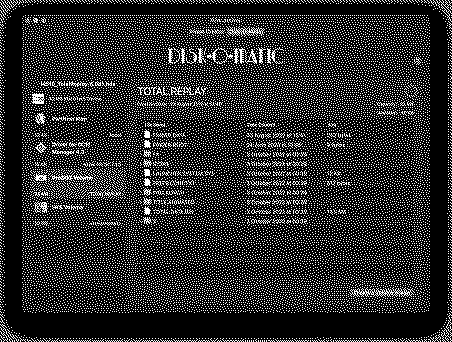
Thank you again for your amazing work on Disk Jockey. I made some time today to test ProDOS images, created with Disk Jockey v.2.5, on a BlueSCSI with my Apple IIe Card installed in a Color Classic Mystic. Here are my findings...
Liked by retr01andOneGeekArmy |
|
OneGeekArmy Active Tinkerer Belgium -------- Joined: Oct 31, 2021 Posts: 103 Likes: 266 |
Nov 5, 2022 - #72
Glad to read that Disk Jockey is behaving well with ProDOS partitions in real-life scenarios (and not just the ones I'm coming up with). Regarding your other points: - The mandatory HFS partition (defaulted to 20 MB) will disappear in an upcoming update. I understand it's more puzzling than helpful, especially for people with ProDOS expertise (like yourself). - Images in Disk Order (.do) are not supported at this point because there is no DOS 3.3 partition type in the Apple Partition Map specification (which was my starting point). However, there's nothing preventing me from teaching Disk Jockey how to parse them (and I have actually written the code to do so, it's just not in use). For Disk Order images to be injectable in a partitioned device image, I would need to first convert them internally to ProDOS order, and then inject them as a ProDOS volume. All this is feasible. I'm a little more reserved about the .nib images: they seem to be streams of raw bytes (to help circumvent copy protections) and I'll need to see how I can include them. Thanks again! Liked by retr01andJDW |
|
retr01 Senior Tinkerer Utah, USA -------- Joined: Jun 6, 2022 Posts: 2,474 Likes: 810 |
Nov 5, 2022 - #73
Liked by OneGeekArmy |
|
OneGeekArmy Active Tinkerer Belgium -------- Joined: Oct 31, 2021 Posts: 103 Likes: 266 |
Nov 5, 2022 - #74
Liked by retr01 |
|
lilliputian Tinkerer Los Angeles, California, USA -------- Joined: Mar 6, 2022 Posts: 251 Likes: 109 |
Nov 7, 2022 - #75
This really is a wonderful project that solves so many problems in the vintage Mac community. Someone may have asked before, but are you accepting donations for development?
Liked by retr01,OneGeekArmyandJDW |
|
OneGeekArmy Active Tinkerer Belgium -------- Joined: Oct 31, 2021 Posts: 103 Likes: 266 |
Nov 7, 2022 - #76
https://ko-fi.com/onegeekarmy No pressure at all, of course! EDIT: Can confirm: you are amazing [heart] Liked by retr01,Drake,JDWand 1 other person |
|
lilliputian Tinkerer Los Angeles, California, USA -------- Joined: Mar 6, 2022 Posts: 251 Likes: 109 |
Nov 21, 2022 - #77
Would it be possible at some point in the future to modify the size of a single volume image? For instance, I have a disk image I use with Mini vMac that I'd like to enlarge without having to transfer its contents to a new image file.
|
|
OneGeekArmy Active Tinkerer Belgium -------- Joined: Oct 31, 2021 Posts: 103 Likes: 266 |
Nov 21, 2022 - #78
It wouldn't be straightforward to do because, amongst other things, HFS calculates its allocation size based on the size of the whole volume (which is mainly what made it painful to use on large hard drives: even files containing just a few bytes would take up entire kilobytes of space - hence HFS+). This means that the way each file is stored, and the space it uses, is intrinsically linked to the hard drive size it's stored on. So, simply taking a volume image and changing its size wouldn't work (which is too bad because that part's easy). Instead, we'd need to create a new volume image, format it as HFS so that it's properly configured with the correct allocation size for the new volume size, and then copy all the files from the original, one by one. Which points to the fact that I really need to start implementing HFS writing in Disk Jockey (which can only read it at this point). Once that's possible, image resizing becomes fairly straightforward. |
|
lilliputian Tinkerer Los Angeles, California, USA -------- Joined: Mar 6, 2022 Posts: 251 Likes: 109 |
Nov 21, 2022 - #79
Ah, I didn't even think of that, but you're absolutely right, that would probably be a nightmare to try and recalculate on the fly for every file on the volume. But your workaround seems reasonable, since it wouldn't make any difference to the user, and would be much faster. I'm guessing that the desktop file would be rebuilt by the system on next boot once it sees that things don't match up?
And for the user wishing to decrease the size of a volume, you would just serve an error if there are too many files for the smaller size. (On a side note, I just finished upgrading my 2010 iMac using OCLP and Monterey doesn't mount HFS volumes anymore. Boo...) |
|
OneGeekArmy Active Tinkerer Belgium -------- Joined: Oct 31, 2021 Posts: 103 Likes: 266 |
Nov 21, 2022 - #80
Indeed, it would be transparent for the user: everything would be preserved, unless their Catalog and Extents Overflow files were corrupted on the original volume, of course.
I don't even think the Desktop DB would need to be rebuilt. It's itself a file, and I don't believe it operates at the block level on the disk. From its perspective, it's just the same files in the same place in the file hierarchy. They just happen to be stored differently but that's invisible to it (I think, and I really need to check all this). And, yes, for a volume decrease, it's just math to know whether the total set of files can fit on the new volume size requested by the user. (It pains me too that they removed support for HFS - I don't think it was taking up that much space or causing that much trouble in its little corner of the OS) Liked by lilliputian |
| << First | < Prev | Page 4 of 5 | Next > | Last >> |
| Home | Forums | What's New | Search | Bookmarks | RSS | Original | Settings |
| XenForo Retro Proxy by TinkerDifferent.com |

![[Image: mega.nz]](/proxy_image?url=https://mega.nz/rich-folder.png)

![[Image: 1667648920731.png]](/proxy_image?url=https://tinkerdifferent.com/data/attachments/9/9642-63ecb74c406284830a8dad22aad20a17.jpg)

![[Image: giphy.gif]](/proxy_image?url=https://media.giphy.com/media/03bUvajor6sFnwkdsz/giphy.gif)