|
* TinkerDifferent *
Retro Computing Community |
| Home | Forums | What's New | Search | Settings |
| Compact Mac Video Adapter |
Forums > Vintage Apple > Macintosh > Compact Macs
|
retr01 Senior Tinkerer Utah, USA -------- Joined: Jun 6, 2022 Posts: 2,474 Likes: 810 |
Jun 9, 2022 - #21
Hello!
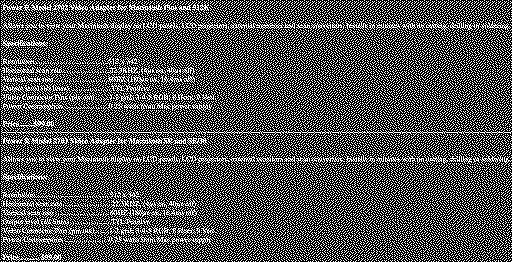
I acquired a SE/30 in excellent condition. I have had a strong computer background, especially Apple since I was a kid. I am happy to be back into tinkering. I saw on YouTube that Adrian Black showed how to do a video out from a Macintosh Classic from its analog board through RGB2HDMI. I realized that in the Mac SE and SE/30, the analog board (AB) was designed differently than in the Mac Classic and Classic II. Adrian's video is based on Classic's AB. The SE and SE/30, as well as older compact Macs, do not have that AB design. Thank you, @Stephen, for doing this! You did splendidly, and I appreciate that. I want to have the video out from the SE/30 like it was done back in the day to TTL output while I am waiting for @Zane Kaminski and the folks at Garrett's Workshop to come up with a new PDS video card for the SE/30 with a second PDS connector for a network card that I have. I would like to have this output set up. So, I purchased the Power R Model 2703 Video Adapter for Apple Macintosh SE or SE/30 off eBay. @Stephen, according to Power R's defunct website via the Wayback Machine (scroll down to the bottom of the page), this model has the exact specifications as 2702, only different connectors. Connecting the male end to the SE or SE/30 logic board (LB) and the cable from the female end from LB to the AB is straightforward. All I have to do is plug-in male to male dupont jumper cables in the black TTL header and solder one end to the RGB female connector as shown in the schematic created by @Stephen. Is that correct? Then, I would get the RGB2HDMI adapter with Pi Zero. @Stephen can you update your GitHub page to include a clone version for the SE and SE/30 since it needs those types of connectors, as shown in the photo herein? I would be happy to let you know the result after doing this and if the results are favorable? By the way, thank you, @JDW, so much for your beautiful videos on YouTube! I appreciate your clear explanations and showing the process. Those helped me a LOT to tear down my SE/30.
Liked by -SE40-,lilliputianandKai Robinson |
|
Stephen BetterBit San Francisco -------- Joined: Sep 5, 2021 Posts: 215 Likes: 264 |
Jun 16, 2022 - #22
Liked by retr01andjcs |
|
retr01 Senior Tinkerer Utah, USA -------- Joined: Jun 6, 2022 Posts: 2,474 Likes: 810 |
Jun 17, 2022 - #23
Liked by -SE40- |
|
-SE40- Tinkerer The Netherlands -------- Joined: Apr 30, 2022 Posts: 422 Likes: 168 |
Jun 17, 2022 - #24
Just wondering, will this conversion / adaptation also work similar for a classic II board?
|
|
retr01 Senior Tinkerer Utah, USA -------- Joined: Jun 6, 2022 Posts: 2,474 Likes: 810 |
Jun 17, 2022 - #25
Morning, @-SE40-!
Yes and no. It depends on various compact Macs' analog boards (AB) and logic boards (LB). Based on the differences, adapting to produce a 1-bit black and white (B/W) video output via (TTL) is done differently. One way is to use a vintage or modern adapter. Another way is to wire the connection based on the required matching pinouts. First, the differences between the ABs will be shown. Second, the location where the adapters are plugged differ. Third, the alternative wiring connection differs as well. 1. Here are the general differences between the ABs of the compact Macs. The first two ABs do not have taps to produce the B/W video output as it is done on the LB. However, the third AB has video output taps. 2. Vintage closed-source and modern open-source adapters send the 1-bit B/W video output via TTL to the DE-15 (DB-15) or DE-9 (DB-9) RGB connector. From there, a vintage RGB monitor can be connected, or a modern monitor can be connected through modern adaption such as Extron or RGB2HDMI. Pictures, links, and explanations are currently in this thread. 3. Alternative wiring connections can be made after identifying the correct video pinouts between the connections. For example, Adrian has shown an excellent method for the Classic and Classic II on a YouTube video: As for COLOR video output, the 128k, 512k, Plus, SE, Classic, and Classic II generally require a SCSI external video adapter, as an example explained in this message. The SE/30 is the only 030 compact Mac with a 030 PDS slot capable of utilizing color video cards. As pointed out in another message earlier, the SE/30 can display 256 grays on the internal CRT monitor with an adapter. I am not sure if there are LC PDS slot color video cards for the Color Classic and Color Classic II to drive external color video.
Liked by -SE40- |
|
-SE40- Tinkerer The Netherlands -------- Joined: Apr 30, 2022 Posts: 422 Likes: 168 |
Jun 17, 2022 - #26
Good morning to you too....although its evening here [check]
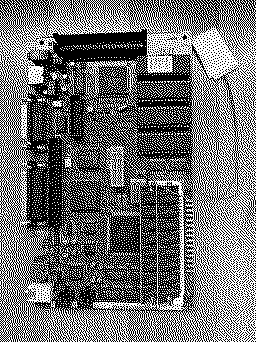
Thank you very much for your extended explanation. This is much appreciated! I think others also will find this info very usefull too[+1] Somehow I did come to option 3. I saw the vid of ADB, and got me thinking..... Would it be possible to combine the CL II board with the RGB to HDMI board and a nice LCD and make Hartmuts [beating-heart] laptop what never was. No analog board .... is that possible? Adding a Lipo pack should last a while on mobile use. This board is recapped and working fine, so that is a good start. I could then recreate Hartmuts "laptop" enclosure, and make it fully functional. Would that not be supercool? [Image: DD469A52-6B34-4FE2-9924-9A0F18DE0F1E.jpeg]
Liked by retr01 |
|
retr01 Senior Tinkerer Utah, USA -------- Joined: Jun 6, 2022 Posts: 2,474 Likes: 810 |
Jun 17, 2022 - #27
Yeah! Super cool! :cool:
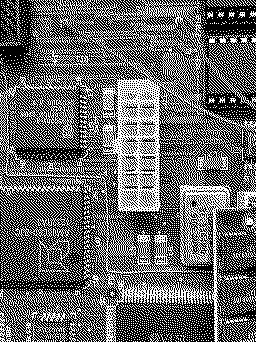
@-SE40-is that the Classic II logic board? I can see the memory SIMM fashion and the 030 CPU. What are the wires for? :confused: As for one of Hartmut's portable Mac designs, I think that is possible with the right logic board and video TTL output. Fabricate the case, keys, LCD housing, hinges, etc., via 3D printing. [+1]:geek: Might the keyboard be one of the most expensive things, though? I have read that custom keyboards are insanely costly, not because of the keys but the switches? [money-mouth-face] Is that a project you want to do as a new thread? Do we need a new category for "the Vaporized Macs" here on Tinker Different? [thinking] |
|
-SE40- Tinkerer The Netherlands -------- Joined: Apr 30, 2022 Posts: 422 Likes: 168 |
Jun 17, 2022 - #28
Hi, retro01!
indeedClassic II board. This is the board of my first Mac. I like it for its compactness, and so usable for this purpose. At least if I can get it to work with a flat panel display without too many extra parts. its not a project yet, until its electronics side is made /proven to work. its actually a similar sort of challenge as with Erics Color Classic. But with another gen board. For the keyboard I have Conversion of a original keyboard with custom made keys in mind. The enclosure I would love to create a mould for from high quality 3D printed shells....but thats still a long way to go. A man can dream.....[smiling-face-with-ha] The wires are temporarely for a 2032 battery soldered on BTW. Liked by retr01 |
|
retr01 Senior Tinkerer Utah, USA -------- Joined: Jun 6, 2022 Posts: 2,474 Likes: 810 |
Jun 17, 2022 - #29
|
|
-SE40- Tinkerer The Netherlands -------- Joined: Apr 30, 2022 Posts: 422 Likes: 168 |
Jun 17, 2022 - #30
My bad...retr01 [check]
As I am no electronics wizzard, any help with this upcomming conversion is welcome... Thanks in advance! |
|
retr01 Senior Tinkerer Utah, USA -------- Joined: Jun 6, 2022 Posts: 2,474 Likes: 810 |
Jun 19, 2022 - #31
Hey @Stephen,
Can you show us a picture of the modern clone of the Power R 2702 that you assembled based on your GitHub repo, please? |
|
alxlab Active Tinkerer -------- Joined: Sep 23, 2021 Posts: 293 Likes: 323 |
Jun 19, 2022 - #32
Here's a conversation with Zane about using a Pico Pi to convert the video signal from a compact Macintosh (128K, 512K, SE, SE/30, Classic, Classic II) to something more usable by modern screens. Maybe this will give some inspiration to someone.
alxlab-zone66x -- 02/07/2022Was contemplating the use of a Pi Pico for outputting the video of a compact b/w Mac
|
|
retr01 Senior Tinkerer Utah, USA -------- Joined: Jun 6, 2022 Posts: 2,474 Likes: 810 |
Jun 19, 2022 - #33
That is an interesting conversation, @alxlab. :)
I agree this is comparable to the Power R series of adapters, including 2702 and 2703 that @Stephen and myself have. So, is it possible that simply using the Pi Pico as a video signal converter to become an alternative to RGB2HDMI with Pi Zero? My only concern is, can enough data be placed with on the Pi Pico to have full featured OSD menus show up on a modern display, many adjustments, varying video signals, etc? The Extron, RGB2HDMI, and other RGB to whatever video signal converters have OSD displayed on modern screens. On the other hand, this is an excellent start to have a signal conversion that just works, requiring less components that are readily available, and cheaper without needing adjustment by the end user. |
|
alxlab Active Tinkerer -------- Joined: Sep 23, 2021 Posts: 293 Likes: 323 |
Jun 19, 2022 - #34
Using the analogy of slicing bread, sure you can use an expensive Swiss Army Swiss Champ XXL (RGB2HDMI) with a bunch of extra tools you won't need or you can just use a dollar store knife (PI Pico or whatever low cost microcontroller will do the job) for a fraction of the cost. The RGB2HDMI has the harder job of trying to handle anything thrown at it. For the compact Macs we're dealing with a know quantity so hopefully we could try to make a less complex, plug and play and cheaper device. Liked by Zane Kaminski,retr01andStephen |
|
retr01 Senior Tinkerer Utah, USA -------- Joined: Jun 6, 2022 Posts: 2,474 Likes: 810 |
Jun 19, 2022 - #35
Thank you, @alxlab, @Stephen, and @Zane Kaminski! You guys are awesome! :D(y)
Is there a GitHub repo with a tentative schematic of this Pico Pi approach? |
|
alxlab Active Tinkerer -------- Joined: Sep 23, 2021 Posts: 293 Likes: 323 |
Jun 19, 2022 - #36
Don't think anyone has attempted anything yet with the pico pi. There are at least a couple sdks for doing video out on the pico:
http://www.breatharian.eu/hw/picovga/index_en.html https://picockpit.com/raspberry-pi/raspberry-pi-pico-video-output/ Ideally we would want 1024 x 768 output so we could just double the resolution of 512 x 384 so it will scale nicely with no weirdness. Liked by -SE40- |
|
retr01 Senior Tinkerer Utah, USA -------- Joined: Jun 6, 2022 Posts: 2,474 Likes: 810 |
Jun 19, 2022 - #37
Cool. :) Yes, I agree with the ideal resolution of 1024 x 768 output by upscaling 2 times of the native 512 x 384.
|
|
-SE40- Tinkerer The Netherlands -------- Joined: Apr 30, 2022 Posts: 422 Likes: 168 |
Jun 19, 2022 - #38
Pico VGA......wow!
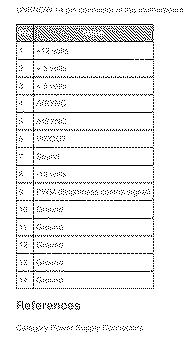
This would be great as the regular pi's seem hard to get. Also the smaller size is a big plus for Hartmut's laptop. So any pico pi will do? Sounds almost to good to be true[four-leaf-clover] Ive found this list for the classic I and II 14 pin connector... Would I be making connection directly for pin 4-5-6 that should do the job? I sure have some reading todo[smiling-face-with-ha]
|
|
retr01 Senior Tinkerer Utah, USA -------- Joined: Jun 6, 2022 Posts: 2,474 Likes: 810 |
Jun 19, 2022 - #39
|
|
Zane Kaminski Administrator Columbus, Ohio, USA -------- Joined: Sep 5, 2021 Posts: 372 Likes: 615 |
Jun 19, 2022 - #40
"Start the SPI [transfer] at the end of the line, wait until the next line, find the hsync transition, go backwards some fixed amount to find the first pixel, then sample each pixel by going forward 62.5/15.6672 (approx 3.989) in the buffer and copy all 512 of that line into the back buffer in preparation to frame-skip copy into the actual video buffer to avoid tearing." The first thing would be to create some kind of simulation to try out the method before actually implementing the hardware. We would want to test the algorithm against many combinations of small frequency and phase differences between the Mac and Pi clocks to make sure it recovers the pixels crisply in all cases. Liked by retr01 |
| << First | < Prev | Page 2 of 6 | Next > | Last >> |
| Home | Forums | What's New | Search | Bookmarks | RSS | Original | Settings |
| XenForo Retro Proxy by TinkerDifferent.com |
![[Image: Power R Model 2703.jpg]](/proxy_image?url=https://tinkerdifferent.com/data/attachments/5/5559-030bd1e17ea8f33523b4c6f57d2877ef.jpg)


![[Image: image]](/proxy_image?url=https://oldcraporg.files.wordpress.com/2019/04/dsc_0139.jpeg?w=NaN&h=)

![[Image: image]](/proxy_image?url=https://oldcraporg.files.wordpress.com/2018/06/fullsizeoutput_1831.jpeg?w=NaN&h=)

![[Image: image]](/proxy_image?url=https://oldcraporg.files.wordpress.com/2020/12/dsc_0002.jpeg?w=NaN&h=)


![[Image: DD469A52-6B34-4FE2-9924-9A0F18DE0F1E.jpeg]](/proxy_image?url=https://tinkerdifferent.com/data/attachments/5/5713-8fae923453e234f5b255c8530bd523f1.jpg)

![[Image: :)]](/proxy_image?url=https://discord.com/assets/da3651e59d6006dfa5fa07ec3102d1f3.svg)
![[Image: Image]](/proxy_image?url=https://media.discordapp.net/attachments/904106801690181642/940318051629404280/Screen_Shot_2022-02-07_at_1.47.21_PM.png?width=400&height=164)
![[Image: Image]](/proxy_image?url=https://media.discordapp.net/attachments/904106801690181642/940321001915416586/unknown.png?width=400&height=278)