|
* TinkerDifferent *
Retro Computing Community |
| Home | Forums | What's New | Search | Settings |
| Comm Slot II 10/100 Ethernet Cards |
|
Fizzbinn Active Tinkerer Charlottesville, VA -------- Joined: Nov 29, 2021 Posts: 256 Likes: 262 |
Jun 30, 2024 - #21
CommSlot I and II compatible modems are making use of the common modem port serial lines they share on the connector. For Ethernet they are very different data buses on the connector, CommSlot I has an 030 "PDS" bus while CommSlot II has a PCI bus. Seems like that would be pretty hard to have a device support both, but we can dream!
Liked by eric |
|
Mk.558 Tinkerer -------- Joined: Nov 11, 2023 Posts: 112 Likes: 45 |
Jun 30, 2024 - #22
Ah see I missed the part that it's only for modem cards. 'Preciate the reminder!
|
|
Trash80toG4 Active Tinkerer Bermuda Triangle, NC USA -------- Joined: Apr 1, 2022 Posts: 1,131 Likes: 329 |
Jul 1, 2024 - #23
Wondering if my snappable board suggestion might have merit?
|
|
Androda TinkerDifferent Board Secretary 2023 USA, Western -------- Joined: Sep 25, 2021 Posts: 523 Likes: 581 |
Jul 1, 2024 - #24
|
|
Trash80toG4 Active Tinkerer Bermuda Triangle, NC USA -------- Joined: Apr 1, 2022 Posts: 1,131 Likes: 329 |
Jul 1, 2024 - #25
Cool, cannot imagine it wouldn't be simple enough to implement "slots" above and below the traces along with slight notches at top and bottom. Using a hacksaw would make for a clean, straight cut. I "hacked" many a prototype board some thirty-five years ago (half a lifetime! :oops: ) along "slots" and end notches in just the copper fill without benefit of laser cutting such things in the FRP. Plenty of intact FRP would remain for solid, unified card implementation.
AI playtime upcoming when I get home in a couple of days! My .TXTual descriptions be sorely lacking. ;) |
|
Androda TinkerDifferent Board Secretary 2023 USA, Western -------- Joined: Sep 25, 2021 Posts: 523 Likes: 581 |
Jul 3, 2024 - #26
Did a little more testing with the 7300's built in "plain 10" Ethernet port.
~170kB per second in 9.1 using iCab, sometimes spiking to 200kB per second. This at least helps to show that it's not 100% the driver's fault. Downloading from the internet in general seems to be very slow and constrained by "something". Next round of testing will be beige g3's internal "plain 10" port against the PCI Ethernet card that my CS II card is based from. |
|
Androda TinkerDifferent Board Secretary 2023 USA, Western -------- Joined: Sep 25, 2021 Posts: 523 Likes: 581 |
Jul 3, 2024 - #27
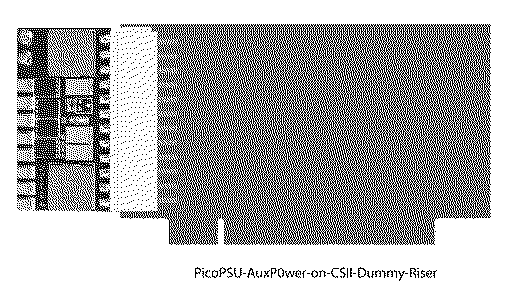
My latest experimental PCB arrived, a CS II to PCI interposer/converter. Note that Comm Slot II is not a direct pin to pin mapping of PCI, so this does change pin assignments. But it really is just PCI. Works fine with my Ethernet CS II card. Yes, I'm using a PCI slot for where the CS II card plugs in. Turns out it's the same pin spacing and the notch fits perfectly.
(That other PCI slot at the bottom is a generic PCI extender cable)
Liked by Mac84andRon's Computer Videos |
|
Trash80toG4 Active Tinkerer Bermuda Triangle, NC USA -------- Joined: Apr 1, 2022 Posts: 1,131 Likes: 329 |
Jul 3, 2024 - #28
Very nice! Almost two(?) decades ago I played with going the other way, a CSII Slot edge card to PCI Slot Riser test setup. Wanted to see if any PCI cards might be hoodwinked into running off CSII.
Got one of those on the way as well? :D |
|
Androda TinkerDifferent Board Secretary 2023 USA, Western -------- Joined: Sep 25, 2021 Posts: 523 Likes: 581 |
Jul 10, 2024 - #29
|
|
Trash80toG4 Active Tinkerer Bermuda Triangle, NC USA -------- Joined: Apr 1, 2022 Posts: 1,131 Likes: 329 |
Jul 10, 2024 - #30
edit: just wondered if a PCI adapter might enable the use of a gigabit NIC? |
|
ClassicHasClass Tinkerer -------- Joined: Aug 30, 2022 Posts: 386 Likes: 215 |
Jul 10, 2024 - #31
Realistically I don't think they could leave many lines off. The Tulip in the CSII Ethernet card is an off-the-shelf part and it would likely have made it more expensive to synthesize any missing signals, which would have defeated the purpose.
|
|
Trash80toG4 Active Tinkerer Bermuda Triangle, NC USA -------- Joined: Apr 1, 2022 Posts: 1,131 Likes: 329 |
Jul 10, 2024 - #32
Sweet, now I know what to do with my current obsession:
Instead of making the PCB a CSII TAM Riser, I'll figure out how to do a RA PCI adaptation so the card hangs off the board opposite the PCI slot(s) for testing purposes. I'll play with it to see if things will fit into the 10cm SEEED square. @Androda May or may not be worth doing a dongled connector version of your NIC within the riser footprint (or lower) for the TAM crowd, but would be hella fun for that well heeled tribe of fanatics.
|
|
Trash80toG4 Active Tinkerer Bermuda Triangle, NC USA -------- Joined: Apr 1, 2022 Posts: 1,131 Likes: 329 |
Jul 10, 2024 - #33
Sorry @Androda methinks my nose is stuck too far into your topic with this CSII<->PCI tangent.
Looks like @trag and I were playing around with this stuff six years ago over at the MLA. I'll start a new topic over here. luckily the pics and diagrams are intact as they predate the catastrophe. teaser: not for discussion in this thread! Three Slot Riser for 6400 - In search of the Mythical Slot CIn another thread, trag mentioned that his SuperMac C600 had Slots A, B AND C along with CS2. Another tangent ensued because the SuperMac clone is based on the 6400's Alchemy architecture. Long story short, got this riser in hopes that it would plug into Slot A and give me A, B, and the...
[Image: 68kmla.org]
68kmla.org
|
|
Trash80toG4 Active Tinkerer Bermuda Triangle, NC USA -------- Joined: Apr 1, 2022 Posts: 1,131 Likes: 329 |
Jul 11, 2024 - #34
Spinning tangent off into its own thread:
Liked by Androda |
|
Fizzbinn Active Tinkerer Charlottesville, VA -------- Joined: Nov 29, 2021 Posts: 256 Likes: 262 |
Jul 15, 2024 - #35
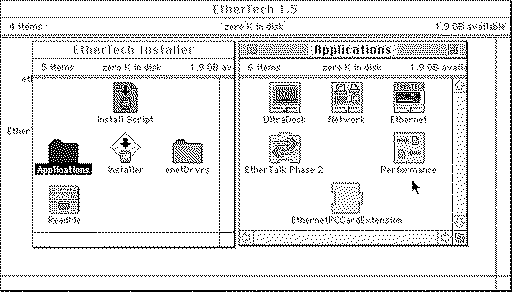
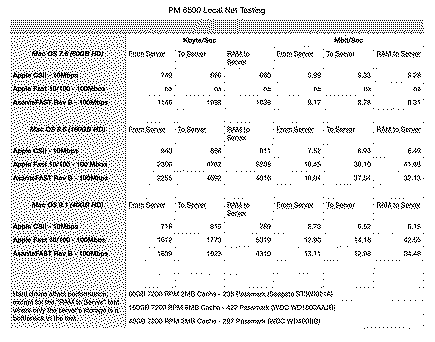
Could Macintosh Garden be rate limiting downloads? I might if I were them... Local network testing seems like it might be better able to reveal the upper bounds of a NIC's performance, to that end I did track down the AppleShare network speed testing tool I remembered stumbling across a while back, likely when getting a Duo Ethernet micro dock working. (Note local FTP via TCP/IP testing, as suggested, would also be neat complimentary idea...): Its "Performance" v1.3 which is included with the Newer Tech EtherTech 1.5 installer: I wouldn't be surprised if there is some better classic Mac OS network benchmarking tool I don't know about but think this one is pretty simple/neat. I ran tests between my PowerBook 540c (10Mbps Ethernet) and PowerBook G3/333 Lombard (100Mbps Ethernet) from/to my Raspberry Pi 4 "retro home server" running MacIPRpi (1Gbps Ethernet) all connected via an Apple Airport Extreme 6th Generation's Gigabit capable Ethernet ports. Results converted from Performance's Kbyte/S output to Mbps to align with Ethernet speed measurement: PowerBook 540c (7.5.3) 3.48Mbps from Server 4.22Mbps to Server PowerBook G3/333 (8.6) 29.33Mbps from Server 30.56Mbps to Server Classic Mac OS, at least in the PPC G3 era can definitely do more that 10Mbps... Perhaps more applicable to your new card I plan to try this from a Power Macintosh 6500 via CSII 10Mbps and a 100Mbps PCI card. I have several of those kicking around.
Liked by Androda |
|
Fizzbinn Active Tinkerer Charlottesville, VA -------- Joined: Nov 29, 2021 Posts: 256 Likes: 262 |
Jul 16, 2024 - #36
So some interesting results I think!
The driver I used ("Apple Enet" extension, v2.4.2) for the "Apple Fast Ethernet 10/100BaseT Card" didn't work under Mac OS 7.6. For the "AsanteFast 10/100 PCI Ethernet Adapter Rev. B" I used this driver from Macintosh Garden. The hard drives I used for the different OS tests were different which makes the tests not directly comparable but I was testing with what I had on hand and as much as it bothers me that I didn't take the time to get a disk configured with partitions for each OS and run the tests from there I think it does help illustrate the impact of drive performance on network data transfers. My take aways: Mac OS 7.6, and likely earlier versions, aren't really able to take advantage of 100Mbps Fast Ethernet. Not sure about 8/8.1 but by 8.5/8.6 it seems Apple made OS changes which allow the same hardware and driver (the Asante card/driver being the proof) to take advantage of 100Mbps Fast Ethernet. In testing and real world you need to have source and destination disks able to sustain more than 10Mbps (1.25MBps) reads and writes to make use of 100Mbps Fast Ethernet. The "RAM to Server" tests may likely show some SD card storage bottlenecks on my Raspberry Pi server. I'm curious to see what the mystery Fast Ethernet controller chip @Androda is using and what the driver is, from its shape it doesn't look like it will be the Digital 21140 that my Asante and Apple Fast Ethernet cards use. Excited for this project!
Liked by eric |
|
Androda TinkerDifferent Board Secretary 2023 USA, Western -------- Joined: Sep 25, 2021 Posts: 523 Likes: 581 |
Jul 30, 2024 - #37
The production order has arrived, so I'll be testing and listing the cards as fast as my spare time permits. Note that I am away all of next week, hence the blue popup on my site saying that shipping will be delayed.
Liked by ericandRon's Computer Videos |
|
Androda TinkerDifferent Board Secretary 2023 USA, Western -------- Joined: Sep 25, 2021 Posts: 523 Likes: 581 |
Jul 31, 2024 - #38
The listing is live on my site now: https://androda.work/product/comm-slot-ii-10-100-ethernet-cards/
Liked by Mac84,PL212,Kai Robinsonand 2 others |
|
Fizzbinn Active Tinkerer Charlottesville, VA -------- Joined: Nov 29, 2021 Posts: 256 Likes: 262 |
Jul 31, 2024 - #39
Ordered! I'll be curious to see how it compares to my other tests!
As always, amazed and delighted by your work! |
|
Androda TinkerDifferent Board Secretary 2023 USA, Western -------- Joined: Sep 25, 2021 Posts: 523 Likes: 581 |
Aug 1, 2024 - #40
|
| << First | < Prev | Page 2 of 3 | Next > | Last >> |
| Home | Forums | What's New | Search | Bookmarks | RSS | Original | Settings |
| XenForo Retro Proxy by TinkerDifferent.com |



![[Image: 68kmla.org]](/proxy_image?url=https://68kmla.org/bb/data/assets/logo/68kmla-512.png)