|
* TinkerDifferent *
Retro Computing Community |
| Home | Forums | What's New | Search | Settings |
| BlueSCSI v2: Sluggish Performance on SE/30 |
|
JDW Administrator Japan -------- Joined: Sep 2, 2021 Posts: 2,534 Likes: 1,982 |
May 4, 2024 - #1
SE/30 owners, if you have a BlueSCSI v2, could you please run MacBench 3.0 "All Disk Tests" and post your scores? (Please use only MacBench and only version 3.0.)
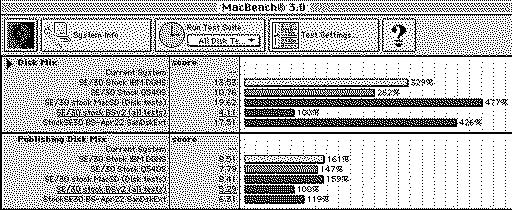
I'm seeing seriously sluggish BSv2 performance in MacBench 3.0 on my SE/30 (with or without accelerators), despite the fact that SCSI Director Pro 4 shows expected BSv2 performance. (And. yes, I have the recommended HD SC Setup 7.3.5 driver installed.) Note in my MacBench 3.0 screenshot below that even my BlueSCSI v1 is 4.26x faster than BSv2 in Disk Mix! And my rather slow Quantum 540S is scoring 2.62x faster than BSv2 in Disk Mix! It's more than just MacBench. I can feel the slowness too. Booting is noticeably slower on BSv2 than MacSD, even though BSv2 is theoretically faster than MacSD. And when I boot to the Desktop, all the file icons or filenames appear very slowing in their respective windows with BSv2. I can see them appear one at a time. But when booting from MacSD, all icons and files appear in their windows super fast. So no one can argue that MacBench 3.0 scores aren't showing reality. Note that my BSv2 has a PICO-W. I actually have two BSv2's and both show the same sluggish performance (both with PICO-W's). So if you kindly run MacBench 3.0, please note if you have the PICO or PICO-W. THANK YOU!
|
|
Kai Robinson TinkerDifferent Board President 2023 Worthing, UK -------- Joined: Sep 2, 2021 Posts: 1,322 Likes: 1,313 |
May 4, 2024 - #2
Are you using the same SD card in every device, formatted the same way?
Liked by JDW |
|
JDW Administrator Japan -------- Joined: Sep 2, 2021 Posts: 2,534 Likes: 1,982 |
May 4, 2024 - #3
Kai, thank you very much for your reply!
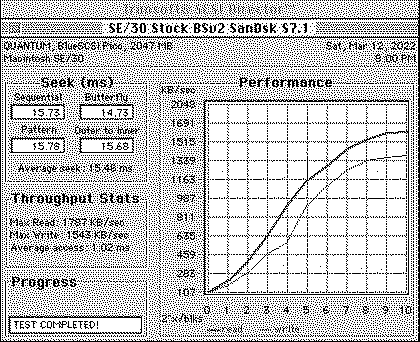
I have two BlueSCSI v2's, both with PICO-W. Each have their own SD card, each card formatted with HD SC Setup 7.3.5 (patched). I have verified the "7.3.5" driver is correct using SCSI Director Pro 4.0. One card is a SanDisk Extreme 32GB V30 uSD, and the other is a Gigastone 16GB MLC V30 uSD. (I use uSD-to-FullSizeSD adapters.) Both of these SD cards are newer and faster than the older SD card I have in my MacSD, which has no V-rating at all. I have switched SD cards in the respective BSv2 drives, but it made no performance difference. The two BlueSCSI v2s are both 2022.12a revisions. One was acquired from Kay Koba here in Japan, and the other came with a IIci I purchased from a seller in Canada. By asking for MacBench 3.0 "All Disk Tests" data from other BSv2 users (who also have an SE/30), my intent is to determine if this slowness is inherent to all BSv2 units, or if it is simply something unique to me (which would imply issues with the 2022.12a revision, potentially). So if you have a BSv2 and an SE/30, I do understand it takes some time to run MacBench 3.0, but I certainly would be grateful to see your results. |
|
speakers Tinkerer San Jose, CA -------- Joined: Nov 5, 2021 Posts: 154 Likes: 99 |
May 5, 2024 - #4
I recently upgraded my SE/30 from a BlueSCSi v1 to v2 with PICO-W for DaynaPort Wifi. Subjectively, the disk performance does seem poor. I'm attempting to run MacBench 3.0. So far though, I've seen a failure and a hang .. but I'll keep trying.
Note, however, that my machine isn't stock and these factors may affect results:
Liked by JDW |
|
JDW Administrator Japan -------- Joined: Sep 2, 2021 Posts: 2,534 Likes: 1,982 |
May 5, 2024 - #5
@speakers
Thank you for your kind feedback and willingness to test. MacBench 3.0 is brain dead when it comes to crashing, but it's the newest version we can run on an SE/30. It's also far better than SCSI Director Pro 4.0 to give you a complete idea of how faster your drive is. But I get crashes sometimes and others not in MacBench 3.0, and I can't explain it. That remains true even after I boosted the RAM size in Get Info. My recommendation since you have a ROM-inator II like me, is to boot into 7.6.1, then run MacBench 3.0. I've never had it crash in that OS. |
|
robin-fo Tinkerer Switzerland -------- Joined: Feb 17, 2022 Posts: 157 Likes: 76 |
May 5, 2024 - #6
Are you sure your image files on the SD card are not fragmented?
|
|
JDW Administrator Japan -------- Joined: Sep 2, 2021 Posts: 2,534 Likes: 1,982 |
May 5, 2024 - #7
@robin-fo
There actually was and still is fragmentation because after updating to Apple Silicon Macs, my SD card life has become a living hell. No matter how many times I format the SD card ExFAT and then write files one at a time, one or more of my 2GB files ends up saying "fragmented" in the log file. I tend to have been experience with writing files to SD card on slower Intel Macs, but fragmentation happens on them too at times. And no, using a dedicated SD formatter is not the solution. It's not a formatting issue. Disk Utility formats the SD card properly every time. I am talking about issues writing large files to the SD card. Often I will try to write the file, then write the same file again, and then again. Sometimes that works, but many times it doesn't. I just turned off Spotlight via the Terminal and then copied a 2GB file to the SD card, then tested in my SE/30, then pulled the card and check the log file. Nope, it still complains the infuriating file is fragmented! It's maddening!
|
|
JDW Administrator Japan -------- Joined: Sep 2, 2021 Posts: 2,534 Likes: 1,982 |
May 5, 2024 - #8
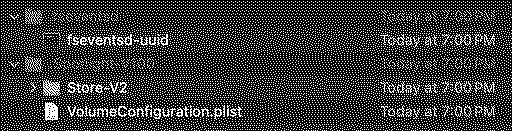
Despite having disabled Spotlight in the Terminal, even after I freshly format the SD card as ExFAT, I still see it writes these hidden files:
I don't know what's happening that causes my files to get fragmented. I write and write and write and write, check and check and check and check, and the log tells me every time the file is fragmented. This is a major issue. It's not exclusive to BlueSCSI either because it affects other devices like the FloppyEMU too. Oh, and I have tried not only my 16" M1 Max MBP's internal SD card slot, but I also have a fast SONY USB3 reader. Doesn't matter what SD card reader I use, the fragmentation result is the same.
|
|
JDW Administrator Japan -------- Joined: Sep 2, 2021 Posts: 2,534 Likes: 1,982 |
May 5, 2024 - #9
After several hours of failed attempts, I finally have zero fragmentation. Even on my Intel Mac, it was tough, but in the end, I found there is NO WAY IN HELL that an Apple Silicon Mac will achieve this. So people who don't have an Intel Mac are out of luck.
Here's my log file content now... Platform: BlueSCSI FW Version: 2024.04.02-release Apr 3 2024 02:22:50 Flash chip size: 2048 kB === SD Card Info === SD card detected, exFAT volume size: 15231 MB SD Name: SD16G, MID: 0x00, OID: 0x34 0x32 === Global Config === Reading configuration from bluescsi.ini Active configuration: === Finding images in / === == Opening /HD20_512 Store.img for ID: 2 LUN: 0 ---- Image ready == Opening /HD10_512 Boot.img for ID: 1 LUN: 0 ---- Image ready === ROM Drive === Platform supports ROM drive up to 1692 kB ---- ROM drive image not detected === Configured SCSI Devices === * ID: 1, BlockSize: 512, Type: Fixed, Quirks: Apple, Size: 2048048kB * ID: 2, BlockSize: 512, Type: Fixed, Quirks: Apple, Size: 2097152kB Initialization complete! INFO: Pico Voltage: 3.221V. I am now running MacBench 3.0 and will report the scores when finished. |
|
eric Administrator MN -------- Joined: Sep 2, 2021 Posts: 1,151 Likes: 1,934 |
May 5, 2024 - #10
Macintosh SE/30 has a NCR 53C80 rated at 1.25 MB/sec. Your performance seems great.
If the test program is factoring seek timings into the result, the result is meaningless - https://github.com/BlueSCSI/BlueSCSI-v2/wiki/Performance#seek Seeks are not called during normal operation either, only in tests. I think this is a case of bad tests. File Fragmentation is important, but likely only affects when you get between 5-10mb/sec ranges, which a SE/30 will never. No one can control how Mac/Win/Lin writes files fragmented or not to an SD card, it is frustrating but I have no solution. HTH. Liked by AlexMac,Kai Robinsonandbakkus |
|
speakers Tinkerer San Jose, CA -------- Joined: Nov 5, 2021 Posts: 154 Likes: 99 |
May 6, 2024 - #11
I'm glad I have the same ROM/OS configuration as yours. But I'm seeing frequent instability from MacBench. For example, it always fails to save the results file completely and choosing to quit without saving always hangs the OS! But here's my result: And that's as bad as yours! Checking the log file - you guessed it - my images are fragmented. D'oh .. I swear I copied the images individually immediately after a fresh exFAT erase. For the record, log.txt is attached. So I repaved the SD card and re-ran MacBench. This time the DIsk Mix test scored doubled to 8.79. To see whether the network is affecting the performance any, I repeated with DaynaPort disabled (i.e. no NE6.hda file) and measured a DIsk Mix of 8.88. So there may be a slight impact (1%) alhough it's probably within the margin of experimental error. So .. beware fragmentation.
Liked by JDW |
|
This Does Not Compute Administrator -------- Joined: Oct 27, 2021 Posts: 345 Likes: 503 |
May 6, 2024 - #12
I had my SE/30 out for filming so I was able to run the same MacBench 3 disk test. I have a BlueSCSI version 2, without WiFi, running the latest firmware. The system has 8MB of RAM and is running System 7.1 using the Apple HD SC Setup 7.3.5 driver. I've attached the export from MacBench 3 if you want all the test results.
Not long ago I did a shootout among different hard disk drivers using this exact same machine and BlueSCSI, albeit with MacBench 2 (which I feel is a more period-accurate version for the SE/30). I saw on a few occasions where test results weren't what I anticipated, and one case where the BlueSCSI was reported to be running faster than what the computer's SCSI controller is capable of -- so I agree with Eric, I think some benchmarks may give false readings since they're expecting to work with a mechanical drive.
Liked by JDWandAndroda |
|
JDW Administrator Japan -------- Joined: Sep 2, 2021 Posts: 2,534 Likes: 1,982 |
May 6, 2024 - #13
@eric , @This Does Not Compute , @speakers
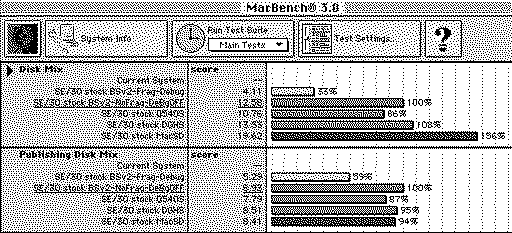
Thank you for your kind replies, and for the very helpful results. For the record, I am using the HD SC Setup (patched) 7.3.5 driver on all my virtual drives, which is the officially sanctioned driver in the vast majority of cases, as per this BlueSCSI Performance page. And while that official page does mention the OS 8 driver too, and while I have discussed minor performance benefits of that OS 8 driver with Eric in the past, my SE didn't work with the OS 8 driver, so I went back to 7.3.5. Even so, as Colin's video points out, if you use PPC, the 7.3.5 driver will work, but give you poor performance. Use his recommended FWB driver instead on PPC. I would encourage everyone to verify what driver you are using. Just launch SCSI Director Pro 4.0 and click on the View menu, then Device Information. If you are using something other than 7.3.5 on your BSv2 drive images with 68k Macs, your performance could be adversely affected. In reply to Eric & Colin, MacBench 3.0's "Disk Mix" consists of Sequential Reads (512b, 1K, 32K, etc.), Random Reads, Sequential Writes and Radom Writes. I have no idea if one can interpret any of that to be or include "SEEK timing." But it doesn't sound like SEEK testing to me. Separately from that, MacBench 3.0 also has a "Publishing Disk Mix" which does not specify what it is testing other than Photoshop & Quark Press files. I've spent way too many hours on this, but I finally have some hard numbers, all done in my otherwise stock 16MHz SE/30 (fully recapped, non-stock power supply with rock solid voltages, brand new RAM & ROM sockets with metal tabs): Compare your "score" numbers to mine. The problem I originally had was two-fold. In my BSv2 INI file, I had DEBUG enabled on one of my two BSv2's. And on both of my BSv2's (I have two SD cards), all the drives were fragmented. In the above results, you can see the huge difference that disabling DEBUG and using a non-Fragmented drive makes, even on a stock 16MHz SE/30. Oddly, even with DEBUG ON and with Fragmented drive images, SCSI Director Pro 4.0's scores were normal. Only MacBench was able to sleuth out the problem. I knew there was a problem in the OVERALL FEEL of the machine. Booting from my MacSD felt fast and smooth, and when icons and filenames appeared for the first time at the Desktop (just after booting), they appeared very quickly. But my BSv2 drives booted noticeably more slowly, and I could then see each and every icon and file name appear in Finder windows, one at a time. So it cannot be argued that MacBench results are misleading or unimportant. I know what I felt in terms of speed. NOTES:
Realistically speaking, I consider the following to be true for the vast majority of people:
@speakers , open your *.ini file and verify if DEBUG is mentioned there and if it is, delete that line and save! You then need to erase your SD card (after first having made a backup to your modern Mac) via Disk Utility, formatting it ExFAT with Master Boot Record. If you then copy your backup files back to the SD with an Intel Mac, you then need to put the SD into your BSv2, boot your SE/30, Shutdown, put the SD back into your modern Mac and check the log. If you still have fragmentation, you can sometimes copy from your backup and overwrite the old file to get that stupid frag warning to vanish in the log, but not always. Sometimes, I have to reformat the card more than once when I have multiple large 2GB image files on the SD card. But be sure you copy the image files one at a time, not all files at once! CONCLUSION: Eliminating Debug Mode & disk image Fragmentation is necessary to maximize BSv2 performance, but even in that case and with a fast V30 SD card in BSv2, MacSD (even without a V-rated SD card at all) still trounces all other drives on the SE/30 in MacBench 3.0's Disk Mix, despite the fact that MacSD's hardware should "theoretically" be slower than BSv2. I can provide my MacBench 3.0 results files to anyone who wishes to have them.
|
|
eric Administrator MN -------- Joined: Sep 2, 2021 Posts: 1,151 Likes: 1,934 |
May 6, 2024 - #14
All of this confusion could have been avoided if you'd followed the troubleshooting guide and provided a log to review - the first trouble shooting steps, always. No exceptions.
When your file is fragmented we give you a link in the logs that tells you all this. So if you were thinking "hey this might be slow" looking at the log would point you in the right direction. Would also be very apparent debug was on too. I see no reason why intel vs arm mac would make a difference, I have both, and can make contiguous files on both. We've learned MacBench is no way to do bench marking in 2024 with modern solutions, ditch it. No one knows what it's actually testing. At least with SCSI Director you can see what it is testing. That's what makes a good test vs. accepting a number from a black box. Liked by dramirez |
|
JDW Administrator Japan -------- Joined: Sep 2, 2021 Posts: 2,534 Likes: 1,982 |
May 6, 2024 - #15
Had I silently followed the guide and mentioned nothing in a post, it would not have gotten me benchmark scores from other people, nor would my investigations have assisted others. Indeed, my previous post makes this thread all worthwhile. It is an investigatory thread. That information we have exchanged is very useful not only for myself, but for other BlueSCSI owners who may be curious about their own drive performance.
I personally like MacBench and rely on it more than other benchmarks, because it is a very comprehensive benchmarking utility. It doesn't take multiple hours to finish testing on an SE/30 for nothing. Also, "Disk Mix" makes it clear what it's testing, as I mentioned in my previous post in paragraph four. I fully understand why you have legitimate concerns about SEEK testing, and that is why I wrote what I did in my previous post to say there's nothing that suggests DISK MIX is conducting SEEK testing at all. When you run DISK MIX and expand out the individual tests, it shows you what was tested. Also, as I said twice earlier (in my opening post and previous post), SCSI Director Pro 4.0 gave me normal results for both of my BSv2's, even when DEBUG was ON and when my volumes were fragmented, but despite the normal scores in SCSI Director Pro 4.0, I could FEEL something was wrong (slow). It was only when I ran MacBench 3.0, that I could then see precisely what I felt in actual use. And no surprises there because that is how MacBench was designed (to simulate real world use in a way that produces repeatable results -- such as written in the MacBench README too). Also, even after all my BSv2 optimizations, we still have the mystery of why the theoretically faster BSv2 is slower than MacSD in Disk Mix. I realize that could be a motivator for people to suggest MacBench is flawed, but like I said, what matters most is how something FEELS during normal use. When you've used a computer long enough, you know when something feels slow, typical, or very snappy. Lastly, I am well aware that when I talk, delicate sensibilities sometimes get trampled upon. I am sorry if that is the case here. But rather than fall silent, I continue on for the sake of gathering information and offering information. It's never my intent to tear down products or lambast creators. I am overjoyed with the amazing tech you developers have worked so hard to produce. But this thread is an information exchange. Nothing more. Nothing less. It's easy to love people who do nothing but offer praise and despise those who don't. But sometimes a good discussion like this has merit even though it does more than just sing to the choir. Whenever I am faced with a mystery, I consult others for help. When few people reply, I tend to learn little to nothing. But when others chime in, as is the case in this thread, I learn something new and can share something new with others. My hat is off to all who have kindly participated in this thread. Thank you! |
|
Drake TinkerDifferent Board Vice-President 2023 -------- Joined: Sep 23, 2021 Posts: 449 Likes: 788 |
May 7, 2024 - #16
When does the audio book version of this thread come out? Need something for my 9 hour flight to Japan next week.
Liked by amiga.technology,rikerjoe,tom_Band 1 other person |
|
JDW Administrator Japan -------- Joined: Sep 2, 2021 Posts: 2,534 Likes: 1,982 |
May 7, 2024 - #17
We've gotta get the word out! [peace]Oh yes, Klingon too is coming soon! Translate English to Klingon | Translate.comEnglish-to-Klingon translation is made accessible with the Translate.com dictionary. Accurate translations for words, phrases, and texts online. Fast, and free.
[Image: www.translate.com]
www.translate.com
[Image: Klingon.png]
Liked by rikerjoe,tom_BandDrake |
|
joopmac New Tinkerer -------- Joined: Jun 18, 2024 Posts: 4 Likes: 1 |
Jun 18, 2024 - #18
My friend has found the fix, Will test with some extra sd cards but it looks promising
|
|
JDW Administrator Japan -------- Joined: Sep 2, 2021 Posts: 2,534 Likes: 1,982 |
Jun 18, 2024 - #19
|
|
joopmac New Tinkerer -------- Joined: Jun 18, 2024 Posts: 4 Likes: 1 |
Jun 19, 2024 - #20
Hello James!
Hello all tinkerers:) Slow performance due to fragmentation seems to be caused by files written by Spotlight Erasing the SD, removing all the invisible files and then adding the SD Card to "Spotlight privacy" list, Then copying the files one by one gives perfect results No log errors, Quick boot, snappy Finder listings, good HD benchmarks tested on wombat, mystic, 475, 170... It works!! You have tried disabling with Terminal but that seens to still write the invisible files during copying and causing fragmentation. Not logical but it's true removing the invisibles and adding to spotlight privacy list in System settings is the fix [face-with-cowboy-hat] keep up the good work, watched a lot of your videos and they are amazing, and educational :D[+1][emoji-modifier-fitzp] Liked by JDW |
| Page 1 of 2 | Next > | Last >> |
| Home | Forums | What's New | Search | Bookmarks | RSS | Original | Settings |
| XenForo Retro Proxy by TinkerDifferent.com |



![[Image: www.translate.com]](/proxy_image?url=https://www.translate.com/next/images/favicon/favicon.svg)
![[Image: Klingon.png]](/proxy_image?url=https://tinkerdifferent.com/data/attachments/16/16477-b87908c1bc04b4495ef3c59a832193b8.jpg)