|
* TinkerDifferent *
Retro Computing Community |
| Home | Forums | What's New | Search | Settings |
| XLR8 - Jumper Settings for a Power Computing 180C |
Forums > Vintage Apple > Macintosh > Clones & Conversions
|
RetroTechy New Tinkerer -------- Joined: Oct 29, 2021 Posts: 5 Likes: 3 |
Jan 14, 2022 - #1
Hi all
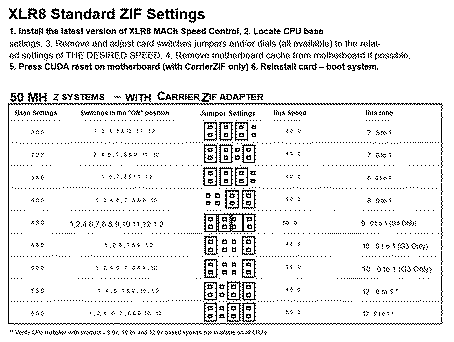
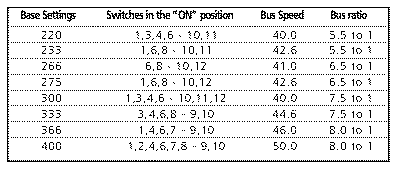
I have a power computing 180c which has a XLR8 Mach Speed card in it with a 266mhz ZIF installed in it. For the life of me I can't get it to boot and think it's the jumpers which the previous owner may have changed. Can anyone lead me to a solution?
|
|
Kai Robinson TinkerDifferent Board President 2023 Worthing, UK -------- Joined: Sep 2, 2021 Posts: 1,322 Likes: 1,313 |
Jan 14, 2022 - #2
Aah! I have the pdf of this somewhere, I have all the pdfs for the xlr8 gear on my desktop.
Lemme dig it out for you. |
|
Kai Robinson TinkerDifferent Board President 2023 Worthing, UK -------- Joined: Sep 2, 2021 Posts: 1,322 Likes: 1,313 |
Jan 14, 2022 - #3
Damn, i can't find it - however, i know i got it off this CD: https://macintoshgarden.org/apps/xlr8-cd-rom
|
|
alxlab Active Tinkerer -------- Joined: Sep 23, 2021 Posts: 293 Likes: 323 |
Jan 14, 2022 - #4
|
|
alxlab Active Tinkerer -------- Joined: Sep 23, 2021 Posts: 293 Likes: 323 |
Jan 14, 2022 - #5
I'll try to go over to my parents to get my XLR8 Zif Carrier manual tonight.
|
|
RetroTechy New Tinkerer -------- Joined: Oct 29, 2021 Posts: 5 Likes: 3 |
Jan 14, 2022 - #6
Thanks @Kai Robinson and @alxlab I tried the MACH carrier zip instructions at 266 but it stays frozen at the macintosh logo. This mind you is on the original scsi hdd which occasionally doesn't spin up...
|
|
Drake TinkerDifferent Board Vice-President 2023 -------- Joined: Sep 23, 2021 Posts: 449 Likes: 788 |
Jan 14, 2022 - #7
Completely off topic but I have a brand new XLR8 mouse that would have been packaged with their usb board.
It even looks fast |
|
mg.man Tinkerer Ardley, UK -------- Joined: Oct 20, 2021 Posts: 133 Likes: 69 |
Mar 18, 2022 - #8
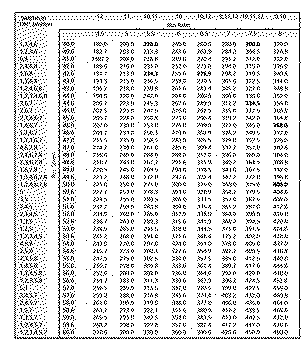
I've also attached the full manual. If you're trying those settings, it may be a problem with the cache. You might try disabling it in the MAChSpeed control panel - but then you need to fully boot to do so. I "think" the cache is only enabled when the XLR8 Extension is loaded, so booting with Extensions Off may make it possible to open the Control Panel and disable the cache.
Liked by Kai Robinsonandalxlab |
|
alxlab Active Tinkerer -------- Joined: Sep 23, 2021 Posts: 293 Likes: 323 |
Mar 18, 2022 - #9
Yeah that's nice having the full chart.
In the end I couldn't find my manual >.<
|
| Page 1 of 1 |
| Home | Forums | What's New | Search | Bookmarks | RSS | Original | Settings |
| XenForo Retro Proxy by TinkerDifferent.com |