|
* TinkerDifferent *
Retro Computing Community |
| Home | Forums | What's New | Search | Settings |
| What's the best Video solution for a Vintage Apple IIe in 2025? |
Forums > Vintage Apple > Apple I/II/III
|
Retronaut New Tinkerer -------- Joined: May 11, 2025 Posts: 26 Likes: 14 |
Oct 15, 2025 - #1
What's the best Video solution for a Vintage Apple IIe in 2025
Continuing our series on using an Apple IIe in 2025, today we are getting video working. Do we use a vintage monitor to get that authentic CRT look? Or do we use a modern flat screen? Another option is to use a modern Apple II video card. Yes, we can even use HDMI! Watch on to see the options you can use to rock 1977 hardware in 2025 and onwards! Liked by JDW |
|
JDW Administrator Japan -------- Joined: Sep 2, 2021 Posts: 2,534 Likes: 1,981 |
Oct 15, 2025 - #2
Good to see you showcasing the A2DVI card...
I have a IIc, so I am currently using that A2DVI card with this adapter: I tried other HDMI and even VGA solutions prior to A2DVI, and I must say, A2DVI produces a better picture overall. Looking forward to seeing your video when it premiers.
Liked by phunguss |
|
Retronaut New Tinkerer -------- Joined: May 11, 2025 Posts: 26 Likes: 14 |
Oct 15, 2025 - #3
Hi James, well, Im mentioning the card, but I could not really showcase it that much as I do not own one. But I think I DO need to get one as it appears my VidHD card has a flaw in it, it writes to inserted floppy disks when turned on. That behaviour I think manifests in the video, where the Floppy Emu fails to boot when my IIe is turned on. Once thats done, you can reset and it works fine. I guess a real floppy would be ruined by then.
I have actually noticed this behaviour recently, I was doing some testing of my DiskII drive, writing out disks and it was rare that they lasted for more than a day or two at the most. I THOUGHT it was the floppy disks getting old, but maybe it was the VidHD slowing sniping them as I used them. Liked by JDW |
|
Retronaut New Tinkerer -------- Joined: May 11, 2025 Posts: 26 Likes: 14 |
Oct 15, 2025 - #4
I was wondering, have you tried any other the other cards out there that have been released over the last two years? I saw the FPGA card, which emulates a Z80 card, Mockingboard etc, but its quite expensive, so I have not invested. Another board I saw, was 4.4 versions of the A2DVI, apparently these can also be re-flashed with other firmware to emulate a Floppy Card and others. Any experience of these? Liked by JDW |
|
JDW Administrator Japan -------- Joined: Sep 2, 2021 Posts: 2,534 Likes: 1,981 |
Oct 16, 2025 - #5
I also dabbled with the GBS-8200 prior to using the A2DVI but as you can see in that video, there are issues with it too. Here's a photo as an example... [Image: ShiftedUpTooHigh.jpg] [Image: PlamensAdapter_and_GBS8200.jpg] The desktop background gray in Apple II Desktop (graphical GUI for the Apple II) is gritty... [Image: DesktopGritty.jpg] That connected to my Eyoyo via this rat's nest of wires... [Image: RatsNestOfWires.jpg] Here are some photos of the A2DVI card for the IIe and the Adapter for the IIc... [Image: tempImage9xlibz.png] [Image: tempImageZy5JtB.png] [Image: tempImageVKSn3L.png] [Image: tempImageVdJ6wV.png] And here is how it displays on the Eyoyo with A2DVI (and IIc Adapter)... [Image: A2DVI_Centered_Eyoyo4x3setting.jpg] [Image: A2DVI_NicelyCentered.jpg] [Image: A2DVI_Centered_Eyoyo16x9setting.jpg] [Image: A2DVI_Centered_Eyoyo16x9setting2.jpg] [Image: A2DVI_Centered_Eyoyo4x3-GRN.jpg] Does it fill the entire display area of the Eyoyo? No, as you can see above, it does not. But it comes closer than anything else I've tried. And most importantly, the content is now vertically centered. With other display interfaces, it gets shifted up vertically and looks bad as a result. I also made a short video for Javier Rivera, Mark Jozaitis (MacEffects) and Jonathan Adar, showing the plastic case I had made for the A2DVI + Adapter Combo from CayMac. Those three gentlemen helped me get started in the world of Apple II somewhat recently in late 2023. I owe a huge debt of gratitude to them all for their kindness, generosity and helpfulness over the past couple years. |
|
Retronaut New Tinkerer -------- Joined: May 11, 2025 Posts: 26 Likes: 14 |
Oct 16, 2025 - #6
Its kind of crazy, doing these Apple II videos has made me realise what a blur the last 5+ years have been. I bought my Apple IIe during COVID and soon after the IIc and then a IIgs. They are NOT easy to source over here in the UK, these were all UK models, which is pretty rare.
Then time interjected and when I started my channel about 2 years back I focussed on Amiga at first, simply because I had more experience with these and also I had so much to repair. Then recently I realised I had left out the Apple II, so I decided to focus on it. Honestly, having such a wide range of retro computers is a blessing and a curse. Its great for me, great fun, but for a channel, its really hard to work out what to show next. Its usually what I am into that month ;) When the A2DVI arrives, I will probably use it as my IIe display card and I will buy another for my IIc. I don't use my IIc much, so no rush. My iigs has an AppleSqueezer, and that has HDMI built in so. My VidHD then may be surplus to requirements, so I may sell it as I think its useful for a IIgs user. I see them for sale for $150+ which seems odd as the A2DVI is here. Is it because of the IIgs support? Liked by JDW |
|
JDW Administrator Japan -------- Joined: Sep 2, 2021 Posts: 2,534 Likes: 1,981 |
Oct 16, 2025 - #7
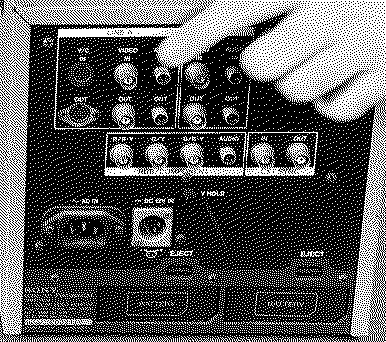
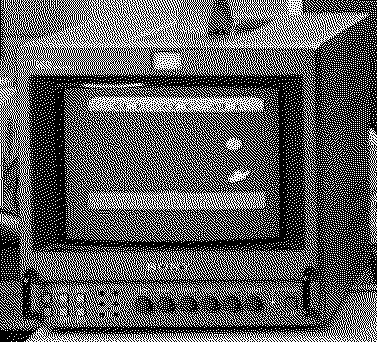
I just finished watching your video, and I must say that SONY Trinitron monitor is very interesting, especially because it can be battery powered!
What is the typical selling price of those monitors? Also of note is the fact that even on your CRT, it is shifted up vertically, as I was describing in my previous post, which indicates it is not something exclusive to use of modern LCD displays on the Apple II. I look forward to hearing your test A2DVI test results!
Liked by Retronaut |
|
Retronaut New Tinkerer -------- Joined: May 11, 2025 Posts: 26 Likes: 14 |
Oct 16, 2025 - #8
About 4+ years ago now, someone in Worcester, near Birmingham here in the UK was selling an Amiga 4000 bundle. This and I think another 9" model and a 15" one were bundled. The vendor said there were issues with all of them. Well, it appears this one at least is good. Whilst I have the Apple II out, I should really get the other two out and test those as well. Yes, the battery, I really did not notice those when I bought them, but did when I was inspecting the back of this one. Pretty nifty! Only problem is, I guess getting those in working condition these days must be troublesome. Also, you REALLY don't want to leave those batteries plugged in over a looooong period, right. Cost, well, I checked and over here they cost between GBP150 and GBP300. Im not sure WHY the range of prices, maybe some have better features? I'll maybe do some research into mine and try and see what specifics they have. These were all used at a TV station AFAIK, so they had a working life. Part of a whole suite using the Amiga 4000 for some kind of broadcast TV effect. Maybe the Sports scores or a Weather report? Liked by JDW |
|
JDW Administrator Japan -------- Joined: Sep 2, 2021 Posts: 2,534 Likes: 1,981 |
Oct 17, 2025 - #9
Also, there are so many knobs on that SONY I can't help but wonder if one if them wouldn't allow you to compensate for that vertical shift up, by allowing you to shift the display down so it then becomes dead center. And is there a control that would let you expand the display area so it will fill more of the CRT? You'd think that modern LCD's would give you such power and control, but they don't. That's why I had to rely on getting the right "Adapter" instead. For now, the best Adapter is the A2DVI. |
|
phunguss Active Tinkerer Stillwater, MN -------- Joined: Dec 24, 2023 Posts: 511 Likes: 437 |
Oct 17, 2025 - #10
Here is a link to the scanned service manual for the Sony PVM-9044qm, see page 5 for the controls. These were common in linear video editing suites in the mid-late 1990s.
|
|
pff000 Tinkerer -------- Joined: Oct 1, 2024 Posts: 30 Likes: 39 |
Oct 18, 2025 - #11
One option that has worked well for me is the RGB2HDMI device. In my Apple II plus it can pick up the digital video signal for a 'perfect' image, including mixed text and graphics, without bypassing the internal video generator (including character rom, etc) There are instructions for an Apple IIC cable here. CablesBare-metal Raspberry Pi project that provides pixel-perfect sampling of Retro Computer RGB/YUV video and conversion to HDMI - hoglet67/RGBtoHDMI
[Image: github.com]
github.com
The device has options to move around the image but I never tried expanding.
|
|
Retronaut New Tinkerer -------- Joined: May 11, 2025 Posts: 26 Likes: 14 |
Oct 20, 2025 - #12
I also have a PVM 14M4E, a 14" model and that has a MENU with image adjustments but no geometry, but then it has a hidden service MENU and that has pretty much everything in it AFAIK. These I think cost more like GBP300 a go, compared to the 9" models at GBP150. Not sure what the local Japanese market would be like for these, possibly a lot cheaper Id think? Liked by JDW |
|
Retronaut New Tinkerer -------- Joined: May 11, 2025 Posts: 26 Likes: 14 |
Oct 20, 2025 - #13
|
|
pff000 Tinkerer -------- Joined: Oct 1, 2024 Posts: 30 Likes: 39 |
Oct 20, 2025 - #14
It does requires a little box and the cable for the Apple needs to be soldered onto a few spots (maybe 5 pins/wires) in the mainboard so that is a hurdle.
I have mine inside the Apple now. It can be used in different machines with different cables. I have used it with a spectrum zx and compact Mac's as well. I can share a picture of a color screen later for comparison. |
|
pff000 Tinkerer -------- Joined: Oct 1, 2024 Posts: 30 Likes: 39 |
Oct 31, 2025 - #15
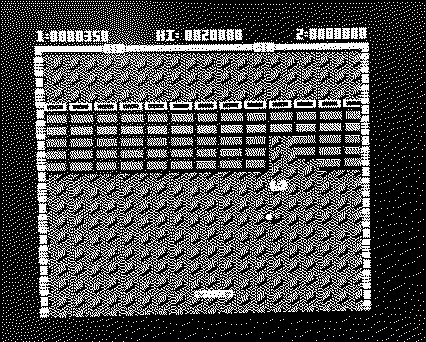
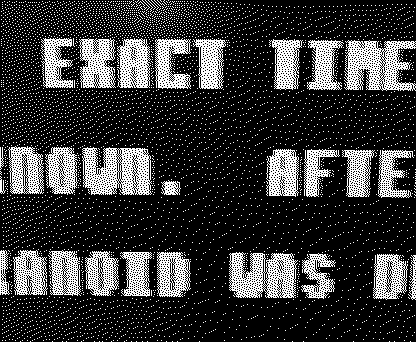
Here are photos of my screen connected via the RGB2HDMI with Arkanoid. I actually don't know what it's supposed to look like. I see interesting striped bricks in the second from the bottom row. And the border of text looks like it has artifacts - I'm not sure how those compare to other solutions. (sorry, these are not good photos, the picture looks extremely sharp in person)
Liked by JDW |
|
JDW Administrator Japan -------- Joined: Sep 2, 2021 Posts: 2,534 Likes: 1,981 |
Oct 31, 2025 - #16
@pff000
Could you shoot a photo zoomed out more so I can see if the displayed content is vertically centered, and so I can see how much of a black border surrounds the display area? |
|
pff000 Tinkerer -------- Joined: Oct 1, 2024 Posts: 30 Likes: 39 |
Oct 31, 2025 - #17
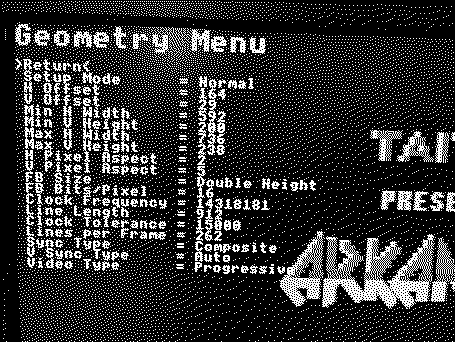
The second screen shows the RGB2HDMI overlay that allows to control many things, including geometry, but appears that only allows for integer scaling of pixels in this configuration, so it is not filling the screen. I could try using other resolutions to find a better fit if one exists.
Liked by JDW |
|
pff000 Tinkerer -------- Joined: Oct 1, 2024 Posts: 30 Likes: 39 |
Oct 31, 2025 - #18
Also one more shows the geometry settings. It does allow one to move the image but the scaling is integer. In another place I can set the resolution of the hdmi video.
Liked by JDW |
|
joevt Tinkerer -------- Joined: Mar 5, 2023 Posts: 218 Likes: 85 |
Oct 31, 2025 - #19
See https://tinkerdifferent.com/threads...dgr-and-dhgr-image-files-in-the-apple-ii.3534 |
| Page 1 of 1 |
| Home | Forums | What's New | Search | Bookmarks | RSS | Original | Settings |
| XenForo Retro Proxy by TinkerDifferent.com |
![[Image: ShiftedUpTooHigh.jpg]](/proxy_image?url=https://tinkerdifferent.com/data/attachments/23/23846-1eb7c5b72af017f25db812df19722063.jpg)
![[Image: PlamensAdapter_and_GBS8200.jpg]](/proxy_image?url=https://tinkerdifferent.com/data/attachments/23/23845-f1cfe96b00cbde81f989ece55588097c.jpg)
![[Image: DesktopGritty.jpg]](/proxy_image?url=https://tinkerdifferent.com/data/attachments/23/23847-df18c6b413adc609bde9a8a60492b9ae.jpg)
![[Image: RatsNestOfWires.jpg]](/proxy_image?url=https://tinkerdifferent.com/data/attachments/23/23843-a338d27483ad897c50885e2487488850.jpg)
![[Image: tempImage9xlibz.png]](/proxy_image?url=https://tinkerdifferent.com/data/attachments/23/23842-3b7dd9b2057e225f8e5e3ebaed2ab972.jpg)
![[Image: tempImageZy5JtB.png]](/proxy_image?url=https://tinkerdifferent.com/data/attachments/23/23841-54e1546c0a23605e6b528d7b3b24806a.jpg)
![[Image: tempImageVKSn3L.png]](/proxy_image?url=https://tinkerdifferent.com/data/attachments/23/23840-82a7e81ff860696a5abfbc7a77defe34.jpg)
![[Image: tempImageVdJ6wV.png]](/proxy_image?url=https://tinkerdifferent.com/data/attachments/23/23839-5bc0a1d02db62a2aa33174a7356d2810.jpg)
![[Image: A2DVI_Centered_Eyoyo4x3setting.jpg]](/proxy_image?url=https://tinkerdifferent.com/data/attachments/23/23849-09991496a4c935be5350822d0545bee1.jpg)
![[Image: A2DVI_NicelyCentered.jpg]](/proxy_image?url=https://tinkerdifferent.com/data/attachments/23/23848-16170bce96572feec59d4d5161c22da7.jpg)
![[Image: A2DVI_Centered_Eyoyo16x9setting.jpg]](/proxy_image?url=https://tinkerdifferent.com/data/attachments/23/23850-0cc3c5a53cc95f61242514797db0ba34.jpg)
![[Image: A2DVI_Centered_Eyoyo16x9setting2.jpg]](/proxy_image?url=https://tinkerdifferent.com/data/attachments/23/23851-e91577b70562a07eb4f5309a6e02c4ef.jpg)
![[Image: A2DVI_Centered_Eyoyo4x3-GRN.jpg]](/proxy_image?url=https://tinkerdifferent.com/data/attachments/23/23844-8c1aa61c8d541434d613364b64e49064.jpg)


![[Image: github.com]](/proxy_image?url=https://github.githubassets.com/favicons/favicon.svg)