|
* TinkerDifferent *
Retro Computing Community |
| Home | Forums | What's New | Search | Settings |
| Universal System 7.1.2 68k Update Disk Set |
|
Paralel Tinkerer -------- Joined: Dec 14, 2022 Posts: 115 Likes: 48 |
Dec 26, 2022 - #1
I have uploaded a universal System 7.1.2 68k update disk set:
Download #18 It consists of 5 floppy disks imaged using Disk Copy 4.2. It will update any System 7.1 or System 7.1.1 installation to 7.1.2 68k with Finder 7.1.4 and associated software. For anyone that has a start up problem after updating their Mac with the disk images, you need to run the first time with extensions off and delete the extension that looks like a strange TV in the Extensions folder inside of the System Folder. It causes some systems to crash for some reason. After that, you will have no trouble. This system installation still needs to have System Update 3.0 installed. You will likely get quite a few prompts that certain files are newer than the ones attempting to be installed while running System Update 3.0. This is because some files in System 7.1.2 are indeed a higher revision than the ones that System Update 3.0 attempts to install. You just need to tell it to retain the newer files, and you are all set. It doesn't work for straight System installations to a blank disk, although it will happily update any 7.1 or 7.1.1 pre-existing installation. I have no idea why. It has something to do with it defaulting to a minimal System installation regardless of the system installation type selected, and then the Mac it is installed on won't boot since it complains of the System being a minimal installation. Maybe the installation script was written incorrectly? IDK. As such, they are only good for a system update, not a system installation. |
|
lilliputian Tinkerer Los Angeles, California, USA -------- Joined: Mar 6, 2022 Posts: 251 Likes: 109 |
Dec 27, 2022 - #2
The link doesn't work. Would you mind linking to the page rather than the download?
|
|
Paralel Tinkerer -------- Joined: Dec 14, 2022 Posts: 115 Likes: 48 |
Dec 28, 2022 - #3
Didn't know they forbid hotlinking. I updated the first post. It is download #18. Liked by bakkusandlilliputian |
|
JDW Administrator Japan -------- Joined: Sep 2, 2021 Posts: 2,534 Likes: 1,981 |
Oct 22, 2024 - #4
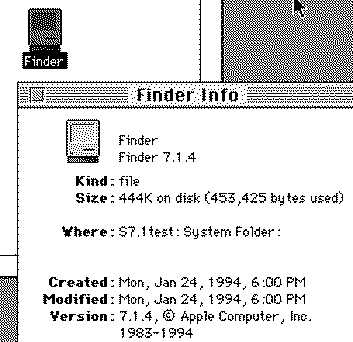
But to start off at the very beginning... I did a clean install of System 7.1 using "for any Macintosh", followed by the System Update 3.0, all downloadable here: After that, I downloaded DL#18 as mentioned in the opening post from here: And when installing, you must make absolutely sure you click the Customize button, then scroll to the bottom and choose "Updates System Software..." as shown below: Then click the "Install" button, not "Easy Install." And then when you try to boot, just as the opening post directs, hold Shift down to avoid a crash. Delete Video Startup, then all should be well. Note, however, that it doesn't give you any indication you're running System 7 Pro. All you see is this: and this... But when checking the Finder version, you will see this...
|
|
phipli Tinkerer -------- Joined: Sep 23, 2021 Posts: 309 Likes: 215 |
Oct 22, 2024 - #5
System 7 Pro is specifically System 7.1.1. The System 7.1.2 update can be applied to System 7 Pro, but can also be applied to System 7.1.0 and so 7.1.2 isn't itself specifically "Pro". Because you started from 7.1.0 JDW, you are running regular System 7.1.2 with no Pro-ness. I suspect it also wouldn't say Pro even if you updated 7.1.1, but you'd have all the extra stuff that Pro installs in that case. Interesting side fact - System 7.5.0 shipped with Finder 7.1.4 too! Liked by JDW |
| Page 1 of 1 |
| Home | Forums | What's New | Search | Bookmarks | RSS | Original | Settings |
| XenForo Retro Proxy by TinkerDifferent.com |