|
* TinkerDifferent *
Retro Computing Community |
| Home | Forums | What's New | Search | Settings |
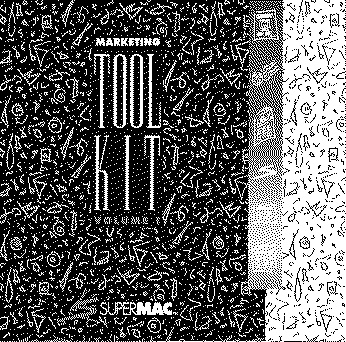
| SuperMac Marketing Tool Kit Vol. 1 |
Forums > Vintage Apple > Software & Operating Systems
|
Fizzbinn Active Tinkerer Charlottesville, VA -------- Joined: Nov 29, 2021 Posts: 256 Likes: 262 |
Aug 8, 2025 - #1
Just posted to Macintosh Garden:
Looks like some neat stuff although you need period (1991) compatible versions of Pagemaker, Persuasion, etc. to open some of the contents.
Liked by JDWandPL212 |
|
JDW Administrator Japan -------- Joined: Sep 2, 2021 Posts: 2,534 Likes: 1,981 |
Aug 8, 2025 - #2
The Apple artwork is kind of neat. When opening the IIci EPS file in a modern version of Illustrator, for example, it displays like this (grayscale)...
[Image: 1754637557239.png] Zooming in all the way on the Apple logo on that IIci shows how crude their shadowing was back then... [Image: 1754637613211.png] But when zoomed out, it looks nice. There's another with a big monitor and laserwriter... [Image: 1754637705233.png] And for Jurassic Park lovers... [Image: 1754637736530.png] Product Scans in 24-bit Color are pretty low-rez. Too bad because these are some interesting images, a few of which I've provided below... 19" SuperMatch Display [Image: 1754638011002.png] 19" Trinitron Display [Image: 1754638057872.png] 21" SuperMatch Display [Image: 1754638088526.png] Display Calibrator [Image: 1754638118358.png] Platinum 2-Page Display [Image: 1754638147486.png] Thunder/24 Card [Image: 1754638192380.png] Spectrum/24 Series III [Image: 1754638232304.png] Line Art is pretty fantastic. The stroke width was a bit too thick, but thankfully it was the same thickness across the entire image, allowing me to reduce it from 0.5 to 0.2 and get this lovely result... [Image: 1754638542646.png] [Image: 1754638597453.png] The color ones are stunning... [Image: 1754638915922.png] [Image: 1754638877240.png] [Image: 1754638965847.png] Thanks to all the EPS files, you can generated some of the best SuperMac logos around... [Image: 1754638698643.png] I didn't install Quark Press 3.0 or PagerMaker or Persuasion 2.0, so I didn't open any of the presentations or technical documents. But it's clear this CD is a treasure chest of info for the SuperMac enthusiast! Thank you, @Fizzbinn ! Liked by slomacuserandFizzbinn |
|
PL212 Tinkerer -------- Joined: Dec 25, 2022 Posts: 45 Likes: 30 |
Aug 8, 2025 - #3
I'm getting slightly better resolution on those product images:
(The PICT format they use is a little wonky/vintage... some stalwarts such as ImageMagick and GraphicConverter choke on them. Modern Photoshop reads them quite well, however.)
Liked by FizzbinnandJDW |
|
JDW Administrator Japan -------- Joined: Sep 2, 2021 Posts: 2,534 Likes: 1,981 |
Aug 9, 2025 - #4
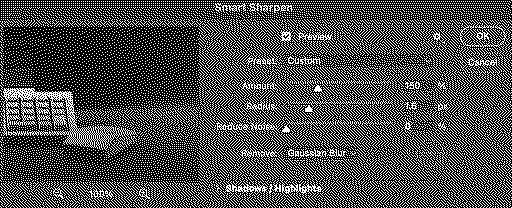
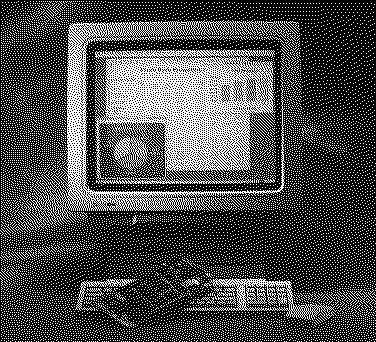
Specifically, these should be opened in modern Photoshop... Then you should add sharpening... Then with some lifting of the Shadows on the NuBus Card, with slightly increased Saturation, and with Blacks adjusted in Levels, and with a 2x upsample in Photoshop using "Preserve Details 2.0", we can get this result: [Image: 19inch-Platinum-Display.jpg] I did not use AI upsampling. That can make upscaling look sharper and better sometimes, but it always destroys small text, which is why Photoshop's "Preserve Details 2.0" is better most of the time, I think, even though it generates a comparatively softer image. Here's how an AI upscale destroys text on the CRT in that photo...
Liked by Fizzbinn |
| Page 1 of 1 |
| Home | Forums | What's New | Search | Bookmarks | RSS | Original | Settings |
| XenForo Retro Proxy by TinkerDifferent.com |
![[Image: 1754637557239.png]](/proxy_image?url=https://tinkerdifferent.com/data/attachments/22/22706-4d099a2a13177d6c476e23a232d9202b.jpg)
![[Image: 1754637613211.png]](/proxy_image?url=https://tinkerdifferent.com/data/attachments/22/22707-213bc6acd0c623358f16c13c802e3682.jpg)
![[Image: 1754637705233.png]](/proxy_image?url=https://tinkerdifferent.com/data/attachments/22/22708-f3753a7d77cfccb8ec85f1af53cc31c2.jpg)
![[Image: 1754637736530.png]](/proxy_image?url=https://tinkerdifferent.com/data/attachments/22/22709-0d7f77c51e33296c3bddf1ad43886267.jpg)
![[Image: 1754638011002.png]](/proxy_image?url=https://tinkerdifferent.com/data/attachments/22/22710-13e5979b7ade9193465f935b2a17fe2d.jpg)
![[Image: 1754638057872.png]](/proxy_image?url=https://tinkerdifferent.com/data/attachments/22/22711-8185ecfee0d206354574f4b5ab2eee3c.jpg)
![[Image: 1754638088526.png]](/proxy_image?url=https://tinkerdifferent.com/data/attachments/22/22712-ffa55cb5c8ba2dc8877fa4e0ebc12041.jpg)
![[Image: 1754638118358.png]](/proxy_image?url=https://tinkerdifferent.com/data/attachments/22/22713-09f6b7876253fe1f9c347eb8746fec1f.jpg)
![[Image: 1754638147486.png]](/proxy_image?url=https://tinkerdifferent.com/data/attachments/22/22714-eb52fb6c0dfbd31597c8917e8e4ab3e0.jpg)
![[Image: 1754638192380.png]](/proxy_image?url=https://tinkerdifferent.com/data/attachments/22/22715-efa617d4adc7161a053424e96c0e2d69.jpg)
![[Image: 1754638232304.png]](/proxy_image?url=https://tinkerdifferent.com/data/attachments/22/22716-2b5af861091b88cac9edbfede42b6ee9.jpg)
![[Image: 1754638542646.png]](/proxy_image?url=https://tinkerdifferent.com/data/attachments/22/22717-c332ddc1019816385f9014261a73966e.jpg)
![[Image: 1754638597453.png]](/proxy_image?url=https://tinkerdifferent.com/data/attachments/22/22718-1278fe55840b6cedf710ccd49a367967.jpg)
![[Image: 1754638915922.png]](/proxy_image?url=https://tinkerdifferent.com/data/attachments/22/22721-378618ea7f8cdf3b4b2625ed5ebe86eb.jpg)
![[Image: 1754638877240.png]](/proxy_image?url=https://tinkerdifferent.com/data/attachments/22/22720-664ec572a5e40c01e25918c22cccd4ab.jpg)
![[Image: 1754638965847.png]](/proxy_image?url=https://tinkerdifferent.com/data/attachments/22/22722-726f52d9aa43f7f467a47abe38ce8203.jpg)
![[Image: 1754638698643.png]](/proxy_image?url=https://tinkerdifferent.com/data/attachments/22/22719-d8dcf87dd2185d1664cecff00e83e2f0.jpg)


![[Image: 19inch-Platinum-Display.jpg]](/proxy_image?url=https://tinkerdifferent.com/data/attachments/22/22733-f67b2bbf01918a866e322626263d872d.jpg)