|
* TinkerDifferent *
Retro Computing Community |
| Home | Forums | What's New | Search | Settings |
| Software-only OVERCLOCK for LC475, LC575, Quadra 605 |
Forums > Vintage Apple > Macintosh > Macintosh LC & Performa
|
JDW Administrator Japan -------- Joined: Sep 2, 2021 Posts: 2,534 Likes: 1,981 |
Aug 28, 2024 - #1
Folks,
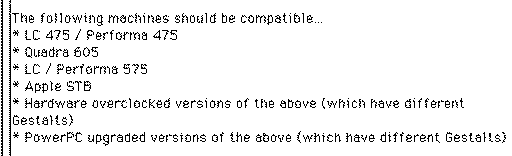
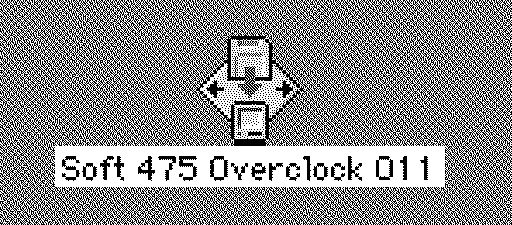
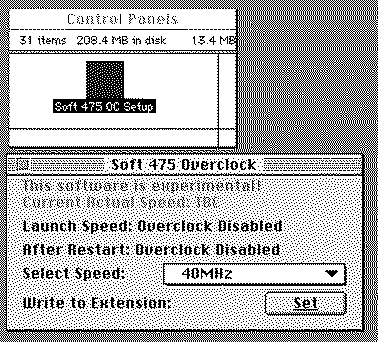
@Mr. Fahrenheit very kindly alerted me to a very surprising discussion at the other forum which introduces a groundbreaking discovery by Mustermann. Apparently, you can now overclock an LC 475, CC Mystic and other machines by software alone, without even using Spicy O'Clock, from @Kay K.M.Mods (Kero's Mac Mods). Here's a screenshot of the machine compatibility from the installer app: When you download the software overclocker BIN file (created by Phipli) and then put it on your vintage Mac and use Stuffit Expander to decompress it, the installer app will look like this: It installs a Control Panel and an Extension: No mention is made of software compatibility, but most likely it works on System 7.1 through 7.5.5. (I made these screenshots in Basilisk II booted into System 7.5.5.) Once installed, you can set the clock speed in the Control Panel (which then requires a restart): There's even a "Custom" selection in the popup menu that allows you to see higher clock frequencies: If you try a clock speed too high for your Mac and it freezes, just reboot with SHIFT held down to prevent the CP and Ext. from loading. This and more is described in the installer app's README text. So be sure to read that completely before installing it. It's not clear if VRAM speed is as important as it is when you overclock with Spicy, but I suspect it is. Having a 68040 with full FPU will also impact your performance and probably overclockability too. Heatsinking at high clock speeds is still important. Another thing that is not clear is how serial ports and SCSI are impacted. In my own testing of Spicy, serial ports stop working when the CPU is overclocked higher than 43.48MHz. (I confirmed serial ports don't work at 43.7MHz when using Spicy.) DISCLAIMER: I've not tested this software overclocker on my Color Classic Mystic yet (which still has Spicy O'Clock installed). @Mr. Fahrenheit has tested it though and confirmed it overclocked his CC Mystic to 40MHz. It's not clear if he tested clock speeds higher than that. The great thing about this solution is that (1) there's nothing to buy to try it, and (2) you just reboot with SHIFT held down if you overclock too high. Have fun! P.S. If you find it useful, I recommend sending a word of thanks to Mustermann and Phipli at the other forum, as well as thank Mr. Fahrenheit for his testing and involvement.
Liked by HardwareHacker,_nec6678,jdmcsand 5 others |
|
Garrett Tinkerer South Carolina -------- Joined: Oct 31, 2021 Posts: 144 Likes: 139 |
Aug 28, 2024 - #2
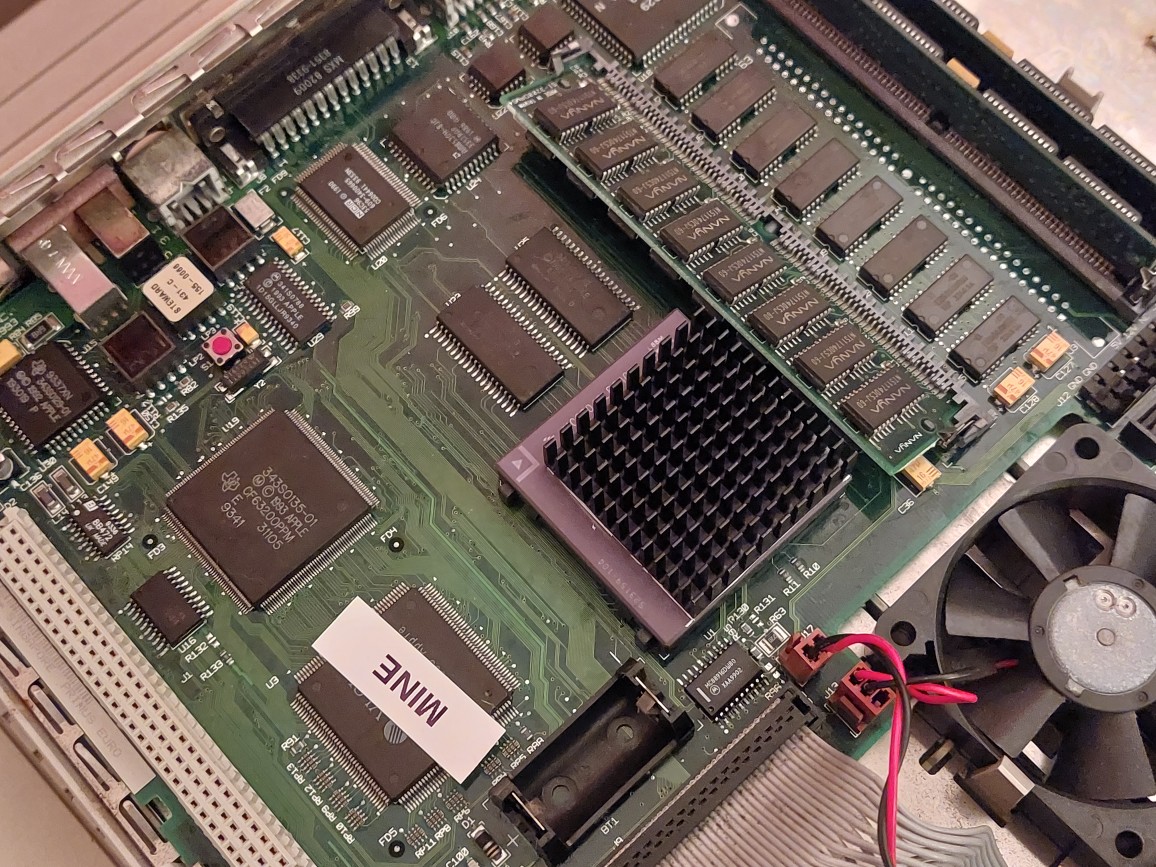
As someone who has done the "hardware" overclock on my 475, I also moved a resistor to keep the SCSI controller at 25MHz (R96 to R95 - see photo). Is there any indication whether or not a software overclock would affect SCSI? I have seen file transfers cause lock ups, reportedly caused by SCSI controller instability at higher frequencies.
|
|
JDW Administrator Japan -------- Joined: Sep 2, 2021 Posts: 2,534 Likes: 1,981 |
Aug 28, 2024 - #3
@Garrett
Because I have not yet done the software overclock, and because I don't own a 475, I'm not equipped to answer your question. However, I keyword-searched all pages in the other forum's thread for "SCSI" and I found the following post from @Bolle : Overclock LC475/P475/Q605 without soldering or spicy-o-clockVery interesting, can anyone confirm the "343S0161" vs "343S1135" thing?
[Image: 68kmla.org]
68kmla.org
|
|
Garth Beagle Tinkerer -------- Joined: Oct 28, 2021 Posts: 31 Likes: 32 |
Aug 30, 2024 - #4
I did some testing with this a little while back and didn't run into any issues using a BlueSCSI v2 off the internal SCSI bus.
I was able to overclock a Quadra 605 with its stock 25MHz CPU and a LC 475 which had already been HW overclocked to 33MHz. Both ran ok at 40MHz, the highest it'd set to was 43MHz. Anything higher and it just didn't seem to take the change. Here's some CPU benchmarks at various speeds on the Quadra 605.
Liked by JDWanderic |
|
ClassicHasClass Tinkerer -------- Joined: Aug 30, 2022 Posts: 386 Likes: 215 |
Aug 30, 2024 - #5
The real question is whether this has an impact on service lifetime and/or burns those systems out sooner.
Liked by XKSTEVE |
|
phipli Tinkerer -------- Joined: Sep 23, 2021 Posts: 309 Likes: 215 |
Aug 31, 2024 - #6
My 475 has the upgraded 80MHz clock divider part (88916DW80??), the SCSI clock mod and a 40MHz grade CPU with a heat sink. I've got a reliable 50MHz at the moment, RAM is likely my limit as the soldered RAM is 80ns. Even at 40MHz with 40MHz timings I should have 70ns RAM, so it is a significant overclock on the soldered RAM. I'm not going to be pushing faster any time soon becaues when I have time I want to get back to improving the software and implement Mustermann's latest tweaks. I've managed to run a CPU benchmark at 55MHz, but it crashed while doing the video benchmark (I only have 70ns VRAM). At 60MHz it crashed instantly.
Liked by trag,ClassicHasClassandJDW |
|
JDW Administrator Japan -------- Joined: Sep 2, 2021 Posts: 2,534 Likes: 1,981 |
Aug 31, 2024 - #7
@phipli
Incredibly informative and helpful post, thank you! And kudos to you on the amazing work you've done in bringing Mustermann's overclocking work to the masses. [clap] |
|
Garth Beagle Tinkerer -------- Joined: Oct 28, 2021 Posts: 31 Likes: 32 |
Sep 1, 2024 - #8
I used your build you'd attached in the comments to your video. |
|
phipli Tinkerer -------- Joined: Sep 23, 2021 Posts: 309 Likes: 215 |
Oct 4, 2024 - #9
Made an updated version. Mustermann found my bug that was stopping arbitrary speeds working on all machines (not sure arbitrary speeds were working on any to be honest...).
Overclocking the LC 475 in SoftwareOverclocking the LC 475 in Software If you want to dive right in, it is recommended that you download and install the Control Strip Module version as this has the most up to date version of the sof...
[Image: stuffandnonsense.elephantandchicken.co.uk]
stuffandnonsense.elephantandchicken.co.uk
This version now fully works and you can type in absolutely any speed you like, for example, if you really want to run your LC 475, 575 or similar computer at 27.85MHz, you can (although things like Clockometer aren't that accurate anyway). Note I haven't put an upper or lower bound on speeds you can pick, so it is up to you to find the upper and lower limits of your machine. If you have problems, remember, power off with the switch, power back on holding shift to disable extensions, then launch the Control Panel and select a safe speed before restarting. Nothing is permanently changed on the computer, it is all software. WARNING! Do not run this software if you have replaced the stock speed resistors with blobs of solder. Although you really shouldn't have done that in the first place, and I'm not sure that anyone would have. Just thought I might say this in case someone had. Actually, I really should say not just "don't use this software", but "go and put resistors back", if you haven't got any, I'll send you some. You shouldn't have shorts instead of resistors xD
Liked by Volvo242GT,JDWanderic |
|
trag Tinkerer -------- Joined: Oct 25, 2021 Posts: 303 Likes: 151 |
Oct 5, 2024 - #10
What affect will this software have on a machine which has had the 33 MHz resistor move modification? Do the resistors need to go back to their original positions?
Edit: Never mind. Found the answer here: https://68kmla.org/bb/index.php?thr...-soldering-or-spicy-o-clock.47946/post-538497 It looks like the resistor move just affects the start up speed, unless I didn't read far enough adn there was later correction. Liked by Kai RobinsonandJDW |
|
phipli Tinkerer -------- Joined: Sep 23, 2021 Posts: 309 Likes: 215 |
Oct 5, 2024 - #11
The schematic values match the Apple Fool clock chipping website, so if you followed either you're good. I actually fitted a 320 to mine because I misplaced the original 300R - I'm not too bothered about 20 ohm higher (its a right side error), although I since found some 300R parts in my parts bin. I actually reverted my 475 to the stock 25MHz during the project because I wanted to work from stock in that sense. Interestingly the 575 (which is the same chipset on a different board layout) came stock as 33MHz.
Liked by trag |
|
JDW Administrator Japan -------- Joined: Sep 2, 2021 Posts: 2,534 Likes: 1,981 |
Oct 5, 2024 - #12
@phipli
I believe your app not only works on the LC575 motherboard too, but it will work even if the CPU has been overclocked with Kay Koba's Spicy O'Clock too, correct? |
|
phipli Tinkerer -------- Joined: Sep 23, 2021 Posts: 309 Likes: 215 |
Oct 5, 2024 - #13
The clock generator goes way higher than the computer could ever achieve though, so there wouldn't be a benefit in using the Spicy O'Clock. Especially once I add on the fly speed changes and separate speeds for PPC and 040. Likely the latter before the former. Liked by tragandJDW |
|
phipli Tinkerer -------- Joined: Sep 23, 2021 Posts: 309 Likes: 215 |
Oct 6, 2024 - #14
Tum te tum...
Today's progress : Its less far on than it looks. I was just testing after building the XCMD I'm using to set the clock speed. Absolutely flabbergasted that it worked first time. I literally only compiled it (successfully) once. The app itself isn't function complete yet. The current speed thing at the top is just showing the raw ms timings for my sudo-benchmark and I haven't written the stuff to read and write from the extension yet. Liked by Garth Beagle,tragandJDW |
|
Garth Beagle Tinkerer -------- Joined: Oct 28, 2021 Posts: 31 Likes: 32 |
Oct 6, 2024 - #15
This is great!
Looking forward to a newer release so I can give it a go on my stack of LC/Performa 475 and Quadra 605 Macs :D Liked by JDWandphipli |
|
phipli Tinkerer -------- Joined: Sep 23, 2021 Posts: 309 Likes: 215 |
Oct 6, 2024 - #16
I don't have a PPC upgrade for my LC 475 - does anyone here have one? Anyone with a little bit of time to test the PPC functionality before I share the updated version? I can write a short list of stuff to test so you don't have to spend long at it. I'm talking about these things (Specifically the 66MHz version) : (picture from https://wiki.preterhuman.net/DayStar_PowerCard_601)
Liked by Garth BeagleandJDW |
|
phunguss Active Tinkerer Stillwater, MN -------- Joined: Dec 24, 2023 Posts: 511 Likes: 439 |
Oct 7, 2024 - #17
|
|
JDW Administrator Japan -------- Joined: Sep 2, 2021 Posts: 2,534 Likes: 1,981 |
Oct 7, 2024 - #18
With Spicy O'Clock (which doesn't overclock everything your app does), serial ports stop working when the CPU is overclocked higher than 43.7MHz. |
|
Kai Robinson TinkerDifferent Board President 2023 Worthing, UK -------- Joined: Sep 2, 2021 Posts: 1,322 Likes: 1,313 |
Oct 7, 2024 - #19
Liked by JDW |
|
phipli Tinkerer -------- Joined: Sep 23, 2021 Posts: 309 Likes: 215 |
Oct 7, 2024 - #20
Is it a 66 or a 100? Liked by JDW |
| Page 1 of 5 | Next > | Last >> |
| Home | Forums | What's New | Search | Bookmarks | RSS | Original | Settings |
| XenForo Retro Proxy by TinkerDifferent.com |



![[Image: 68kmla.org]](/proxy_image?url=https://68kmla.org/bb/data/assets/logo/68kmla-512.png)


![[Image: stuffandnonsense.elephantandchicken.co.uk]](/proxy_image?url=https://elephantandchicken.co.uk/stuffandnonsense/wp-content/uploads/2024/10/LC475Board.jpg)
![[Image: stuffandnonsense.elephantandchicken.co.uk]](/proxy_image?url=https://elephantandchicken.co.uk/stuffandnonsense/wp-content/uploads/2024/12/cropped-ElephantChicken512-1-32x32.bmp)