|
* TinkerDifferent *
Retro Computing Community |
| Home | Forums | What's New | Search | Settings |
| Snooper serial loopback plug |
Forums > Vintage Apple > Macintosh > Compact Macs
|
jajan547 Active Tinkerer Houston, Texas, USA -------- Joined: Mar 25, 2022 Posts: 738 Likes: 297 |
Aug 17, 2022 - #21
|
|
JDW Administrator Japan -------- Joined: Sep 2, 2021 Posts: 2,534 Likes: 1,981 |
Aug 17, 2022 - #22
Liked by jajan547 |
|
jajan547 Active Tinkerer Houston, Texas, USA -------- Joined: Mar 25, 2022 Posts: 738 Likes: 297 |
Aug 17, 2022 - #23
|
|
JDW Administrator Japan -------- Joined: Sep 2, 2021 Posts: 2,534 Likes: 1,981 |
Aug 17, 2022 - #24
|
|
retr01 Senior Tinkerer Utah, USA -------- Joined: Jun 6, 2022 Posts: 2,474 Likes: 810 |
Aug 17, 2022 - #25
LOL, @jajan547 asked me to look for it. I did not see any. It is better to make one. A biology professor at the University of Utah provided instructions about Mac's serial port and pinouts.
|
|
retr01 Senior Tinkerer Utah, USA -------- Joined: Jun 6, 2022 Posts: 2,474 Likes: 810 |
Aug 17, 2022 - #26
They talked about it over at 68kmla, too.
Best way to test serial ports on an SE/30After several rounds of troubleshooting I have my external floppy and SCSI ports fully functional again. Now it's time to focus on the serial ports. What are the preferred ways of thoroughly testing these on an SE/30? Is it possible to cable them together and test them in a loopback...
[Image: 68kmla.org]
68kmla.org
|
|
retr01 Senior Tinkerer Utah, USA -------- Joined: Jun 6, 2022 Posts: 2,474 Likes: 810 |
Aug 17, 2022 - #27
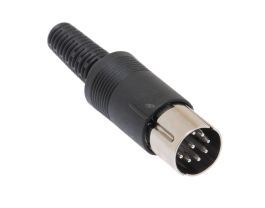
Is this a good start to making one? How did @Branchus have that plug? Was it from a male connector end like @JDW made and then somehow tucked inside and made look clean? Or 3D printed housing?
8 Pin DIN Male Solder Connector - Plastic - 262* Style8 Pins | Solder Cups | Plastic | Molded Strain Relief | 22 AWG Wire | 7mm Cable
[Image: www.showmecables.com]
www.showmecables.com
|
|
jajan547 Active Tinkerer Houston, Texas, USA -------- Joined: Mar 25, 2022 Posts: 738 Likes: 297 |
Aug 17, 2022 - #28
I just made one electrical tape for the win no heat shrink :(
|
|
retr01 Senior Tinkerer Utah, USA -------- Joined: Jun 6, 2022 Posts: 2,474 Likes: 810 |
Aug 17, 2022 - #29
Did it work? |
|
jajan547 Active Tinkerer Houston, Texas, USA -------- Joined: Mar 25, 2022 Posts: 738 Likes: 297 |
Aug 17, 2022 - #30
About to test
|
|
AlexCL Tinkerer -------- Joined: Nov 1, 2021 Posts: 43 Likes: 43 |
Sep 30, 2022 - #31
Liked by Kai Robinson,Elemenohandretr01 |
|
retr01 Senior Tinkerer Utah, USA -------- Joined: Jun 6, 2022 Posts: 2,474 Likes: 810 |
Sep 30, 2022 - #32
Liked by Kai Robinson,Elemenohandjajan547 |
|
retr01 Senior Tinkerer Utah, USA -------- Joined: Jun 6, 2022 Posts: 2,474 Likes: 810 |
Sep 30, 2022 - #33
And...? did you get it to work? |
|
JDW Administrator Japan -------- Joined: Sep 2, 2021 Posts: 2,534 Likes: 1,981 |
Sep 30, 2022 - #34
Liked by retr01 |
|
retr01 Senior Tinkerer Utah, USA -------- Joined: Jun 6, 2022 Posts: 2,474 Likes: 810 |
Sep 30, 2022 - #35
@AlexCL posted it. I restored it because I love to restore old print information and other media. :giggle: I am glad I inspired you! :D[clap]
|
|
JDW Administrator Japan -------- Joined: Sep 2, 2021 Posts: 2,534 Likes: 1,981 |
Sep 30, 2022 - #36
|
|
Elemenoh Active Tinkerer Bay Area -------- Joined: Oct 18, 2021 Posts: 428 Likes: 415 |
Dec 19, 2022 - #37
I'm in the process of troubleshooting a LaserWriter 12/640. The service manual refers to a EPOST (Extended Power-On Self Test) mode. This mode is initiated with a "printer rollback test plug" (P/N 922-1489). I went ahead and tried the loopback plug I built for Snooper and can confirm it works fine to put the printer into EPOST mode.
Now I just need to figure out how to repair the laser/scanner assembly. [upside-down-face] Liked by JDWandKai Robinson |
|
lilliputian Tinkerer Los Angeles, California, USA -------- Joined: Mar 6, 2022 Posts: 251 Likes: 109 |
Dec 23, 2022 - #38
|
|
JDW Administrator Japan -------- Joined: Sep 2, 2021 Posts: 2,534 Likes: 1,981 |
Dec 24, 2022 - #39
Next, I booted into System 7.1 and launched CanOpener 4 and selected the Snooper 2 app. In total, it extracted only the main splash screen picture and 4 icons. I did not find any of the motherboard images contained in the PICT resource. So for now, I am dead in the water on this one. I would encourage someone out there following this to give it a try with Snooper 2.0 yourself, maybe on a Mac other than an SE/30 to see if you can extract the motherboard images from the PICT resource of the Snooper app. |
|
Crutch Tinkerer Chicago -------- Joined: Jul 10, 2022 Posts: 293 Likes: 228 |
Dec 24, 2022 - #40
I like a weird mystery so decided to take a look.
You can prevent ResEdit from trying to display thumbnails of the list of PICT resources (and therefore maybe crashing if there's junk in there) by opening the "PICT" resource type icon while holding down the Shift key, or by typing Shift-Return. This gives the list at left, you can see "plus", "classic", etc. which I presume ought to be the PICTs for each bare logic board. You can then open a PICT resource to look at the raw data by choosing "Open Template..." and leaving the default template type of "PICT" in place then hitting Return. That gives me, for example, the data on the right. I can see immediately that this is not a normal PICT: the Rect is invalid (those coordinates are top, left, bottom, right, in that order ... you can see the image is weirdly tall with bottom - top almost 8000 pixels, and the right is less than the left, which shouldn't be possible). You can do something similar in Resourcerer by clicking the PICT type name from the list, then pressing Cmd-1 to turn off "Show PICT Data" and then opening the resource by clicking "Data" instead of "Open". This gives the error shown in the second snip below, confirming that these are not properly parsable sets of PICT opcodes. My guess is these are actually bitmaps, or maybe portions of a valid PICT that Snooper stitches together on the fly to create those logic board images. I don't think it will be possible to directly extract the images from these without some sort of processing. I would suggest just using Cmd-Shift-3 to grab screenshots while running Snooper. [Image: 1671886031870.png] [Image: 1671886480307.png]
Liked by lilliputianandKai Robinson |
| << First | < Prev | Page 2 of 3 | Next > | Last >> |
| Home | Forums | What's New | Search | Bookmarks | RSS | Original | Settings |
| XenForo Retro Proxy by TinkerDifferent.com |
![[Image: 68kmla.org]](/proxy_image?url=https://68kmla.org/bb/data/assets/logo/68kmla-512.png)

![[Image: www.showmecables.com]](/proxy_image?url=https://www.showmecables.com/media/catalog/product/cache/0ab79c459786c18f369f1b3f54b51f25/1/7/1734_1.jpg)


![[Image: giphy.gif]](/proxy_image?url=https://media.giphy.com/media/7jKlvZ2DMlfCu8LiZU/giphy.gif)
![[Image: 1671886031870.png]](/proxy_image?url=https://tinkerdifferent.com/data/attachments/10/10245-ad99ffba03fa96f078645009214a0a83.jpg)
![[Image: 1671886480307.png]](/proxy_image?url=https://tinkerdifferent.com/data/attachments/10/10246-ff82544d3b905aaf65f4dff2beb64d61.jpg)

