|
* TinkerDifferent *
Retro Computing Community |
| Home | Forums | What's New | Search | Settings |
| PowerBook 1xx USB-C PD Adapter |
|
PotatoFi Active Tinkerer -------- Joined: Oct 18, 2021 Posts: 181 Likes: 372 |
Sep 15, 2024 - #1
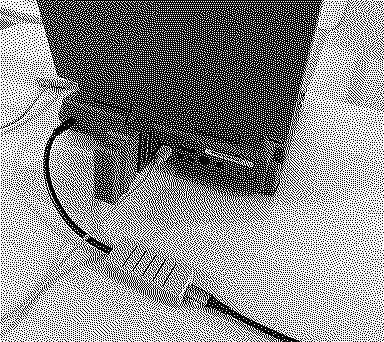
I finally smuggled a PowerBook 145B and 160 to Finland where I've lived for a year, which means I'm finally able to play with old Macs again! I opted to not bring the power adapter with me, since they're pretty heavy and would require a plug adapter to work. Instead, I hacked together a USB-C PD to PowerBook adapter!
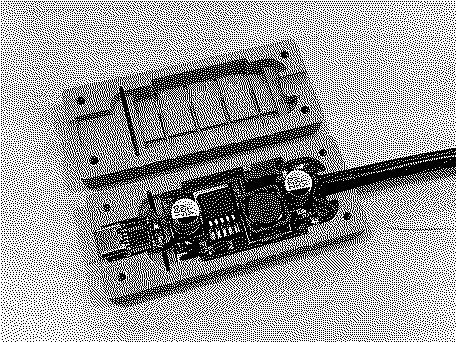
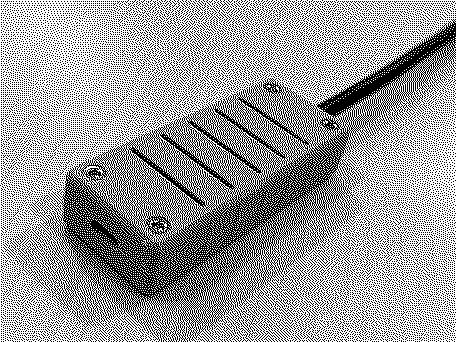
The implementation is super simple: It's just a 15V USB-C Power Delivery trigger board, a variable step-down converter, and a pigtail in a 3D-printed case. Here's the complete bill of materials:
I also tested nearly all of my USB-C PD power adapters (and battery):
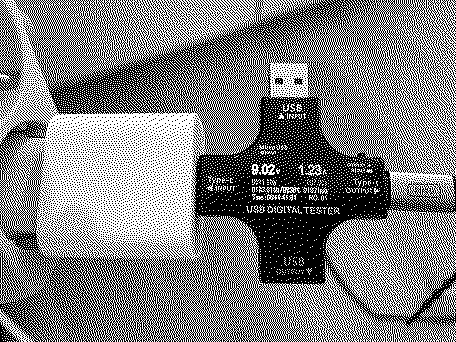
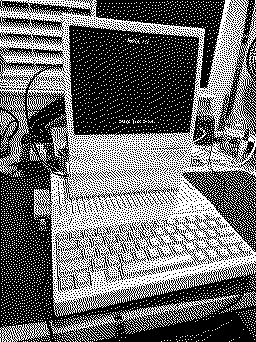
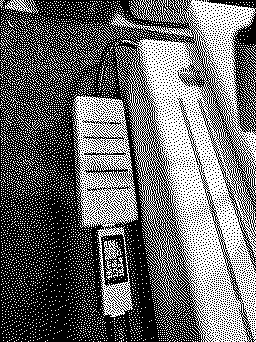
Here it is with my Apple 20W adapter that came with a 10th-gen iPad. This adapter outputs a max of 9V, so when the trigger board asks for 15V, the adapter simply outputs the highest voltage that if offers. Although I tuned the step-down board for 15V input, the output is still 7.55V. My PowerBook 160 has been powered with this adapter for most of the weekend. With the adapter on it's side (so both sides of vents are exposed) I saw a max temperature of 38*C / 100*F on the exterior of the case. With the 9V adapter I see about 1.3A, and with a 15V adapter I see about 0.8A. Note that I don't have a battery in this machine, so I'm not sure what kind of load charging a battery would add. To assemble it:
Of course, the printed case, BOM, and instructions are all available on Printables. There's also the Fusion 360 file, so if your pigtail wire is a different diameter than mine (6 mm), there's a single variable you can adjust. I've also included a PrusaSlicer file with the paint-on supports all done, so you can quickly slice and print it. Special thanks to @MacintoshLibrarian, who I think suggested the step-down board when I floated this idea about 1.5 years ago. As always, carefully check your voltages before connecting this to your PowerBook!
Liked by Elemenoh,luminescentsimian,Certificate of Excellenceand 6 others |
|
Ron's Computer Videos Active Tinkerer -------- Joined: Oct 15, 2021 Posts: 199 Likes: 278 |
Sep 15, 2024 - #2
Liked by Trash80toG4,Opualuan,mmu_manand 3 others |
|
wottle Active Tinkerer Fort Mill, SC -------- Joined: Oct 30, 2021 Posts: 841 Likes: 577 |
Sep 16, 2024 - #3
This is awesome. I've been exploring options for my vintage laptops and basically came to a similar solution to yours. I originally built a variable output device thinking one device for everything, but now I like the idea of USB-C with step-down / step up converters dedicated for each of the 3 main voltages for vintage Macs.
There's 7.5v for the Portable / 1xx series (although the pickiness of the Portable probably warrants just keeping a dedicated 7.5v 1.5A charger). 16v for the 5xx series (I'm hoping maybe the straight 15v from the usb-C PD trigger board will suffice). And finally, 24v with various adapters for the PB5300/190/1400/3400/Duo/G3, iBook G3/G4 range. I tested an iBook G4 with 20v straight from the USB-PD trigger and it SEEMED to work fine, but other convinced me it would be best to get a solution with 24v. This would in theory allow me to have a big USB-C battery, 3 cables (7.5,15v,24v) and a handful of adapters. I might even look into forcing a different connector for the different adapters to prevent me being silly and plugging a 5xx adapter into my 24v cable. Anyway, I appreciate your efforts here and your 3d modelling skills are much better than mine. I love the size of your enclosure and the fact it's passively cooled. Liked by PotatoFi |
|
wottle Active Tinkerer Fort Mill, SC -------- Joined: Oct 30, 2021 Posts: 841 Likes: 577 |
Sep 20, 2024 - #4
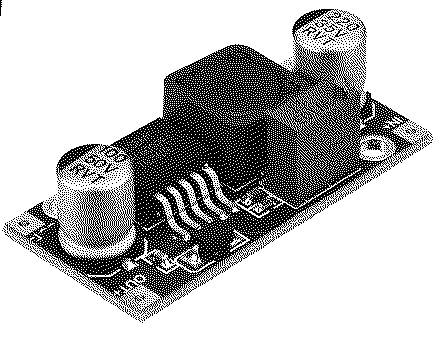
OK, I put together my own versions of these. One using the buck converter you specified, and two using this boost converter to get 16v and 24v versions: https://www.amazon.com/dp/B07BNHR4HW?ref=ppx_yo2ov_dt_b_fed_asin_title&th=1
I chose it because it matched the dimensions of the buck converter you used in your design. Mine came with a bit of extra PCB still attached to the end of each board that I had to snap off... But once I did, they fit the same. In fact, it almost looks the same as the original buck converter, but flipped around. I probably could have managed to use the straight 15v output of the USB-C boards you used, but since I ordered a 10 pack of the boost converters, I figured I may as well try to get as close to the appropriate voltage for each type of connector. My plan is to get a broken PB5xx charger to harvest the connector from and directly wire it in. In addition, I printed some labels but thought it would be nice to have the voltage printed on the case, so I messed around in Meshmixer and created both tops and bottoms with the voltage specification embossed in the surface. I'm printing now to see how they turn out. I'll post the STLs later if anyone is interested.
Liked by FizzbinnandCertificate of Excellence |
|
PotatoFi Active Tinkerer -------- Joined: Oct 18, 2021 Posts: 181 Likes: 372 |
Sep 21, 2024 - #5
Nice work, @wottle! I considered putting the output voltage on mine, too. Heads up, PrusaSlicer has built-in text embossing too, so that could be a quick way to add voltage labels.
I've considered adding variables for the width, height, and length of the buck/boost boards, in addition to the variable for the output cable diameter. This could enable better compatibility with various buck/boost boards when people are shopping. The downside is that everyone would have to fire up Fusion 360, edit the variables, and then output the models. I sure with there was a "Fusion 360 Lite" to streamline the process. If anyone is interested in that, let me know and I can look into those adjustments. I also feel like the board fit is super tight; I think I can make a spring-loaded section of the part (like my SD to 2.5" IDE hard drive caddy) to make board installation easier. Liked by wottle |
|
wottle Active Tinkerer Fort Mill, SC -------- Joined: Oct 30, 2021 Posts: 841 Likes: 577 |
Sep 21, 2024 - #6
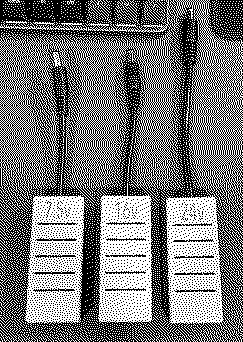
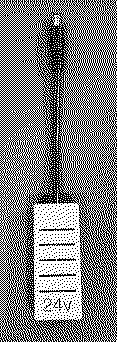
Appreciate it. I may need to look into PrusaSlicer (I use Cura just because it's what I learned on and I have my printer settings the way I like them). I used Stamping in MeshMixer to add the voltages, but I'm guessing PrusaSlicer would be a much easier, cleaner process. Here's the finished product, along with my current set of 24v adapters.
I think the current model is perfect given the boost / buck converters appear to be readily available in the sizes you have setup. One of my 5.5mm cables was a bit small so I just wrapped it in electrical tape to give a secure fit. I've not used Fusion360 - would the free version be enough to do the modifications needed to customize the model? As for the board tightness, I noticed this and wasn't sure if it was just my new 3d printer / new filament. I ended up scaling up by 100.5% and it worked well for me. A spring mechanism that provides a bit more room for differences in printers and materials would be amazing. Again, thanks for building this out! It's going to be awesome storing all my laptop power supplies and ending up with just this cluster of USB-C based ones. I already have a magzafe USB-C cable, so I can pretty much handle any of my machines (except my Portable) with just these cables. So maybe your idea of adding options for the board size would be helpful. I wonder if being able to throw a constant current buck-boost module (like this? https://electropeak.com/lm2596-2577) would allow for building one that would allow me to set the 7.5v/1.5A limiter that would allow it to be safely used with my Portable as well? Update: I went a bit overboard with the text debossing in PrusaSlicer and added the machines that the charger can be used with on the underside:
|
|
wottle Active Tinkerer Fort Mill, SC -------- Joined: Oct 30, 2021 Posts: 841 Likes: 577 |
Sep 30, 2024 - #7
Minor update. I haven't used the adapters too extensively yet, but I did break two of my boost converters powering my PowerBook G4 (Al 12") for only about 5 minutes. I forgot this one actually has a battery that takes a charge, and I believe a combination of boosting the voltage from 15v to 24v, as well as increased current to both power the machine and charge the battery likely caused the boost converter to overheat. After failure, I tested and the boost convert's failure mode is to apparently just pass through the 15v input to the output. Also, after failing, the XL6009E1 chip got blazingly hot. So, not ideal
So I noticed that the USB-C trigger boards that I bought at 15v allow for you to choose 20v by creating a solder bridge. So I did that, added a new boost converter, and got to 24v output with 20v input. I assume that will be easier on the boost converter. So I ran a longer test and the converter, while getting pretty warm, was able to work for 15 minutes at 24v output and 1.75A (I believe the max for those machines original PSUs was 1.88A - 45W?). So I'm going to do some further testing later, but I think I'm also going to try to always uses these lightweight adapters with no batteries in the laptops. Or only charge the batteries, not while using. The failure mode of the boost converter did have me thinking about a scenario where the buck converter fails. If it does, I'd be very worried about the 15v being sent through. So I may look to buy the 9v version of the USB-C trigger board. That will limit damage if it does "fail open". And for my 16v version, failing to 15v will likely be just fine. But just a word of caution for others that may be using with a voltage sensitive machine (I'm assuming the PB1xx series are, given how incredibly finicky the Portable was). However, I love the form factor and am still hoping I can store all my old power bricks in the garage and use these, I will be very happy. Thanks again. Liked by PotatoFi |
|
wottle Active Tinkerer Fort Mill, SC -------- Joined: Oct 30, 2021 Posts: 841 Likes: 577 |
Nov 3, 2024 - #8
Update number 2. The new adapters that do smaller boosting of voltage seem to be working well. I'm using a 20v trigger board for the 24v and a 15v trigger board for my 16v adapter, both with boost converters.. Both ran for a good amount of time without failing / overheating. The 7.5v adapter still uses the 9v with a buck convert.
I was looking into ideas to make my IIc somewhat portable (USB-C power and an LCD that runs off the monitor port) and found this: Available at https://8bitstuff.com/product/apple-iic-usb-c-power-adapter-with-volt-gauge/ (Note on 8bitstuff.com - be careful. Not sure if it was just me, but it defaulted to the UPS next day air option for shipping, which was $99!. Shipping is $15 for the cheapest, so I'll likely just build my own since I have the USB-C trigger boards, a great little adapter pattern, and the connectors to make an adapter for the Iic) Very cool idea. Really like the voltage display - would be cool to incorporate into this design! Would give me confidence in the buck/boost converter doing its thing. Eventually between this and PicoPSUs, I hope to have somewhat reliable long term power solutions for all my machines.
|
|
Francois Tinkerer France -------- Joined: Aug 9, 2022 Posts: 116 Likes: 51 |
Nov 3, 2024 - #9
AdaFruit sells premade USB-C to barrel jack cables. They're only available in the standard USB-PD voltages, but they seems like a simple solution. Just chop off the barrel jack and wire the right connector for your retro device! (I plan to do that for my Apple //c)
|
|
wottle Active Tinkerer Fort Mill, SC -------- Joined: Oct 30, 2021 Posts: 841 Likes: 577 |
Nov 3, 2024 - #10
Update: built and works very well. Since there was no buck/boost converter in the 3d printed case, I used hot glue to secure the usb trigger board on the one end and the cable on the other. But it powered my Iic just fine, along with the LCD that pulls 12v/composite from the monitor connector! In theory I could power it from a USB-C power brick. Not sure how long it would run, but I need to grab some floppies and give it a shot.
|
|
Opualuan New Tinkerer -------- Joined: Oct 10, 2024 Posts: 14 Likes: 5 |
Nov 21, 2024 - #11
These seem small enough to build into the (empty) battery bay of a powerbook. Combine with a small usb-c battery pack... maybe a path back to portabllity?
At a minimum this would require disabling of the stock power input port on the powerbook for safety. Liked by eric |
|
wottle Active Tinkerer Fort Mill, SC -------- Joined: Oct 30, 2021 Posts: 841 Likes: 577 |
Nov 21, 2024 - #12
I don't mind having a USB-C battery pack and a small adapter to power my laptop to gain the portability. If you built it into the battery bay and figured out the BMS, you might as well add some batteries and simply produce a battery pack. |
|
wottle Active Tinkerer Fort Mill, SC -------- Joined: Oct 30, 2021 Posts: 841 Likes: 577 |
Nov 23, 2024 - #13
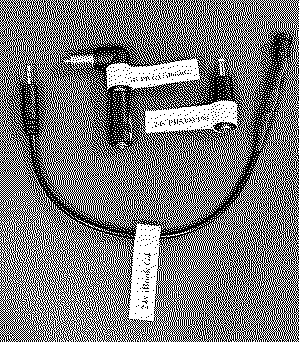
Minor update. I found some people saying their PB5xx machines run fine on 12v, and I've had the buck and boost converters getting very hot during longer use, and so I decided to see if I can just use the standard voltages supported by USB-C for the two higher ones (15v for 16v, and 20v for 24v). Without the need for the boost converters, I realized I don't really need the space in the middle, so I cut out the middle part. It actually makes for a nice little package, especially the 15v ones for the PB5xx series. I got some resin printed plugs and manufactured a new cable for it (details here: https://68kmla.org/bb/index.php?thr...connector-520-520c-540-540c.45148/post-548401). Makes for an even sleeker adapter and I think 15v should be fine, and I won't have to worry about the heat frying the boost converter and what that failure mode might look like.
I need to dial in my 3d printer a bit (turns out printing matte PLA can wear down the non-replaceable extruder gear on the Ender 3), or maybe I'll order a bundle of resin ones from JLCPBC to match the connectors. Really happy with the results of those connectors and it would look nice printed professionally. I also will be re-printing my Apple IIc adapter.
|
|
PacNPal New Tinkerer -------- Joined: Mar 17, 2022 Posts: 4 Likes: 0 |
Mar 19, 2025 - #14
I love my PowerBooks/iBooks but I don't like dealing with the headaches old power supplies bring. If anyone ends up making some of these, I'd love to buy some. I fear I'm not handy enough to do it myself.
|
|
Trash80toG4 Active Tinkerer Bermuda Triangle, NC USA -------- Joined: Apr 1, 2022 Posts: 1,131 Likes: 329 |
Mar 19, 2025 - #15
@wottle what no eyebrows? :p
Liked by wottle |
|
wottle Active Tinkerer Fort Mill, SC -------- Joined: Oct 30, 2021 Posts: 841 Likes: 577 |
Mar 20, 2025 - #16
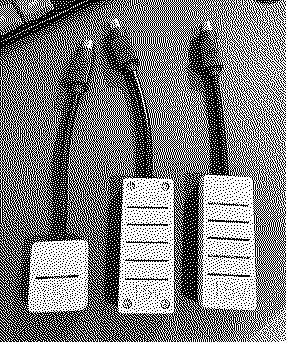
[Image: IMG_1544.jpeg][Image: IMG_1545.jpeg] I went with the closest without going over for my adapters because I had some overheating issues with my buck / boost converters and didn't experience any problems with the adapters using 20v for the 24v adapters and 15v for the 16v adapters. One less component to fail. I also found adapters for most portable Macs from the Portable up to the iBook G4. I did manage to make 3d printed versions (shown above) for the PB5xx series. Let me know and I can see how much in parts it cost me and I can probably whip some up for you. It's been a fantastic change for me to have a small bundle of these adapters and a single USB-C adapter and cable for almost all my portables. I'll be able to do it cheaper with my home printed cases, but the resin prints are relatively reasonable (I'd estimate ~$3 per adapter) vs probably $0.50-$1.00 for my prints. It would also add some time as they take 1-1.5weeks to arrive depending on which resin you use.
|
|
MeTheMac New Tinkerer Mars -------- Joined: Feb 20, 2025 Posts: 72 Likes: 16 |
Mar 20, 2025 - #17
Awesome work!
Is it possible for this to work on my Mac Portable (Backlit)? Maybe with modification! |
|
wottle Active Tinkerer Fort Mill, SC -------- Joined: Oct 30, 2021 Posts: 841 Likes: 577 |
Mar 20, 2025 - #18
|
|
MeTheMac New Tinkerer Mars -------- Joined: Feb 20, 2025 Posts: 72 Likes: 16 |
Mar 20, 2025 - #19
Yeah, I'd prefer to keep it running on battery power since I feel like it otherwise takes away the charm. I just don't like entrusting my expensive machine to an old Portable adapter. If anyone can recap one of these without damaging the casing, please, please send me a PM!
Good to know, though. Thanks for the info! |
|
PacNPal New Tinkerer -------- Joined: Mar 17, 2022 Posts: 4 Likes: 0 |
Mar 20, 2025 - #20
I would like to have an adapter for my PowerBooks, especially 180c, 540c, G4 (I have a late 17" G4 that makes the power adapter SUPER hot), and G3 style (I have a 3400 and 1400 that uses the same). Last I checked all my power adapters work but hunting them down and dealing especially with the 500 series is not something I am looking forward to dealing with. What would be an all-in price? |
| Page 1 of 2 | Next > | Last >> |
| Home | Forums | What's New | Search | Bookmarks | RSS | Original | Settings |
| XenForo Retro Proxy by TinkerDifferent.com |






![[Image: IMG_1544.jpeg]](/proxy_image?url=https://tinkerdifferent.com/data/attachments/20/20783-0a0e279edfe93398cf087b314ad2d6ff.jpg)
![[Image: IMG_1545.jpeg]](/proxy_image?url=https://tinkerdifferent.com/data/attachments/20/20784-83cddaca086a0b57a84e92cf6ceafa81.jpg)

