|
* TinkerDifferent *
Retro Computing Community |
| Home | Forums | What's New | Search | Settings |
| Possible To Hide Partition From Desktop In Classic Mac OS 8.1 / 7.6.1 / 7.5.5? |
Forums > Vintage Apple > Software & Operating Systems
|
mcbeav New Tinkerer -------- Joined: May 18, 2024 Posts: 13 Likes: 11 |
Jul 10, 2025 - #1
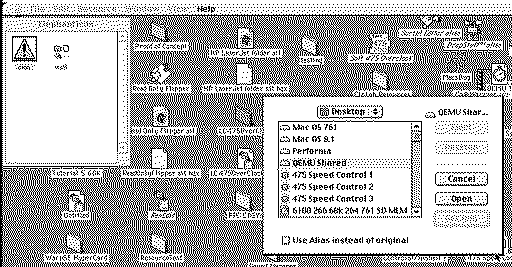
Just curious if it is possible to hide a partition from the desktop, or even an entire drive on classic Mac OS. Either 8.1, 7.6.1, or 7.5.5? I have an alias to a folder on the drive, but I want to hide the drive from my desktop just to clean up the desktop.
|
|
misterg33 New Tinkerer -------- Joined: Oct 10, 2022 Posts: 61 Likes: 14 |
Jul 11, 2025 - #2
I use an AppleScript that unmounts volumes I don't want. Save it as an app, then drop it in the startup items folder (or add to login items in OS X).
|
|
adamgracrrgv New Tinkerer -------- Joined: Oct 12, 2023 Posts: 11 Likes: 4 |
Nov 7, 2025 - #3
Yes. You can try to hide it by changing the visibility flag on the desktop using a utility.
Such as ResEdit, or Finder Options. |
|
phipli Tinkerer -------- Joined: Sep 23, 2021 Posts: 309 Likes: 215 |
Nov 7, 2025 - #4
Oh, there is a cunning way to do that.
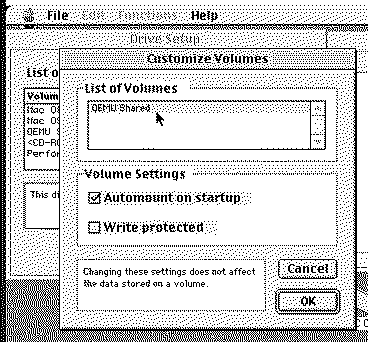
In Drive Setup, select the disk and go to "Customize Volumes..." Then select the partition you don't want to mount. Deselect "Automount on startup" and it wont appear on boot. You can manually mount it using various utilities including Drive Setup, and unmount it again by dragging the disk to the Trash / Wastebasket. Or sorry, do you still want it to be mounted, just hidden? That is a strange thing to do. It isn't really how Classic Mac OS works. The desktop is where mounted disks are. Bodge I can think of is to set a clear / empty icon and a null character name, but you'll still get a small vertical white bar for the name.
Liked by ClassicHasClassandmisterg33 |
|
phipli Tinkerer -------- Joined: Sep 23, 2021 Posts: 309 Likes: 215 |
Nov 7, 2025 - #5
"Get Info" is disabled and only enables when you select a file or folder.
|
|
annawat4 New Tinkerer -------- Joined: Nov 19, 2025 Posts: 3 Likes: 0 |
Nov 21, 2025 - #6
Yes. There are a couple of ways you can hide a volume in classic Mac OS. For example, Wish I Were, TinkerTool, or by editing the Finder flags of the drive with ResEdit. The drive will still work and remain accessible through your alias.
|
| Page 1 of 1 |
| Home | Forums | What's New | Search | Bookmarks | RSS | Original | Settings |
| XenForo Retro Proxy by TinkerDifferent.com |