|
* TinkerDifferent *
Retro Computing Community |
| Home | Forums | What's New | Search | Settings |
| New Remote Desktop Server for Vintage Macs |
Forums > Vintage Apple > Software & Operating Systems
|
marciot Tinkerer -------- Joined: Nov 13, 2021 Posts: 19 Likes: 97 |
Mar 5, 2022 - #1
Hello everyone,
I wanted to share with you a project I have been working on since last year. It is a remote desktop server I wrote from scratch using MacTCP. It was originally an experiment to see whether a Macintosh Plus could be controlled remotely, but has since been expanded to support color on all vintage color Macs! The first release is now up on github: GitHub - marciot/mac-minivnc: A VNC remote desktop server for vintage Macintosh computers, including the Mac Plus.A VNC remote desktop server for vintage Macintosh computers, including the Mac Plus. - marciot/mac-minivnc
[Image: github.com]
github.com
Liked by lobust,Patrick,-SE40-and 13 others |
|
landogriffin Tinkerer Iowa -------- Joined: Sep 23, 2021 Posts: 42 Likes: 44 |
Mar 5, 2022 - #2
This is amazing!!! Great job @marciot !!!
|
|
marciot Tinkerer -------- Joined: Nov 13, 2021 Posts: 19 Likes: 97 |
Mar 6, 2022 - #3
Hi all! New video demonstration of the very latest release:
|
|
marciot Tinkerer -------- Joined: Nov 13, 2021 Posts: 19 Likes: 97 |
Mar 6, 2022 - #4
Liked by landogriffin |
|
Eric's Edge Tinkerer -------- Joined: Oct 31, 2021 Posts: 131 Likes: 96 |
Mar 8, 2022 - #5
Tried it out and it works great. The color version is a bit slower as you've pointed out. I tried the B&W version on my Performa 550 to see if it was any faster. It appears the B&W version is fixed to the classic screen resolution - entirely understandable.
Liked by marciot |
|
marciot Tinkerer -------- Joined: Nov 13, 2021 Posts: 19 Likes: 97 |
Mar 8, 2022 - #6
Liked by Eric's Edge |
|
Eric's Edge Tinkerer -------- Joined: Oct 31, 2021 Posts: 131 Likes: 96 |
Mar 8, 2022 - #7
|
|
marciot Tinkerer -------- Joined: Nov 13, 2021 Posts: 19 Likes: 97 |
Mar 10, 2022 - #8
New release! I've made major strides in generalizing the application, so now one executable should run on both B&W and Color Macs at any resolution. While a dedicated build would theoretically perform a tad better, in testing I was not able to see a difference. This latest version also adds keyboard support and comes with perks for GitHub supporters like a preconfigured RaSCSI disk image.
Release [March 10th] Keyboard Support; Combined B&W and Color Mode; Headless Mode; RaSCSI Boot Disk - marciot/mac-minivncWhat's New: This version supports keyboard input This version adds a menu bar and an About box with additional credits. The color and B&W functionality have been combined, allowing one application...
[Image: github.com]
github.com
Liked by ericandEric's Edge |
|
marciot Tinkerer -------- Joined: Nov 13, 2021 Posts: 19 Likes: 97 |
Mar 13, 2022 - #9
In this latest video, I talk to Rick from Lisa2.com about the Apple Lisa while I remotely connect and control his Lisa computers via the Internet using MiniVNC!
Liked by -SE40-,Eric's Edge,ericand 1 other person |
|
fred1212 Tinkerer -------- Joined: Jul 27, 2022 Posts: 133 Likes: 28 |
Oct 15, 2022 - #10
Hi getting this error "Protocol error:bad pixel format: depth32 (8 bpp) colour map. Using your app on g4 lampshade imac, system 9. cheers
|
|
fred1212 Tinkerer -------- Joined: Jul 27, 2022 Posts: 133 Likes: 28 |
Oct 15, 2022 - #11
Also error starting server -23000 on PowerBook 150 system 7
|
|
marciot Tinkerer -------- Joined: Nov 13, 2021 Posts: 19 Likes: 97 |
Jan 8, 2024 - #12
Hello,
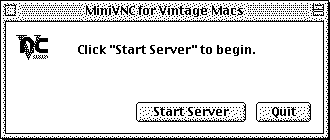
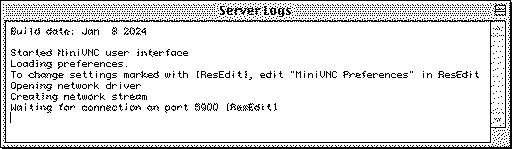
I wanted to update this thread with a note that I made a pretty major update to MiniVNC. The thing I wanted to focus on in this release was compatibility with clients other than RealVNC. Due to processor limitations, B&W 68000 Macs can only use the older TRLE encoding and still require the RealVNC client, but color Macs now can use Hextile and ZRLE encodings which vastly improve compatibility with other clients. I also added a cursor pseudo-encoding which lets the client draw the cursor locally, and added an option to hide the remote cursor. This improves the perceived responsiveness of the connection. Lastly, I redesigned the UI to use of separate windows which can be shown and hidden independently, and made logging a whole lot more convenient: Oh yeah, it also uses a preferences file to store settings between runs. It also allows advanced users to change some more obscure parameters using ResEdit! :D To try out this release, go here: https://github.com/marciot/mac-minivnc/releases/tag/v1.1-beta-jan-8-2024 And now for a more technical run down... I investigated several VNC clients and found two things that were causing MiniVNC to fail with most clients 1) the use of TRLE encoding and 2) the use of indexed colors. To address these issues, I implemented the Hextile encoding and TrueColor support. This allowed TightVNC, VNCThing, and MacVNC to function. The last VNC client I had access to was Screen Sharing on macOS High Sierra. This one proved to be a bit of a bear. It always failed to get past initial handshaking, so I could never get the connection far even to know what encodings are supported. Eventually, I found out it always breaks the connection at an early stage of the handshaking and then immediately reconnects. Due to the way MiniVNC handled disconnected clients, I was not restarting fast enough to pick up on the second connect attempt. Once I resolved this, I learned Screen Sharing would only connect if password authentication was enabled. I did not want to implement DES encryption, so I implemented a fake handshake that sends a challenge string and does not check the reply. The upshot of this is that Screen Sharing now asks for a password, but will connect no matter what you type in. Once I finally was able to get past the handshaking, I learned that Screen Sharing only supported Zlib and ZRLE encodings. I wasn't sure about how successfully older Macs could run ZLib, but I decided to find the smallest implementation of Zlib I could find and try that. I settled on a library called MiniZ and implemented a new ZRLE protocol. It is very similar to the old TRLE encoding but uses larger tiles and compresses the stream with ZLib. Getting that to work meant that I could now connect using Screen Sharing on macOS!
Liked by Patrick |
|
marciot Tinkerer -------- Joined: Nov 13, 2021 Posts: 19 Likes: 97 |
Jan 8, 2024 - #13
Liked by fred1212anderic |
| Page 1 of 1 |
| Home | Forums | What's New | Search | Bookmarks | RSS | Original | Settings |
| XenForo Retro Proxy by TinkerDifferent.com |
![[Image: github.com]](/proxy_image?url=https://github.githubassets.com/favicons/favicon.svg)