|
* TinkerDifferent *
Retro Computing Community |
| Home | Forums | What's New | Search | Settings |
| MacSD - SCSI to SD adapter with CD audio, MIDI and fan control |
|
YMK Active Tinkerer -------- Joined: Nov 8, 2021 Posts: 408 Likes: 343 |
Mar 3, 2023 - #1
MacSD is a SCSI adapter for Macs, DOS, Windows and other platforms.
It's a bus-powered device in a 3.5" drive form factor. General features:
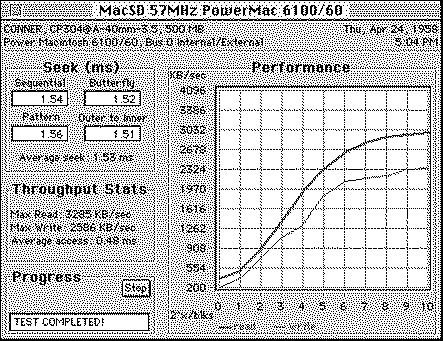
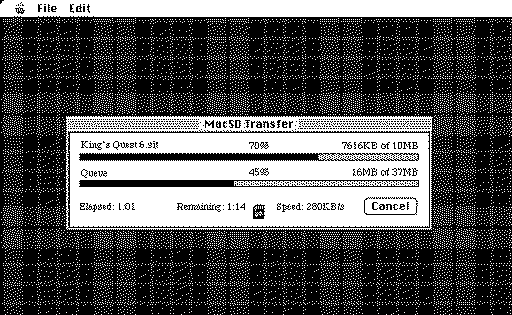
Performance on a PowerMac 6100 with 57MHz overclock: MacSD ships with the Commander application, which easily moves files from the FAT32-formatted SD card, to your Mac. This is a convenient way to move downloads to older Macs without networking or emulators:
Liked by JDWandretr01 |
|
YMK Active Tinkerer -------- Joined: Nov 8, 2021 Posts: 408 Likes: 343 |
Mar 3, 2023 - #2
[reserved]
|
|
YMK Active Tinkerer -------- Joined: Nov 8, 2021 Posts: 408 Likes: 343 |
Mar 3, 2023 - #3
[reserved]
|
|
YMK Active Tinkerer -------- Joined: Nov 8, 2021 Posts: 408 Likes: 343 |
Mar 3, 2023 - #4
[reserved]
|
|
JDW Administrator Japan -------- Joined: Sep 2, 2021 Posts: 2,534 Likes: 1,982 |
Jul 29, 2023 - #5
@YMK
Sorry if this is written somewhere, but what are all the file types that your Commander app can understand? Your screenshot only shows SIT files. But can pretty much any file be downloaded from Macintosh Garden be placed in the root (or directory of one's choice) on a properly FAT-formatted SD card, and then the user would put that SD card into MacSD on the vintage Mac, boot the vintage Mac, and then user the Commander app to select/move those files to the primary MacSD volume (and/or any connected SCSI drives)? Liked by YMK |
|
YMK Active Tinkerer -------- Joined: Nov 8, 2021 Posts: 408 Likes: 343 |
Jul 29, 2023 - #6
Yes, any file type can be moved. Commander does not filter based on type or extension. Liked by JDW |
|
TT/30 New Tinkerer California -------- Joined: Sep 17, 2023 Posts: 25 Likes: 15 |
Oct 20, 2023 - #7
I didn't know about the Commander and Midi applications since I don't recall those features being available when I bought mine a few years ago.
@YMK Is there any more info on the synth engine? The product page mentions it is sample based. Does it include Roland type samples like 808 drums? Let's say someone wants to output the MIDI sound while using the MacSD in an SE/30. What ways would someone route out the sound? One thing that comes to mind is some kind of internal mixer to mix the system and MIDI audio, but that would probably be too complicated and to do it right would be like designing a sound card. |
|
YMK Active Tinkerer -------- Joined: Nov 8, 2021 Posts: 408 Likes: 343 |
Oct 20, 2023 - #8
Yours must have shipped with pre-v1.0.0 firmware then. There have been many improvements since, including a significant performance increase. Take a look through the manual. You might be interested in some of the other new features.
The synthesizer does include 808 drums, sampled from the Roland SC-55 and the Yamaha MU100. These are all of the available kits: There's more information about the synthesizer and options in the manual. If there's anything specific you'd like to know, feel free to ask. As for mixing MacSD's output into the SE/30's audio circuit, I haven't looked into it. It may be easier to add another audio output at the expansion slot if you have that available. If you feed the logic board audio into MacSD's CD Audio In header, it will handle the mixing. There's latency when using MIDI over SCSI of a few hundred milliseconds. This isn't a problem for games and .mid file playback, but it could be an issue for other uses. This latency does not affect MIDI received over the expansion or USB port. Here's a sample of the synthesizer on an LC475:
Liked by JDW |
|
TT/30 New Tinkerer California -------- Joined: Sep 17, 2023 Posts: 25 Likes: 15 |
Oct 21, 2023 - #9
Nice! I found the MIDI section further down in the manual. It makes more sense now knowing there's a separate package for the sounds that needs to be included on the SD card. This functionality is very interesting and not expected to have on a SCSI emulator. I would like to try this out sometime and need to recall how I rigged up playing the CD audio when I first tried out playing CD audio on the MacSD.
I recall I was having issues with the MacSD early on with reading images. I have had issues with SCSI2SD as well. This past August I bought a ZuluSCSI at VCF and that worked well (point being maybe my hardware is in a stable config) and somewhere in the process I also updated the MacSD firmware, so it looks like I have the latest. Besides disk image issues, I remember running into fragmentation errors and tried remaking the SD card setup multiple times. |
| Page 1 of 1 |
| Home | Forums | What's New | Search | Bookmarks | RSS | Original | Settings |
| XenForo Retro Proxy by TinkerDifferent.com |