|
* TinkerDifferent *
Retro Computing Community |
| Home | Forums | What's New | Search | Settings |
| macproxy_plus - a (new, revised) proxy for wikipedia, reddit, chatgpt etc for old http bound computers |
Forums > Vintage Apple > Software & Operating Systems
|
Mu0n Active Tinkerer Quebec -------- Joined: Oct 29, 2021 Posts: 649 Likes: 606 |
Oct 15, 2024 - #1
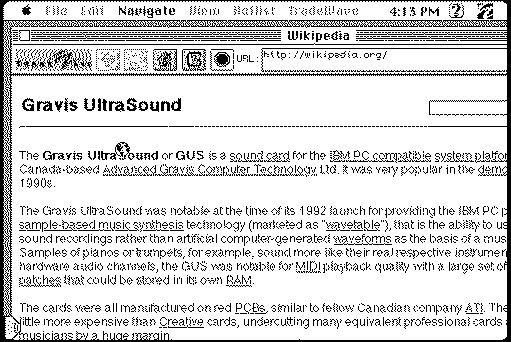
so this video made the rounds, and in it, Hunter Irving exposes how a linux flask server can act as a proxy for his Mac Plus using the very old MacWeb2.0c browser (but any old computer that can set up a http proxy is fair game, ie a SE/30, a windows xp machine, etc) Places that work with it: chatgpt, claude, hackaday, hacksburg, hunterirving, npr, override, reddit, waybackmachine, weather, websimulator, wiby, wikipedia, notyoutube Liked by JDW |
|
Mu0n Active Tinkerer Quebec -------- Joined: Oct 29, 2021 Posts: 649 Likes: 606 |
Oct 15, 2024 - #2
I'm currently looking to run this server on my Windows machine through WSL and I'm getting my behind kicked thoroughly. I'm very untrained in all things linux/ubuntu/whatever distro you want and I try not to mess with network stuff if I can help it usually - sadly, this project requires a HEAVY hand in both.
My gear in the retro side: Mac Plus with BlueSCSI v2 w/ pico W, booting with 7.5.3 and can MacTCP ping local addresses on my LAN, I can run Mac2.0c and it shows a connection to my wifi Mac SE/30 with BlueSCSI v2 w/ pico W, booting with 7.5.3 and can MacTCP ping local addresses on my LAN, connect to a hosted ftp on my modern PC, or connect to a local http python server hosted on my modern PC as well. It shows a connection to my wifi. My gear on the modern side: Windows 11 i5-13600KF PC, with WSL installed, with Ubuntu, updated. I copied a new config.py from config.py.example and uncommented a bunch of stuff I wanted to try out. I used this trail of commands inside WSL:
I went to the proxy part of a mac browser and tried a bunch of stuff for the address: http://192.168.0.18:5001 (local IP for my windows 11 PC) http://172.xxx.xxx.xxx:5001 (address stated by the mac_proxy script as it launches) http://172.xxx.xxx.xxx:5001 (DIFFERENT address I get if I run this
I can't establish a connection to the proxy I can't continue further on my own, really need a willing guru to help me. I can't decipher this page (apparently as I learned) enough to get to the finish line. https://learn.microsoft.com/en-us/w...distribution-from-your-local-area-network-lan The Venn diagram section of linux gurus and windows WSL gurus is really, really thin. Let me know if you are in it! edit - with the help of polpo, ian scott and gutbomb, I ditched WSL and just went straight to python
|
| Page 1 of 1 |
| Home | Forums | What's New | Search | Bookmarks | RSS | Original | Settings |
| XenForo Retro Proxy by TinkerDifferent.com |