* TinkerDifferent *
Retro Computing Community
Home | Forums | What's New | Search | Settings
Macintosh SE/30 Vertical & Horizontal Bars on Display "Simasima" Repair Guide

Forums > Vintage Apple > Macintosh > Compact Macs

Mac84
Administrator
New Jersey, USA
--------
Joined: Sep 4, 2021
Posts: 306
Likes: 431
Oct 9, 2025 - #1
Hello everyone,

This has been a long time coming... presenting the Macintosh SE/30 Vertical & Horizontal Bars on Display "Simasima" Repair Guide!! [party]


This is a FREE downloadable PDF document (~55 MB) filled with high-resolution pictures and technical details. You can find this PDF file attached to this post.

I can't take sole credit for this guide, many talented people and individuals contributed to this guide. This guide would not exist without the amazing efforts of the many geeky individuals in the vintage Macintosh and electronics community. While it would be impossible to name everyone individually, these fine folks know who they are. [heart] (and you can find some them mentioned in the guide!)

This is an early release of this guide, consider it a beta release. There are some areas that are still a work in progress, refer to page 5 to learn more about that. So apologies if anything is missing, inaccurate or broken, but perfect is the enemy of good.

As updates happen, they'll be logged at the end of this post.

What's included in this guide:

This comprehensive 112-page guide provides expert-level guidance on this common issue. Containing sections on:
  1. Theory of the issue
  2. Things to check first
  3. Troubleshooting & Repair
  4. Recommended Tools
  5. Clock signal references
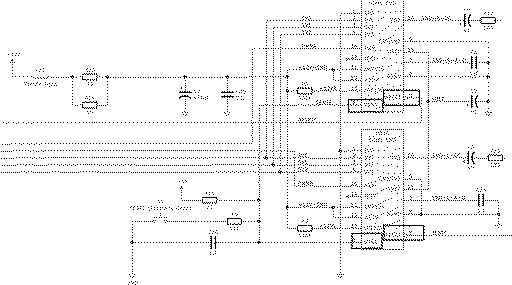
  6. Resources and helpful links, including the redrawn schematics

What's next?

if you find this guide useful, have success stories related to it, feedback or corrections - please post them in this thread! Be mindful that not all replies can be addressed or reflected in the scope of this document.

Since all future revisions of this guide will be attached to this first post, we kindly ask that instead of sharing the PDF to others, please share this link to ensure they always have the latest version.

There are a number of things we'd like to add to this guide, but for now this makes a very solid first edition.

Thanks again to EVERYONE who helped, this was a monster effort that took years to prepare and I'm super happy to post the initial version here for all to enjoy. [party]

-Steve


Version history & notes:
  • October 9, 2025: v0.9a Initial beta release (archived)
  • October 25, 2025: v0.9b 2nd release (attached to this post)
    • Changes: Fixed typos, added Table of Contents, added page numbers, cleaned up and consolidated pages, added additional tools information, added links to videos and other resources.
Attachments:
Macintosh SE30 Simasima Display Bars Repair Guide v0.9b, 10-25-2025.pdf (55.6 MB)
SE30 Book for TD v2_Oct25_2025.jpg [View]

Liked by GreenBar0n,dramirez,museand 25 others

3lectr1c
Active Tinkerer
the United States
--------
Joined: May 15, 2022
Posts: 668
Likes: 336
Oct 9, 2025 - #2
This is amazing work! Good job to all those that contributed. I will link this page on the SE/30 page on my website :)

Liked by Mac84

naruse
Tinkerer
--------
Joined: Sep 14, 2024
Posts: 52
Likes: 33
Oct 10, 2025 - #3
woah, many many thanks to everyone for the combined effort! def a jewel to have here!

Liked by Mac84

MacintoshLibrarian
Tinkerer
--------
Joined: Oct 19, 2021
Posts: 32
Likes: 46
Oct 10, 2025 - #4
Excellent work everyone! This is a lot more detailed than any guide I have ever seen! I also agree, the Conair Blue Bird is a good blowdryer.

Liked by Mac84andJDW

Eric's Edge
Tinkerer
--------
Joined: Oct 31, 2021
Posts: 131
Likes: 96
Oct 10, 2025 - #5
>> Mac84 said:
Hello everyone, This has been a long time coming... presenting the Macintosh SE/30 Vertical & Horizontal Bars on Display "Simasima" Repair Guide !! View attachment 23683 This is a FREE downloadable PDF document (~55 MB) filled with high-resolution pictures and technical details. You can find this PDF file attached to this post. I can't take sole credit for this guide, many talented people and individuals contributed to this guide. This guide would not exist without the amazing efforts of the many geeky individuals in the vintage Macintosh and electronics community. While it would be impossible to name everyone individually, these fine folks know who they are. (and you can find some them mentioned in the guide!) This is an initial release of this guide, consider it a beta release . There are some areas that are still a work in progress, refer to page 6 to learn more about that. So apologies if anything is missing, inaccurate or broken, but perfect is the enemy of good. What's included: This comprehensive 112-page guide provides expert-level guidance on this common issue. Containing sections on: Theory of the issue Things to check first Troubleshooting & Repair Recommended Tools Clock signal references Resources and helpful links, including the redrawn schematics What's next? if you find this guide useful, have success stories related to it, feedback or corrections - please post them in this thread! Be mindful that not all replies can be addressed or reflected in the scope of this document. Since all future revisions of this guide will be attached to this first post, we kindly ask that instead of sharing the PDF to others, please share this link to ensure they always have the latest version. There are a number of things we'd like to add to this guide, but for now this makes a very solid first edition. Thanks again to EVERYONE who helped, this was a monster effort that took years to prepare and I'm super happy to post the initial version here for all to enjoy. -Steve Version history: October 9, 2025: v0.9a Initial beta release Click to expand...
WOOT!
I'm so happy to have resources like this! Thank You!

Liked by Mac84

Eric's Edge
Tinkerer
--------
Joined: Oct 31, 2021
Posts: 131
Likes: 96
Oct 10, 2025 - #6
Typographical error on page 10:

"ROM is not napped into address $0 by the VIA, so the CPU cannot find any ROM code."

Liked by Mac84

JDW
Administrator
Japan
--------
Joined: Sep 2, 2021
Posts: 2,534
Likes: 1,981
Oct 11, 2025 - #7
@Mac84 , you're a star! [star]

Many years ago, one of my SE/30 boards showed the exact pattern shown below, and at the time I posted in another forum to ask if anyone had seen that instead of the regular horizontal stripes, but no one replied back to say they did. Thanks to your Repair Guide, I see it is simply another variant of the horizontal stripes, differing due to the VRAM being NEC. Great info! (Still haven't read it all, but slowly making my way through it). Kudos!


UPDATE: Just finished going through the entire document. Fantastic work, especially the oscilloscope screenshots showing the signals to look for. That info is extremely helpful!
Attachments:
1760175662164.png [View]

Liked by Mac84

iantm
Tinkerer
Michigan
--------
Joined: Sep 8, 2025
Posts: 73
Likes: 32
Oct 11, 2025 - #8
>> Mac84 said:
This is a FREE downloadable PDF document (~55 MB) filled with high-resolution pictures and technical details. You can find this PDF file attached to this post. Click to expand...
aaaaand this would be precisely the kind of reason I'm glad I found these forums. Kudos to all the contributors! You're making life more wonderful for all of us.

Liked by Mac84,bakkus,JDWand 1 other person

Mac84
Administrator
New Jersey, USA
--------
Joined: Sep 4, 2021
Posts: 306
Likes: 431
Oct 11, 2025 - #9
Thank you everyone for the kind words! I'm super glad people are finding this useful and valuable! [heart]

I hope to release a fast follow update this weekend that corrects some typos, adds some additional links/videos/tools, and cleans things up a bit... thanks again for the positive response. [+1]

Liked by ericandJDW

eric
Administrator
MN
--------
Joined: Sep 2, 2021
Posts: 1,149
Likes: 1,926
Oct 13, 2025 - #10
Few items I just purchased to work on my SE/30 that worked last time I put it away and now no longer works:

20" ATX extender cable for $4+s/h

Amazon.com: Phanteks 24 Pin M/B Premium Sleeved Extension Cable 19.68" 500mm Length, Green (PH-CB24P_GR) : Tools & Home Improvement

Buy Phanteks 24 Pin M/B Premium Sleeved Extension Cable 19.68" 500mm Length, Green (PH-CB24P_GR): Extension Cords - Amazon.com [check-mark] FREE DELIVERY possible on eligible purchases
www.amazon.com

50Mhz 2ch Oscilloscope

Liked by iantmandMac84

thlnk3r
New Tinkerer
--------
Joined: Nov 21, 2021
Posts: 2
Likes: 0
Oct 14, 2025 - #11
Very detailed document. Amazing work!

Peter-Erik
New Tinkerer
Bilthoven - The Netherlands - Europe - Earth
--------
Joined: Mar 24, 2025
Posts: 20
Likes: 7
Oct 23, 2025 - #12
Thanks for this very very nice document - just buy me an SE/30 with some battery damage but it was on storage sinds 1995 with the screen face up so the damage is on the battery holder mainly (its gone) and some rust on the metal case, order some part (logic first) DigiKey USA -> The Netherlands (waiting for now) and see if we get an normal image to start..

Liked by Mac84

Mac84
Administrator
New Jersey, USA
--------
Joined: Sep 4, 2021
Posts: 306
Likes: 431
Oct 26, 2025 - #13
Update! A second release, v0.9b has been released! [party] This revised PDF is now attached to the 1st post.

Thank you everyone for all the feedback and comments. [heart] I'm so glad this guide is already coming in handy for so many people.
  • Changes in this version include:
    • Fixed typos and cleaned up language
    • Added a Table of Contents
    • Added page numbering
    • Cleaned up and consolidated information on a few of the initial pages
    • Added additional tools information, links to more YouTube videos and other helpful resources.

Liked by asphaise,pax,JDWand 1 other person

David Cook
Tinkerer
--------
Joined: Jul 20, 2023
Posts: 130
Likes: 172
Nov 13, 2025 - #14
This is a fantastic guide! It helped me repair a board that I would otherwise have given up on.

Are you sure page 46 has the correct frequencies? On two fully working SE/30s, I measure exactly half the frequency listed for each ROM pin.

Liked by Kai RobinsonandJDW

Mac84
Administrator
New Jersey, USA
--------
Joined: Sep 4, 2021
Posts: 306
Likes: 431
Nov 14, 2025 - #15
>> David Cook said:
This is a fantastic guide! It helped me repair a board that I would otherwise have given up on. Are you sure page 46 has the correct frequencies? On two fully working SE/30s, I measure exactly half the frequency listed for each ROM pin. Click to expand...
Thanks for the feedback! It's on the list for us to look into. (y)

Liked by JDW

Laer
New Tinkerer
--------
Joined: Oct 10, 2024
Posts: 3
Likes: 0
Nov 15, 2025 - #16
>> Mac84 said:
Hello everyone, This has been a long time coming... presenting the Macintosh SE/30 Vertical & Horizontal Bars on Display "Simasima" Repair Guide !! View attachment 24299 This is a FREE downloadable PDF document (~55 MB) filled with high-resolution pictures and technical details. You can find this PDF file attached to this post. I can't take sole credit for this guide, many talented people and individuals contributed to this guide. This guide would not exist without the amazing efforts of the many geeky individuals in the vintage Macintosh and electronics community. While it would be impossible to name everyone individually, these fine folks know who they are. (and you can find some them mentioned in the guide!) This is an early release of this guide, consider it a beta release . There are some areas that are still a work in progress, refer to page 5 to learn more about that. So apologies if anything is missing, inaccurate or broken, but perfect is the enemy of good. As updates happen, they'll be logged at the end of this post. What's included in this guide: This comprehensive 112-page guide provides expert-level guidance on this common issue. Containing sections on: Theory of the issue Things to check first Troubleshooting & Repair Recommended Tools Clock signal references Resources and helpful links, including the redrawn schematics What's next? if you find this guide useful, have success stories related to it, feedback or corrections - please post them in this thread! Be mindful that not all replies can be addressed or reflected in the scope of this document. Since all future revisions of this guide will be attached to this first post, we kindly ask that instead of sharing the PDF to others, please share this link to ensure they always have the latest version. There are a number of things we'd like to add to this guide, but for now this makes a very solid first edition. Thanks again to EVERYONE who helped, this was a monster effort that took years to prepare and I'm super happy to post the initial version here for all to enjoy. -Steve Version history & notes: October 9, 2025: v0.9a Initial beta release ( archived ) October 25, 2025: v0.9b 2nd release (attached to this post) Changes: Fixed typos, added Table of Contents, added page numbers, cleaned up and consolidated pages, added additional tools information, added links to videos and other resources. Click to expand...
Working on two SE/30s now. This could be helpful. Thank you!

kmm
New Tinkerer
--------
Joined: Nov 23, 2025
Posts: 3
Likes: 0
Dec 1, 2025 - #17
>> Mac84 said:
Hello everyone, This has been a long time coming... presenting the Macintosh SE/30 Vertical & Horizontal Bars on Display "Simasima" Repair Guide !! View attachment 24299 This is a FREE downloadable PDF document (~55 MB) filled with high-resolution pictures and technical details. You can find this PDF file attached to this post. I can't take sole credit for this guide, many talented people and individuals contributed to this guide. This guide would not exist without the amazing efforts of the many geeky individuals in the vintage Macintosh and electronics community. While it would be impossible to name everyone individually, these fine folks know who they are. (and you can find some them mentioned in the guide!) This is an early release of this guide, consider it a beta release . There are some areas that are still a work in progress, refer to page 5 to learn more about that. So apologies if anything is missing, inaccurate or broken, but perfect is the enemy of good. As updates happen, they'll be logged at the end of this post. What's included in this guide: This comprehensive 112-page guide provides expert-level guidance on this common issue. Containing sections on: Theory of the issue Things to check first Troubleshooting & Repair Recommended Tools Clock signal references Resources and helpful links, including the redrawn schematics What's next? if you find this guide useful, have success stories related to it, feedback or corrections - please post them in this thread! Be mindful that not all replies can be addressed or reflected in the scope of this document. Since all future revisions of this guide will be attached to this first post, we kindly ask that instead of sharing the PDF to others, please share this link to ensure they always have the latest version. There are a number of things we'd like to add to this guide, but for now this makes a very solid first edition. Thanks again to EVERYONE who helped, this was a monster effort that took years to prepare and I'm super happy to post the initial version here for all to enjoy. -Steve Version history & notes: October 9, 2025: v0.9a Initial beta release ( archived ) October 25, 2025: v0.9b 2nd release (attached to this post) Changes: Fixed typos, added Table of Contents, added page numbers, cleaned up and consolidated pages, added additional tools information, added links to videos and other resources. Click to expand...
Thank you very much for your helpful information.

GreenBar0n
New Tinkerer
East Bay Area, CA
--------
Joined: Dec 22, 2025
Posts: 32
Likes: 6
Dec 24, 2025 - #18
This guide was the reason I found this site and joined, well done and thank you for this!

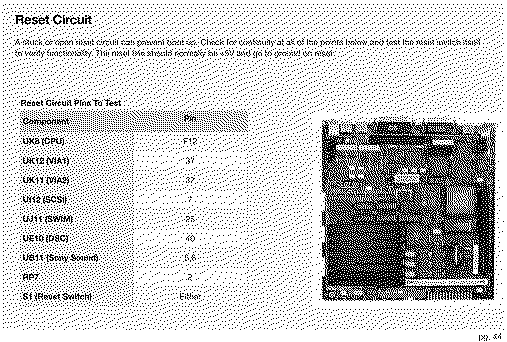
I wanted to ask about the Reset section, on page 44, it instructs that UB11 Pin6 should go to 0V.

The picture is showing UB10 highlighted on my logic board, instead of UB11 - I can't get UB10 or UB11 Pin6 to drop below 3.9V with the S1 button pressed.


Can anyone confirm that Pin6 VSNS, should also be at 0V with the S1 button pressed.


Thanks again!
Attachments:
Reset pg.44.jpg [View]
Souny Sound UB10-11.jpg [View]

Liked by eric

David Cook
Tinkerer
--------
Joined: Jul 20, 2023
Posts: 130
Likes: 172
Dec 24, 2025 - #19
With power off, check the continuity of S1 when pressed and not pressed. This switch often fails due to capacitor juice. I've replaced several.

Liked by GreenBar0n

David Cook
Tinkerer
--------
Joined: Jul 20, 2023
Posts: 130
Likes: 172
Dec 24, 2025 - #20
You should still check S1 (to make sure it isn't shorted). However, given the resistors (100/(100+27))*5V = 3.94V, the voltage when pressed should be about 3.9V volts.

What are you getting for pin 5 of UB11 and pin 5 of UB10 when the button is pressed and released?

Liked by GreenBar0n

Page 1 of 2 | Next > | Last >>

Home | Forums | What's New | Search | Bookmarks | RSS | Original | Settings
XenForo Retro Proxy by TinkerDifferent.com