|
* TinkerDifferent *
Retro Computing Community |
| Home | Forums | What's New | Search | Settings |
| Mac IIci "It is now safe to switch off your Macintosh" |
Forums > Vintage Apple > Macintosh > Macintosh II
|
Brutus75 New Tinkerer -------- Joined: Aug 15, 2025 Posts: 11 Likes: 1 |
Dec 20, 2025 - #1
Hi Guys,
I bought an old Mac IIci and it was in really good shape. After turning it on everything worked except for the sound. I was advised to recap the board and this worked. I now have sound :) The only issue is after recapping, whenever I shutdown the IIci it now says "It is now safe to switch off your Macintosh" instead of shutting down by itself. I was advised to replace UB13, UD13, and UE13. I have now done this but still have the same result. I was then advised to recap the power supply. I have now done this but no change. Anyone have any suggestions? Thanks
|
|
David Cook Tinkerer -------- Joined: Jul 20, 2023 Posts: 130 Likes: 172 |
Dec 20, 2025 - #2
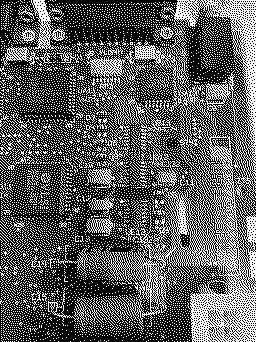
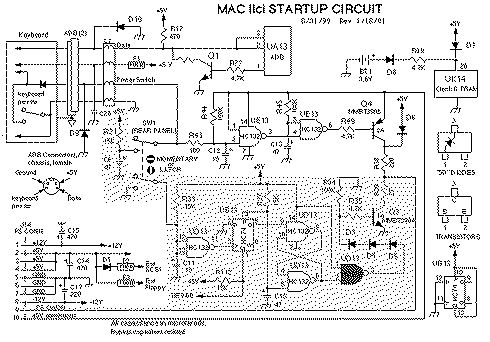
Yes, you're doing the right things. Here is what the traces look like underneath the chips. Turn off power and check that each trace connecting to each pin of UB13 and UD13 have continuity. For example, even though it looks good, my board had a tiny break where the red arrow is. I'll bet you'll find a tiny break somewhere as well. The capacitor juice often pools right at the edge of a pad or via, causing a break in the shadows.
You don't need to check UE13, as it is involved in power on, not power off. When checking for breaks, gently touch the side or top of the chip leg where it enters the chip, rather than the pad itself or the "foot" of the leg. That will catch legs that are "floating" above the pads rather that solidly soldered. I have high hopes that you will fix this problem. It is common and the source is usually easy to find.
Liked by JDW,dougg3andKai Robinson |
|
Brutus75 New Tinkerer -------- Joined: Aug 15, 2025 Posts: 11 Likes: 1 |
Dec 22, 2025 - #3
Thanks David... especially for the shot of the traces under the chips... it really helped. Unfortunately still the same issue. Another enthusiast I know has now recommended I check out the diodes in the circuit... hopefully issue is there.
|
|
David Cook Tinkerer -------- Joined: Jul 20, 2023 Posts: 130 Likes: 172 |
Dec 22, 2025 - #4
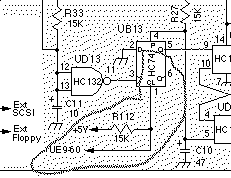
After you get the message, if you push the rear button, does it power off? If it does, then there's only a couple of possible issues. Most likely, check continuity between UE9 pin 60 and UB13 pin 1. Other people have had that fail at a via due to capacitor juice.
|
|
Brutus75 New Tinkerer -------- Joined: Aug 15, 2025 Posts: 11 Likes: 1 |
Tuesday at 8:11 AM - #5
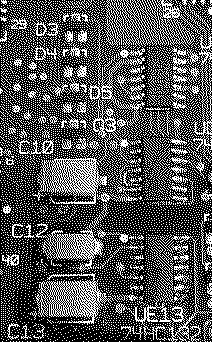
It turned out to be the diode near C10. One of the legs had a cracked solder joint and after resoldering it now works! Thanks for the help :)
|
|
Brutus75 New Tinkerer -------- Joined: Aug 15, 2025 Posts: 11 Likes: 1 |
Tuesday at 8:34 AM - #6
|
|
David Cook Tinkerer -------- Joined: Jul 20, 2023 Posts: 130 Likes: 172 |
Tuesday at 6:03 PM - #7
Wonderful! Congratulations. Liked by Brutus75 |
| Page 1 of 1 |
| Home | Forums | What's New | Search | Bookmarks | RSS | Original | Settings |
| XenForo Retro Proxy by TinkerDifferent.com |