|
* TinkerDifferent *
Retro Computing Community |
| Home | Forums | What's New | Search | Settings |
| I Got An M3 MacBook Pro; Obsolescence Forced My Hand |
Forums > The Soap Box > General Chat
|
2112st Tinkerer Northeastern New Jersey, USA -------- Joined: Oct 8, 2023 Posts: 287 Likes: 112 |
Jul 13, 2024 - #1
Due to certain things I needed to do online, I needed an upgrade. My regular workhorses are from 2011 and 2012. While they will continue to be used, of course-I had to get this M3 MacBook Pro. 18 gigs of RAM, 1 TB SSD.
However, I absolutely refused to get the cloud versions of MS Office & Photoshop. I bought a copy of Affinity Pro instead. Now, I need to find something akin to MS Word, as I'm a writer. It's a nice machine.
Liked by Certificate of ExcellenceandByte Knight |
|
phunguss Active Tinkerer Stillwater, MN -------- Joined: Dec 24, 2023 Posts: 513 Likes: 441 |
Jul 13, 2024 - #2
Liked by Certificate of Excellenceand2112st |
|
Yoda Tinkerer -------- Joined: Jan 22, 2023 Posts: 155 Likes: 99 |
Jul 13, 2024 - #3
Or.... you could run something like Basilisk II or Sheepshaver, and a pleasant MacOS 7 variant, then you could use Word 5.1 or 6 - files are directly readable in LibreOffice. You could even use DOSBox-x and put Word 5.5 for DOS on there! No hint of cloud nonsense in either of those!
Liked by 2112st |
|
2112st Tinkerer Northeastern New Jersey, USA -------- Joined: Oct 8, 2023 Posts: 287 Likes: 112 |
Jul 13, 2024 - #4
A buddy recommended this, and it WORKED. I write fiction, and I have to be able to work across newer and older platforms.
FreeOffice: The best free alternative to Microsoft OfficeFreeOffice, the best free alternative to Microsoft Office (Word, Excel, PowerPoint) for Windows, Mac and Linux
[Image: www.freeoffice.com]
www.freeoffice.com
|
|
phunguss Active Tinkerer Stillwater, MN -------- Joined: Dec 24, 2023 Posts: 513 Likes: 441 |
Jul 13, 2024 - #5
Comparison of LibreOffice vs FreeOffice
Liked by 2112st |
|
2112st Tinkerer Northeastern New Jersey, USA -------- Joined: Oct 8, 2023 Posts: 287 Likes: 112 |
Jul 13, 2024 - #6
My bad; I should have clarified. LibreOffice gave me problems when I tried creating documents on the M3 and then attempting to view them on the 2011 iMac. I'm using older versions of Word there, and I couldn't open up documents I made on the M3 in LibreOffice. However, FreeOffice easily solved that problem. :)
|
|
phunguss Active Tinkerer Stillwater, MN -------- Joined: Dec 24, 2023 Posts: 513 Likes: 441 |
Jul 13, 2024 - #7
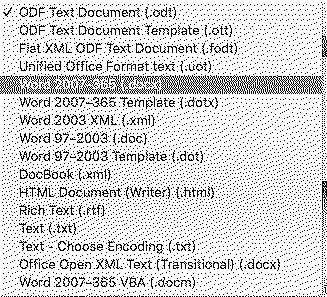
In LibreOffice, there is "save as" (the default LibreOffice document is .odt) and you can choose which compatibility you require (including .docx).
|
|
2112st Tinkerer Northeastern New Jersey, USA -------- Joined: Oct 8, 2023 Posts: 287 Likes: 112 |
Jul 13, 2024 - #8
I tried that. When I tried to save documents the way you indicated, I'd get the following. I saved in that fashion anyway. But then, I wasn't able to view this document on the iMac.
|
|
phunguss Active Tinkerer Stillwater, MN -------- Joined: Dec 24, 2023 Posts: 513 Likes: 441 |
Jul 13, 2024 - #9
What version of Word are you running on your iMac (and what OS version)?
|
|
2112st Tinkerer Northeastern New Jersey, USA -------- Joined: Oct 8, 2023 Posts: 287 Likes: 112 |
Jul 13, 2024 - #10
The iMac is using Yosemite. Versions of Word on my iMac I use are: MS Word 15.13.3, & MS Word 14.0. |
|
mac27 Tinkerer Virginia, USA -------- Joined: Apr 30, 2024 Posts: 119 Likes: 140 |
Jul 13, 2024 - #11
FYI, it is still possible to get MS Office 2021 for Mac as a one-time purchase of $150. Although I also totally support using alternatives.
Liked by 2112st |
|
2112st Tinkerer Northeastern New Jersey, USA -------- Joined: Oct 8, 2023 Posts: 287 Likes: 112 |
Jul 13, 2024 - #12
|
|
mac27 Tinkerer Virginia, USA -------- Joined: Apr 30, 2024 Posts: 119 Likes: 140 |
Jul 13, 2024 - #13
Unlike Photoshop (and other Adobe CC stuff) which forces the cloud and subscriptions. Liked by phungussand2112st |
|
2112st Tinkerer Northeastern New Jersey, USA -------- Joined: Oct 8, 2023 Posts: 287 Likes: 112 |
Jul 13, 2024 - #14
|
|
S. Pupp Tinkerer -------- Joined: Apr 2, 2023 Posts: 78 Likes: 37 |
Jul 13, 2024 - #15
Liked by 2112standmac27 |
|
phunguss Active Tinkerer Stillwater, MN -------- Joined: Dec 24, 2023 Posts: 513 Likes: 441 |
Jul 13, 2024 - #16
Lots of opportunity existed in the past for the HUP (Home Use Program) as well, where you could get a copy of office for $10 to use at home if you used it as an employee of certain agencies. Nowadays, it's only 30% off.
Liked by Certificate of Excellence |
|
Certificate of Excellence Active Tinkerer United Sates -------- Joined: Nov 1, 2021 Posts: 765 Likes: 530 |
Jul 13, 2024 - #17
@2112st congrats on your M3 MBP. I really am enjoying my M2 16" MBP quite a bit. My wife thinks it's too heavy and I guess if I had to hike uphill in the snow both ways with it, I might agree but as a around town portable running current macos that fits in my messenger bag perfectly, it has been a great tool and I am happy with it. Interestingly, as of late, I have been using Apple pages/KN/Numbers alot. Liked by 2112standphunguss |
|
Paolo B Tinkerer Switzerland -------- Joined: Nov 27, 2021 Posts: 303 Likes: 182 |
Jul 14, 2024 - #18
Why not Pages? Numbers is a bad joke, but Pages and Keynote are solid propositions.
As a writer, though, I'd consider more specific applicatios, such as iA Writer (https://ia.net/writer). |
| Page 1 of 1 |
| Home | Forums | What's New | Search | Bookmarks | RSS | Original | Settings |
| XenForo Retro Proxy by TinkerDifferent.com |

![[Image: www.freeoffice.com]](/proxy_image?url=https://www.freeoffice.com/templates/joomaker/images/softmaker-favicon.svg)