|
* TinkerDifferent *
Retro Computing Community |
| Home | Forums | What's New | Search | Settings |
| HTTP proxy and transcoder for vintage browsers |
|
rdmark Moderator -------- Joined: Oct 3, 2021 Posts: 196 Likes: 260 |
Nov 4, 2021 - #1
Do you all have experience running HTTP proxy and transcoders to get modern web content into a shape that vintage web browsers can handle?
After some cursory research, I found two active open source projects: WebOne and Browservice. The latter uses full on backend rendering, and passing images of the rendered pages to the user agent, which is not quite what I was looking for. The former seems more promising, as it does selective transcoding of web contents, and decryption of HTTPS traffic, for rendering in the vintage browser. From some cursory testing, it seems to work fairly well for text-centric content pages for rendering on a mid-range Power Mac type machine, in particular when enabling low quality jpeg re-compression of image files. However, overall it is not quite aggressive enough in transcoding html/css/javascript contents to be really useful for general browsing on, say, a 68040 based Mac. Are there other solutions out there that are more suited for early 90s, or earlier, systems? I've been looking into this as another potential companion utility for RaSCSI, following the integration of Netatalk for AppleShare file sharing in the 21.10 release. It's all well and good to emulate an Ethernet adapter to get old machines online, but having a convenient transcoder running in parallel would take it to the next level I think. :) |
|
alxlab Active Tinkerer -------- Joined: Sep 23, 2021 Posts: 293 Likes: 323 |
Nov 4, 2021 - #2
Someone made a proxy. Let me try to find the link.
|
|
alxlab Active Tinkerer -------- Joined: Sep 23, 2021 Posts: 293 Likes: 323 |
Nov 4, 2021 - #3
Ah yeah here we go:
https://github.com/tghw/macproxy The link is originally from this page where Stefan Wolfrum hooks up to the net with a Macintosh Plus: How I introduced a 27-year-old computer to the web Liked by rdmarkandktnjared |
|
rdmark Moderator -------- Joined: Oct 3, 2021 Posts: 196 Likes: 260 |
Nov 4, 2021 - #4
|
|
rdmark Moderator -------- Joined: Oct 3, 2021 Posts: 196 Likes: 260 |
Nov 5, 2021 - #5
So I've ran a few tests, and macproxy is close to being an excellent solution for very low-end machines, but it has two major drawbacks:
For one, unlike WebOne is does not translate https requests to http, which means that any inline hyperlink on an https site will fail. You can still copy paste that URL into the address bar and change the protocol to http to get by this limitation, but it's a huge inconvenience. And secondly, it's a Python2 script, which is no surprise given that the last commit was 8 years ago. But it means that running it on a modern system has additional overhead, and brings risk of dependency nightmare. Both shortcomings are probably relatively easily overcome with some time investment, but in the meantime I'll keep researching more recent/active projects. :) |
|
mozzwald New Tinkerer -------- Joined: Nov 1, 2021 Posts: 3 Likes: 3 |
Nov 5, 2021 - #6
There is also FrogFind and source is at https://github.com/ActionRetro/FrogFind so you can run your own server
|
|
rdmark Moderator -------- Joined: Oct 3, 2021 Posts: 196 Likes: 260 |
Nov 6, 2021 - #7
Will keep this one on the back burner for now. |
|
rdmark Moderator -------- Joined: Oct 3, 2021 Posts: 196 Likes: 260 |
Nov 6, 2021 - #8
There, I forked and improved the macproxy code a tiny bit to make it run with Python3 and venv (actually, very few changes had to be made.)
GitHub - rdmark/macproxy_classic: A simple HTTP proxy for putting old computers on the WebA simple HTTP proxy for putting old computers on the Web - rdmark/macproxy_classic
[Image: github.com]
github.com
It's not consistently successful in translating all https requests to http. Some sites work fine, but others like arstechnica.com don't, and you have to manually change the protocol in the address bar after the error. Somebody who has actual knowledge about Flask and requests can probably do better here. :) Anyhow, I really really like how light-weight and lighting fast this proxy is. When it works, it makes it a breeze to browse the web on 68k Macs.
Liked by alxlab |
|
alxlab Active Tinkerer -------- Joined: Sep 23, 2021 Posts: 293 Likes: 323 |
Nov 6, 2021 - #9
Yeah was just thinking it shouldn't be too bad to modify. Good for you for doing the mods :)
|
|
rdmark Moderator -------- Joined: Oct 3, 2021 Posts: 196 Likes: 260 |
Nov 6, 2021 - #10
There, I pushed a few changes to my fork so that inline hyperlink URLs should now always be rewritten to the http protocol. It was just a matter of using beautifulsoup to modify the html in memory.
I think this proxy is eminently usable at this point. The one major improvement I can think of now would be image transcoding to low quality jpeg and/or indexed gif. |
|
alxlab Active Tinkerer -------- Joined: Sep 23, 2021 Posts: 293 Likes: 323 |
Nov 6, 2021 - #11
Yeah not sure how that could be done transparently.
Off the top of my head I could see the proxy downloading the image, converting them with image magick or the like, hosting it locally in directory path named to uniquely identify the page and image for current/future use and then replace/inject the new urls into the page. |
|
rdmark Moderator -------- Joined: Oct 3, 2021 Posts: 196 Likes: 260 |
Nov 6, 2021 - #12
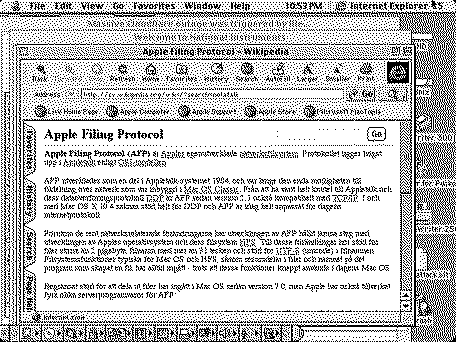
Figured out the easy way to get embedded images working! I tweaked the proxy logic to only modify the contents when content-type is 'text/html'. This way, any traditional embedded image (<img src="">) in traditional formats (jpeg, gig) work absolutely swimmingly on a higher-spec 68k Mac (Performa 476 below).
It slows down page loads in MacWeb on my Mac SE a bit since it has to handle a bunch of "image load errors" but still perfectly usable. The problem to tackle is binary file downloading. It works fine if you 'save as' with the latest change, since the proxy no longer tries to mess with non-html contents, but I need to tweak the response headers a bit for the user agent to recognize it as a binary stream, I think.
|
|
rdmark Moderator -------- Joined: Oct 3, 2021 Posts: 196 Likes: 260 |
Nov 6, 2021 - #13
Binary file downloading is now working as well, at least in Netscape 4.5 on Mac. I had to use a workaround with Flask sessions to retain the content-type header, which Flask always changes to text/html regardless of the original header. There may be some decorator or hook or something to achieve the same thing more elegantly, but so far it seems to work great.
|
|
rdmark Moderator -------- Joined: Oct 3, 2021 Posts: 196 Likes: 260 |
Nov 10, 2021 - #14
After a bit more tinkering, making the port number configurable and cleaning up the code, I cut something I'd like to call a stable release of macproxy (off of my fork of course; I hope the original author don't mind) here:
Release Macproxy v21.11 - rdmark/macproxy_classicMacproxy v21.11 Changes since the original Macproxy codebase by tghw: New features Configurable port number Made embedded image loading work. (Pinpoint html transcoding to 'text/html' only.) Made ...
[Image: github.com]
github.com
If you want to use this with a really old machine, such as a 68000 Mac, you'd want to turn off image loading in your browser (e.g. MacWeb). But overall, I consider this an amazingly usable little proxy server for most casual web browsing on a vintage computer. Please try it out!
Liked by davewongillies,Byte Knight,Daniel Hansenand 2 others |
|
rdmark Moderator -------- Joined: Oct 3, 2021 Posts: 196 Likes: 260 |
Jan 10, 2022 - #15
Bumping this thread to mention that I cut another three releases in December that improves compatibility with the modern web, and introduces a few advanced command line options to further customize the proxy.
The most important change is that it no longer mangles the layout of www.frogfind.com ;) See the full changelog at: https://github.com/rdmark/macproxy/releases |
|
Byte Knight Tinkerer -------- Joined: Oct 21, 2021 Posts: 133 Likes: 116 |
Jan 10, 2022 - #16
Thanks for the updates! I haven't tried it out yet - what advantages does this have over just using frogfind.com which also converts modern web pages?
|
|
rdmark Moderator -------- Joined: Oct 3, 2021 Posts: 196 Likes: 260 |
Jan 10, 2022 - #17
@Byte Knight That is a great question! My executive summary would be something like:
A few other benefits of Macproxy over FrogFind:
Liked by PepeSEATvintage,Byte Knight,JDWand 1 other person |
|
PepeSEATvintage New Tinkerer -------- Joined: Mar 23, 2025 Posts: 1 Likes: 0 |
Mar 23, 2025 - #18
I'm using macproxy v24.8 and it works great. I run in on Ubuntu 22.04 and I have it set up as a systemd service, as described in its README.md file.
My aim is to use Lynx 2.8 and Netscape 4.7 on Red Hat 6.2 (the one released on year 2000, not the "Enterprise" modern version of Red Hat) to browse some "lite" modern web sites, like https://lite.cnn.com (where I can read great fake news and excellent propaganda). It works beautifully. --- However, I have a problem where my setup (macproxy v24.8 on Ubuntu 22.04) cannot reach HTTPS web sites where TLS 1.0 is used as the only TLS/SSL option by the remote web server. I get the error message "[SSL: SSLV3_ALERT_HANDSHAKE_FAILURE] sslv3 alert handshake failure": I understand this is not a macproxy problem per se, but caused by an UbuntU/OpenSSL default setting which is trying to sunset TLS 1.0 support. I have enabled general TLS 1.0 support in Ubuntu 22.04's OpenSSL (by setting
So I guess the problem finally lies in Python itself, which in version 3.10 deprecated TLS 1.0 ( https://bugs.python.org/issue43998 ). And it so happens that Ubuntu 22.04 uses Python 3.10. So does anyone per chance know how to force Python 3.10 on Ubuntu 22.04 to enable TLS 1.0 support? Any tips would be greatly appreciated.
|
|
rdmark Moderator -------- Joined: Oct 3, 2021 Posts: 196 Likes: 260 |
Nov 20, 2025 - #19
@PepeSEATvintage It's fascinating to see a live website that still uses TLS 1.0! At the end of the day, reaching out to the owner of the website and ask them to update the encryption standard might be the only reliable way to access it from any recent user agent.
Curiously, the same error occurs with Python 3.9 for me, namely on an RPi 3B+ still running Raspbian Bullseye. The error occurs in _ssl.c which I believe is the SSL sockets module for Python. Maybe Python is statically linked to a (vendored) OpenSSL library which has disabled TLS 1.0 at compile time? Just hypothesizing now though. At a related note, I tagged a new version of this little application moments ago: say hello to Macproxy Classic v25.11.1 tarball: https://github.com/rdmark/macproxy_classic/releases/tag/v25.11.1 container image: https://hub.docker.com/r/rdmark/macproxy Last year a cool fork of my fork called Macproxy Plus was released to great fanfare and with a slick YouTube video to promote it. I have ported over most of that fork's improvements now, minus all of the extensions that uses 3rd party commercial APIs (e.g. LLMs) or broke compatibility with Python 3.9 (I want to run it on my RPi!) This is a huge leap in the fidelity and capability of this proxy server:
Liked by Byte Knight,fogWraithandPL212 |
| Page 1 of 1 |
| Home | Forums | What's New | Search | Bookmarks | RSS | Original | Settings |
| XenForo Retro Proxy by TinkerDifferent.com |
![[Image: github.com]](/proxy_image?url=https://github.githubassets.com/favicons/favicon.svg)