|
* TinkerDifferent *
Retro Computing Community |
| Home | Forums | What's New | Search | Settings |
| HP Prodesk 405 G4 DeskMini |
Forums > The Soap Box > Finds & Conquests
|
Kai Robinson TinkerDifferent Board President 2023 Worthing, UK -------- Joined: Sep 2, 2021 Posts: 1,322 Likes: 1,313 |
Dec 29, 2024 - #1
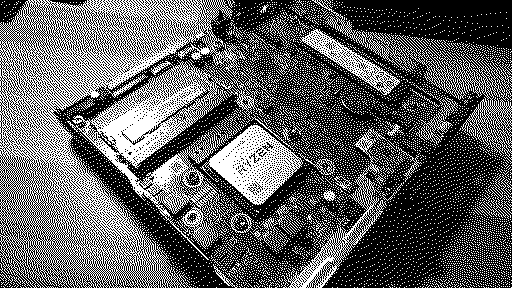
So this was about to be yeeted into the e-waste at work when one of my colleagues stopped it from going in the bin, putting it on my desk instead.
I love these little USFF 1L machines, they pack so much into such a tight space, and this appeared to be no different. Opening it up, oh, a socketed CPU, and a PGA one at that. Two SO-DIMM sockets - I wonder what it is... WHAT?! JACKPOT! Unfortunately the BIOS locks the CPU options to this, and a Ryzen 5 PRO 2400GE (4c8t, 35W OEM only part), so that's exactly what I grabbed for GBP30 on the bay of e, along with a used 512GB M.2 nVME SSD (for GBP14) and a 16GB (2x8GB) PC4-3200 Memory kit (for GBP18). Oh, and the other cool feature of this? It comes with something called 'FlexIO' - so there's an interchangeable PCIe 1x connector at the back - came with a VGA module in it, but i found a USB-C 3.1 module for GBP10, so I grabbed one of those, too. The memory kit and the USB-C module have arrived already, just the R5-2400GE needs to arrive, then I can button it all up and get Windows installed on it. Be interesting to see how this APU handles games at basic resolutions. Shame the BIOS is locked down to the Ryzen 2000 series, the chipset in it is a B350, so would easily accept a 5600G inside it, but the BIOS says no....anyone know how to hack an HP BIOS to add CPU support? :D
Liked by davewongilliesandCertificate of Excellence |
|
phunguss Active Tinkerer Stillwater, MN -------- Joined: Dec 24, 2023 Posts: 511 Likes: 439 |
Dec 29, 2024 - #2
|
|
Kai Robinson TinkerDifferent Board President 2023 Worthing, UK -------- Joined: Sep 2, 2021 Posts: 1,322 Likes: 1,313 |
Dec 30, 2024 - #3
|
|
Kai Robinson TinkerDifferent Board President 2023 Worthing, UK -------- Joined: Sep 2, 2021 Posts: 1,322 Likes: 1,313 |
Jan 7, 2025 - #4
Finally, the Ryzen 5 PRO 2400GE arrived:
So, now there's SMT and an additional 192 GPU cores. I've also backstepped to Windows 10 22H2 from Windows 11 24H2 as Windows 11 was just hot garbage. Stuttery, laggy, always using CPU when idle (30% in some cases), always using the SSD. Windows 10 is just so much snappier and lag-free. Going to run some more benchmarks. I managed 46fps on average with a load of stutter in Windows 11 with the 2200GE at 720p low in Forza Horizon 4.
|
|
Kai Robinson TinkerDifferent Board President 2023 Worthing, UK -------- Joined: Sep 2, 2021 Posts: 1,322 Likes: 1,313 |
Jan 7, 2025 - #5
OK, after some benchmarks, driver updates and setting everything up the same as the 2200GE was in Windows 11, the final results for Forza Horizon 4 are...
52fps average! :) |
| Page 1 of 1 |
| Home | Forums | What's New | Search | Bookmarks | RSS | Original | Settings |
| XenForo Retro Proxy by TinkerDifferent.com |