|
* TinkerDifferent *
Retro Computing Community |
| Home | Forums | What's New | Search | Settings |
| Homemade MIDI switching (3in 3out) |
|
Mu0n Active Tinkerer Quebec -------- Joined: Oct 29, 2021 Posts: 649 Likes: 606 |
Feb 28, 2024 - #1
I have 3 MIDI producing "controller" "things"
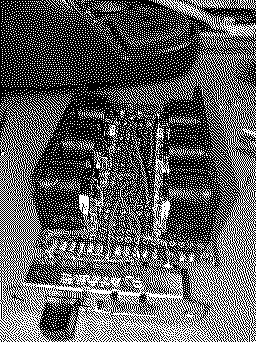
After reviewing a few switch design, I zeroed in on this model: which turns out to be incompatible with my perf board (oops) but heh, whatever, I'll mount them on the sides First up, connect all ground (center pins) together on the underside (using small pins that I extracted as a pin header to help create solder canals) Next up, the 3 input pins #4 (VCC) each go to their respective switch pins on the overside: Next, the intermediary pins are connected together, are always involved no matter which switch position we use and are sent out grouped to the intermediary pins of the output switch. Copy what I do with the pins #5 (signal) on the underside, paying attention to the reversed orientation: Here, we can see the "double pole" nature of this switch from the sides: wiring finished on the underside: The first test is conclusive!! I was able to connect my M-Audio Sono 88 to my Roland SC-88ST and play some notes. If I moved either input or output switch, it stopped working. Bringing them back made it work again! WORKS ON FIRST TRY! Liked by ericandStinkerton18 |
|
Mu0n Active Tinkerer Quebec -------- Joined: Oct 29, 2021 Posts: 649 Likes: 606 |
Feb 28, 2024 - #2
This is the best diagram that gives all possible views of the connector and cable, clearly outlining which it is and from which of the two sides.
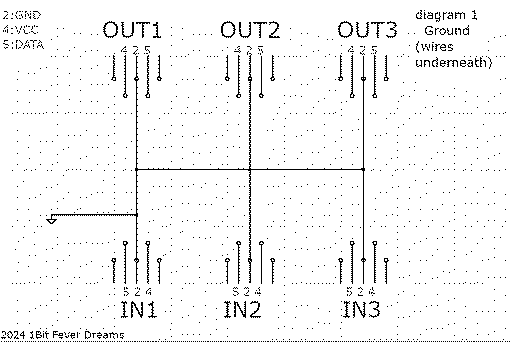
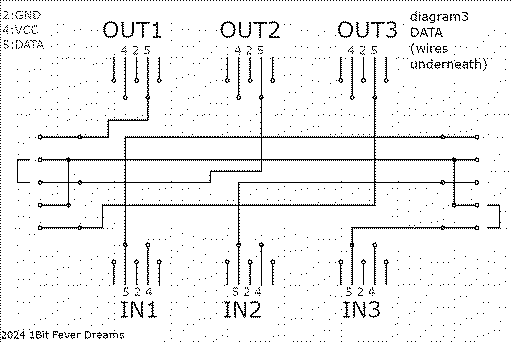
Here are my diagrams. ALL views are from the top side, ie the MIDI female sockets are seen from above, but these 3 wires can be either on the top side of the board or the bottom side (the diagram specifies which) VCC lines: DATA lines:
Liked by Certificate of Excellence |
|
Mu0n Active Tinkerer Quebec -------- Joined: Oct 29, 2021 Posts: 649 Likes: 606 |
Feb 28, 2024 - #3
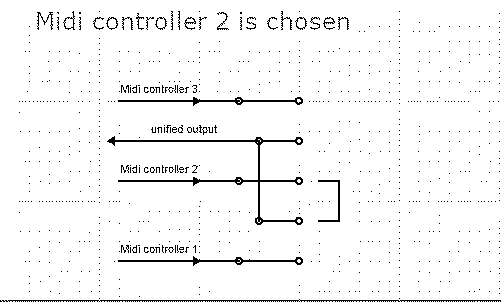
And the way these DP4T (double pole, 4 throw) switches work, is that I use 3 pins as inputs, 2 intermediary pins as output. I get 3 unique configurations out of it with one repeating.
"double pole" means that 2 things are routed at the same time: the VCC on the top side and the Signal on the bottom side. "4 throw" means that there are 4 different positions of the switch. I'll dedicate them as such: input choice 1: SE/30 input choice 2 & 3: WeeCee input choice 3: free/keytar output choice 1: Roland MT-32 output choice 2 & 3: Roland SC-88ST output choice 3: Kawai GMega LX Here are examples of the input side, all 4 "throw" positions. Notice the repetition with switch positions 2 and 3.
Liked by Certificate of Excellence |
|
Mu0n Active Tinkerer Quebec -------- Joined: Oct 29, 2021 Posts: 649 Likes: 606 |
Feb 28, 2024 - #4
|
|
Mu0n Active Tinkerer Quebec -------- Joined: Oct 29, 2021 Posts: 649 Likes: 606 |
Jul 28, 2024 - #5
Update:
I'm working on a video. Short story: the GND pins must *not* be connected together. it was drowning the signal when all connectors were present. pin2 of the DIN5 sockets are only tied to the midi cables' shielding, nothing else. Not between each other. Details in there: |
|
Mu0n Active Tinkerer Quebec -------- Joined: Oct 29, 2021 Posts: 649 Likes: 606 |
Jul 29, 2024 - #6
Liked by Nitram78 |
| Page 1 of 1 |
| Home | Forums | What's New | Search | Bookmarks | RSS | Original | Settings |
| XenForo Retro Proxy by TinkerDifferent.com |