|
* TinkerDifferent *
Retro Computing Community |
| Home | Forums | What's New | Search | Settings |
| Help splicing a CRT VGA cable cut by ewaste [SOLVED] |
Forums > Vintage Other > Monitors > CRT
|
Elemenoh Active Tinkerer Bay Area -------- Joined: Oct 18, 2021 Posts: 428 Likes: 415 |
Feb 9, 2022 - #1
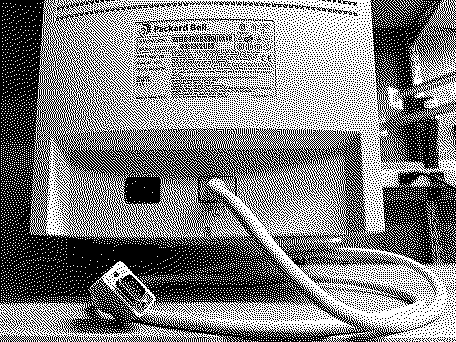
I recently got this lovely Packard Bell CRT monitor, but its VGA cable was cut by ewaste. I got another VGA cable to splice in, but the wire colors are different. Before I do the work, I was hoping someone here could let me know if I'm on the right track or not.
Can someone here advise if the 'Connect to Pin' column in the table below is correct? Also, should all the grounds be tied together or kept discrete?
|
|
Elemenoh Active Tinkerer Bay Area -------- Joined: Oct 18, 2021 Posts: 428 Likes: 415 |
Feb 9, 2022 - #2
This beauty is now working! Below is a table showing the final connections that I made when splicing the new cable in. I hope it helps someone in the future. Now on to rebuilding the speaker cables which should be a lot easier.
Liked by Mac84,eric,fehervariaand 5 others |
|
alectrona6400 New Tinkerer -------- Joined: Mar 10, 2022 Posts: 36 Likes: 15 |
Mar 11, 2022 - #3
I hate when people cut cables off of nicer CRTs. Sure, it's a Packard Bell, but it's free. The evolution of technology has made it a little harder to find CRT monitors in some cases.
|
|
Elemenoh Active Tinkerer Bay Area -------- Joined: Oct 18, 2021 Posts: 428 Likes: 415 |
Mar 15, 2022 - #4
One more update to this project. I spliced the audio cables, which got the speakers working, but they were very quiet. I read somewhere else online that the amplifier IC in powered PC speakers and wear out over time and lead to this symptom. I thought that sounded weird, but worth a shot. Before that I tried replacing the capacitors on the amp, but it made no change. The IC these speakers use is a TEA2025B. I coudln't find that chip very cheaply on its own, but did find it as part of a component in a complete amp, including heat sink for $7 shipped. There may be pin compatible alternatives available more cheaply too.
I swapped the chip from that amp with the one in the Packard Bell speakers and sure enough that solved the problem. They're now as loud could be expected. The audio quality still sucks by most standards. There's a bit of hiss when no audio is playing and there's no low end to speak of. The drivers are 3.5"x2" 4 Ohm. I tried looking for modern alternatives that might be more dynamic but didn't find anything compelling. Anyway, they're now like new to match the monitor itself. To celebrate, here's a cursed video of it paired with a PowerMac 9600 playing a CD from 2020. Liked by Mac84 |
|
jajan547 Active Tinkerer Houston, Texas, USA -------- Joined: Mar 25, 2022 Posts: 738 Likes: 297 |
Mar 28, 2022 - #5
Nice work that's a great looking monitor!
|
| Page 1 of 1 |
| Home | Forums | What's New | Search | Bookmarks | RSS | Original | Settings |
| XenForo Retro Proxy by TinkerDifferent.com |