|
* TinkerDifferent *
Retro Computing Community |
| Home | Forums | What's New | Search | Settings |
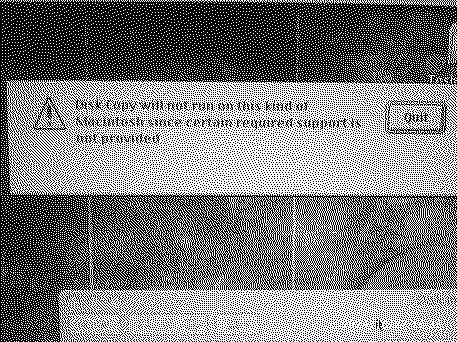
| Having issues with Disk Copy 4.2 (running in classic) on mac os x 10.4 tiger |
Forums > Vintage Apple > Software & Operating Systems
|
MacManiac New Tinkerer -------- Joined: Sep 24, 2024 Posts: 27 Likes: 6 |
Oct 27, 2024 - #1
Want to copy over some .img files to floppy disks. But when I try opening Disk Copy 4.2 it gives me this error even though I have my USB floppy drive connected. Any tips?
|
|
eric Administrator MN -------- Joined: Sep 2, 2021 Posts: 1,152 Likes: 1,935 |
Oct 27, 2024 - #2
Disk Copy 4.2 was built before USB was even a thought in someones mind :) Can 10.4 just mount a Disk Copy image when you double click the image (with Disk Utility?) If not you'll have to convert from the Disk Copy 4.2 format to a raw format then write it. I believe you can convert it with something like CiderPress or https://github.com/jonthysell/Convert2Dsk - There are a few utilities to do this from before when FloppyEMU only supported raw disks.
|
|
MacManiac New Tinkerer -------- Joined: Sep 24, 2024 Posts: 27 Likes: 6 |
Oct 27, 2024 - #3
|
|
eric Administrator MN -------- Joined: Sep 2, 2021 Posts: 1,152 Likes: 1,935 |
Oct 27, 2024 - #4
Then I'd have to guess it's a limitation of the classic environment. If so boot into OS9, write your disks, and boot back. Or else do the raw conversion and use OSX.
|
|
MacManiac New Tinkerer -------- Joined: Sep 24, 2024 Posts: 27 Likes: 6 |
Oct 30, 2024 - #5
|
|
ClassicHasClass Tinkerer -------- Joined: Aug 30, 2022 Posts: 386 Likes: 215 |
Oct 30, 2024 - #6
All iMac G4 systems should be able to boot OS 9, either officially or (for those units that Apple didn't support) using the unofficial booters at https://www.macos9lives.com/downloads .
Liked by JDWanderic |
|
Mk.558 Tinkerer -------- Joined: Nov 11, 2023 Posts: 112 Likes: 45 |
Nov 2, 2024 - #7
You cannot use any disk program with OS X with the Classic Environment. The only one that will work is $ dd through the Terminal. In Mac OS 9 on compatible machines like the Mac mini G4, the floppy drive should be plugged in first, then Disk Copy 4.2 will work with it. Disk Copy 6.3.3 will not work: use Disk Copy 6.4 or 6.5b13.
|
| Page 1 of 1 |
| Home | Forums | What's New | Search | Bookmarks | RSS | Original | Settings |
| XenForo Retro Proxy by TinkerDifferent.com |