* TinkerDifferent *
Retro Computing Community
Home | Forums | What's New | Search | Settings
Have an IBM PC compatible on the 486 or the first Pentium? Please run it for me!

Forums > Vintage IBM Compatible PC's > 80486 / 5x86

Vol
New Tinkerer
--------
Joined: Jul 28, 2022
Posts: 35
Likes: 4
Aug 6, 2022 - #1
I have written small programs which may be used as a benchmark. It is a number pi calculator that can give us any digits of the pi. It also outputs the amount of time spent on each calculation.
I am gathering timings for 100, 1000, and 3000 digits. I have found out that emulators are rather inaccurate with timings and they especially inaccurate for the 486+ systems. So I need data from real hardware. I need just 3 timings for a system, optional screenshots (one for every system) are welcome too. For the 386+ systems, would you like also to run the 80386/80486 optimized programs (pi-pc386/pi-pc486)? It is very interesting to know what program is the best fit for the 80486 or Pentium.
These programs are for the old good DOS.
Thank you.
Attachments:
pi-ibmpc.zip (6.5 KB)

Kai Robinson
TinkerDifferent Board President 2023
Worthing, UK
--------
Joined: Sep 2, 2021
Posts: 1,322
Likes: 1,313
Aug 6, 2022 - #2
Any particular DOS version required?

Vol
New Tinkerer
--------
Joined: Jul 28, 2022
Posts: 35
Likes: 4
Aug 6, 2022 - #3
>> Kai Robinson said:
Any particular DOS version required? Click to expand...
It should work even with the first DOS but newer versions are ok too. I can provide a version for DOS compatible computers which don't have standard BIOS but it is rather redundant for the 486/Pentium machines.

Mu0n
Active Tinkerer
Quebec
--------
Joined: Oct 29, 2021
Posts: 649
Likes: 606
Aug 7, 2022 - #4
@Vol , here you go
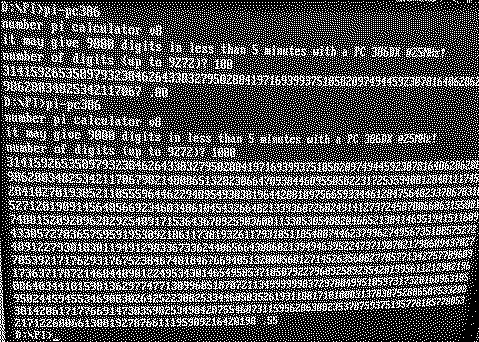
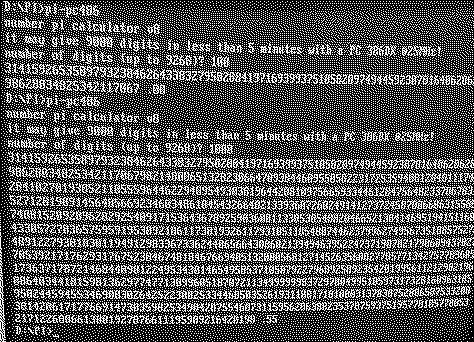
Results from my 486 IBM 425 SX/S ValuePoint (no L2 cache; but upgraded to a 486 DX2/66 cpu) with 32 mb RAM and MS-DOS 6.22


Results in text format:

pi-ibmpc:

100 digits = 0.00
1000 digits = 0.55
3000 digits = 4.61

pi-pc386:

100 digits = 0.00
1000 digits = 0.55
3000 digits = 4.89

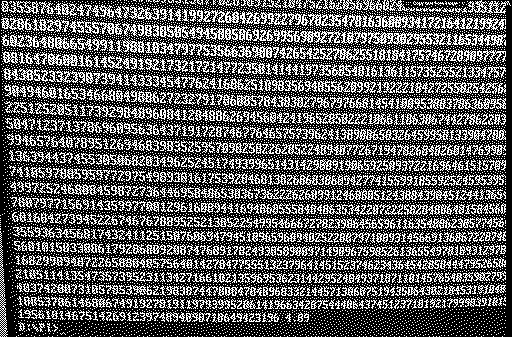
pi-pc486:

100 digits = 0.00
1000 digits = 0.55
3000 digits = 4.89


screenshots:

pi-ibmpc:


pi-pc386:


pi-pc486:


Attachments:
1659866434262.png [View]
1659866448375.png [View]
1659866703384.png [View]
1659866718582.png [View]
1659866298290.png [View]
1659866314378.png [View]

Liked by Vol

Mu0n
Active Tinkerer
Quebec
--------
Joined: Oct 29, 2021
Posts: 649
Likes: 606
Aug 7, 2022 - #5
The pc-ibm version may seem faster but it starts with this strange V180 and I don't recognize the sequence of decimals afterwards.

Liked by Vol

Vol
New Tinkerer
--------
Joined: Jul 28, 2022
Posts: 35
Likes: 4
Aug 7, 2022 - #6
>> Mu0n said:
@Vol , here you go Results from my 486 IBM 425 SX/S ValuePoint (no L2 cache; but upgraded to a 486 DX2/66 cpu) with 32 mb RAM and MS-DOS 6.22 Results in text format: pi-ibmpc: 100 digits = 0.00 1000 digits = 0.55 3000 digits = 4.61 pi-pc386: 100 digits = 0.00 1000 digits = 0.55 3000 digits = 4.89 pi-pc486: 100 digits = 0.00 1000 digits = 0.55 3000 digits = 4.89 Click to expand...
Thank you very much for your results. I have just published them - http://litwr2.atspace.eu/pi/pi-spigot-benchmark.html - I didn't publish a screenshot because all screenshots (but for the PI-IBMPC) have strange marks on them. These marks contain the "copy text from image" button, the share button, the zoom button, ... It seems that you used a different OS for PI-IBMPC and for other programs, right?
Your results with PI-IBMPC.COM is an actual mystery. I can't understand how this is possible. I tested this program very thoroughly under emulators and real hardware. In particular, I tested it on my 386 @25Mhz, Celeron @766Mhz, and AMD Phenom @3200MHz machines under pure DOS - it works fine. What is your processor id?

Mu0n
Active Tinkerer
Quebec
--------
Joined: Oct 29, 2021
Posts: 649
Likes: 606
Aug 7, 2022 - #7
>> Vol said:
Thank you very much for your results. I have just published them - http://litwr2.atspace.eu/pi/pi-spigot-benchmark.html - I didn't publish a screenshot because all screenshots (but for the PI-IBMPC) have strange marks on them. These marks contain the "copy text from image" button, the share button, the zoom button, ... It seems that you used a different OS for PI-IBMPC and for other programs, right? Your results with PI-IBMPC.COM is an actual mystery. I can't understand how this is possible. I tested this program very thoroughly under emulators and real hardware. In particular, I tested it on my 386 @25Mhz, Celeron @766Mhz, and AMD Phenom @3200MHz machines under pure DOS - it works fine. What is your processor id? Click to expand...
All my tests were done on the same machine.

What program do you recommend to check the processor id? Can you provide a link to it? It's just a normal Intel 486 dx2/66. All tests were performed on a compact flash card (512 mb), booted by a real 320mb hard disk (on drive C) containing mdsos 6.22.

Vol
New Tinkerer
--------
Joined: Jul 28, 2022
Posts: 35
Likes: 4
Aug 7, 2022 - #8
>> Mu0n said:
All my tests were done on the same machine. What program do you recommend to check the processor id? Can you provide a link to it? It's just a normal Intel 486 dx2/66. All tests were performed on a compact flash card (512 mb), booted by a real 320mb hard disk (on drive C) containing mdsos 6.22. Click to expand...
Standard system information can show the id but the best method is to look at the chip. It would be great if we can detect the hardware error for this chip.
I can't understand how can the marks appear under DOS? Why are they on screenshots for PI-PC386 and PI-PC486 and there are none for PI-IBMPC? Any hint?

Mu0n
Active Tinkerer
Quebec
--------
Joined: Oct 29, 2021
Posts: 649
Likes: 606
Aug 7, 2022 - #9
>> Vol said:
Standard system information can show the id but the best method is to look at the chip. It would be great if we can detect the hardware error for this chip. I can't understand how can the marks appear under DOS? Why are they on screenshots for PI-PC386 and PI-PC486 and there are none for PI-IBMPC? Any hint? Click to expand...

I don't understand your post. I've posted 6 screenshots, all ordered as I wrote in the text part.

Screenshot 1: pi-ibmpc for 100 and 1000
Screenshot 2: pi-ibmpc for 3000
Screenshot 3: pi-pc386 for 100 and 1000
Screenshot 4: pi-pc386 for 3000
Screenshot 5: pi-pc486 for 100 and 1000
Screenshot 6: pi-pc486 for 3000

Vol
New Tinkerer
--------
Joined: Jul 28, 2022
Posts: 35
Likes: 4
Aug 8, 2022 - #10
>> Mu0n said:
I don't understand your post. I've posted 6 screenshots, all ordered as I wrote in the text part. Screenshot 1: pi-ibmpc for 100 and 1000 Screenshot 2: pi-ibmpc for 3000 Screenshot 3: pi-pc386 for 100 and 1000 Screenshot 4: pi-pc386 for 3000 Screenshot 5: pi-pc486 for 100 and 1000 Screenshot 6: pi-pc486 for 3000 Click to expand...
Look at the screenshots #2-4 and #6, they have the marks at the top. The screenshots #1 and #5 don't have them. However the #5 is for the 486 so there is no connection to the PI-IBMPC strange results, so I confused some things. I am writing a test which can detect what instruction on your CPU works untypical. It may take several days.

Mu0n
Active Tinkerer
Quebec
--------
Joined: Oct 29, 2021
Posts: 649
Likes: 606
Aug 8, 2022 - #11
I'm sorry to have caused confusion with the markings of my screenshots.
Here's why they happened:
I took photos with my phone. The photos synced up in Google photos after a short delay.
I took lower res partial screen caps of them before I pasted them in this thread. This causes me to catch the small message overlay above them (only some of the times). If I had taken screencaps directly on my dos machine, this issue wouldn't have happened. However, I don't have a DOS terminate stay resident screencap utility handy (it's been 30 years ish since I used one).

Here are the pure text results which I captured by launching your programs and setting an output stream, like so:

pi-ibmpc > ibm100.txt

and typing '100' and enter blindly since it expects an entry from me.
Attachments:
IBM1K.TXT (1.1 KB)
486100.TXT (237 bytes)
386100.TXT (237 bytes)
4863K.TXT (3.1 KB)
4861K.TXT (1.1 KB)
3863K.TXT (3.1 KB)
3861K.TXT (1.1 KB)
IBM100.TXT (235 bytes)
IBM3K.TXT (3.1 KB)

Liked by Vol

Mu0n
Active Tinkerer
Quebec
--------
Joined: Oct 29, 2021
Posts: 649
Likes: 606
Aug 8, 2022 - #12
Just for funsies, here are the results when I use a x86 system-on-module from ICOP, the Vortex86DX running at 800 MHz (warning, this is not matching a 800 MHz cpu; the closest equivalent in processor power is more akin to pentium 2 233 MHz) in my WeeCee

ibm:
100 = 0.00
1000 = 0.05
3000 = .33

386:
100 = 0.00
1000 = 0.05
3000 = 0.33

486:
100 = 0.00
1000 = 0.05
3000 = 0.33

it also doesn't exhibit the strange 'V180' at the start of the ibm tests.
Attachments:
V3861K.TXT (1.1 KB)
V3863K.TXT (3.1 KB)
V4861K.TXT (1.1 KB)
V4863K.TXT (3.1 KB)
V386100.TXT (237 bytes)
VIBM100.TXT (235 bytes)
VIBM3K.TXT (3.1 KB)
VIBM1K.TXT (1.1 KB)
V486100.TXT (237 bytes)

Liked by Vol

Vol
New Tinkerer
--------
Joined: Jul 28, 2022
Posts: 35
Likes: 4
Aug 8, 2022 - #13
>> Mu0n said:
I'm sorry to have caused confusion with the markings of my screenshots. Here's why they happened: I took photos with my phone. The photos synced up in Google photos after a short delay. I took lower res partial screen caps of them before I pasted them in this thread. This causes me to catch the small message overlay above them (only some of the times). If I had taken screencaps directly on my dos machine, this issue wouldn't have happened. However, I don't have a DOS terminate stay resident screencap utility handy (it's been 30 years ish since I used one). Here are the pure text results which I captured by launching your programs and setting an output stream, like so: pi-ibmpc > ibm100.txt and typing '100' and enter blindly since it expects an entry from me. Click to expand...
Thank you very much for your explanation. However I had no doubts about the results you received, you know, I have published them. So I just tried to find an explanation about strange results from PI-IBMPC.
I have written a program that can help us to find out what is a peculiarity of your CPU that causes the strange results. This program prints tracing information. Please run it on your PC
pi-log >trace.txt
and send TRACE.TXT to me.
Attachments:
pi-log.zip (601 bytes)

Vol
New Tinkerer
--------
Joined: Jul 28, 2022
Posts: 35
Likes: 4
Aug 8, 2022 - #14
>> Mu0n said:
Just for funsies, here are the results when I use a x86 system-on-module from ICOP, the Vortex86DX running at 800 MHz (warning, this is not matching a 800 MHz cpu; the closest equivalent in processor power is more akin to pentium 2 233 MHz) in my WeeCee ibm: 100 = 0.00 1000 = 0.05 3000 = .33 386: 100 = 0.00 1000 = 0.05 3000 = 0.33 486: 100 = 0.00 1000 = 0.05 3000 = 0.33 it also doesn't exhibit the strange 'V180' at the start of the ibm tests. Click to expand...
So this confirms that your ValuePoint has some issue. Thanks for interesting information about your WeeCee. IMHO it is better to use the maximum to test modern systems. And no need to send me the digits of the pi, they are very well known. :) Just check the first digits 31415...
I use 9264 digits when I test modern hardware. Maybe it will be interesting for somebody to know results from my systems.

the Celeron @766Mhz
ibmpc 2.20
pc386 2.47
pc486 2.42

the AMD Phenom @3200Mh
ibmpc 0.99
pc386 0.99
pc486 0.99

I ran the tests under pure DOS.

Mu0n
Active Tinkerer
Quebec
--------
Joined: Oct 29, 2021
Posts: 649
Likes: 606
Aug 8, 2022 - #15
>> Vol said:
Thank you very much for your explanation. However I had no doubts about the results you received, you know, I have published them. So I just tried to find an explanation about strange results from PI-IBMPC. I have written a program that can help us to find out what is a peculiarity of your CPU that causes the strange results. This program prints tracing information. Please run it on your PC pi-log >trace.txt and send TRACE.TXT to me. Click to expand...

Here you go:

p0115 000E p0142 0000 p0164 0000 000E 001C 2710 p023B 2D00 0007 0131 001B 2D00 0131 p01A3 0131 2D00 0000 001B 2D00 000B 0008 p0280 4D84 000B 0014 001B 0131 p01F8 4D84 000B 0014 EFB4 0092 p023B 1CB4 000B 01C4 0019 1CB4 01C4 p01A3 01C4 1CB4 0000 0019 1CB4 0012 0002 p0280 15A0 0012 0014 0019 01C4 p01F8 15A0 0012 0014 0380 00D9 p023B 3080 0012 020A 0017 3080 020A p01A3 020A 3080 0000 0017 3080 0016 0010 p0280 B432 0016 0002 0017 020A p01F8 B432 0016 0002 BE26 00F9 p023B EB26 0016 022A 0015 EB26 022A p01A3 022A EB26 0000 0015 EB26 001A 0008 p0280 6CB8 001A 000E 0015 022A p01F8 6CB8 001A 000E 3F30 0108 p023B 6C30 001A 0239 0013 6C30 0239 p01A3 0239 6C30 0000 0013 6C30 001D 0012 p0280 F838 001D 0008 0013 0239 p01F8 F838 001D 0008 B9F8 010D p023B E6F8 001D 023E 0011 E6F8 023E p01A3 023E E6F8 0000 0011 E6F8 0021 000D p0280 D159 0021 000F 0011 023E p01F8 D159 0021 000F 8AC8 010E p023B B7C8 0021 023F 000F B7C8 023F p01A3 023F B7C8 0000 000F B7C8 0026 0005 p0280 6195 0026 000D 000F 023F p01F8 6195 0026 000D AB13 010C p023B D813 0026 023D 000D D813 023D p01A3 023D D813 0000 000D D813 002C 0001 p0280 2450 002C 0003 000D 023D p01F8 2450 002C 0003 D9E0 0108 p023B 06E0 002C 023A 000B 06E0 023A p01A3 023A 06E0 0000 000B 06E0 0033 0009 p0280 D214 0033 0004 000B 023A p01F8 D214 0033 0004 1A64 0103 p023B 4764 0033 0234 0009 4764 0234 p01A3 0234 4764 0000 0009 4764 003E 0006 p0280 B299 003E 0003 0009 0234 p01F8 B299 003E 0003 CA64 00FA p023B F764 003E 022B 0007 F764 022B p01A3 022B F764 0000 0007 F764 004F 0002 p0280 6C7C 004F 0000 0007 022B p01F8 6C7C 004F 0000 4574 00EE p023B 7274 004F 021F 0005 7274 021F p01A3 021F 7274 0000 0005 7274 006C 0003 p0280 B07D 006C 0003 0005 021F p01F8 B07D 006C 0003 60FA 00D9 p023B 8DFA 006C 020A 0003 8DFA 020A p01A3 020A 8DFA 0000 0003 8DFA 00AE 0000 p0280 2F53 00AE 0001 0003 020A p01F8 2F53 00AE 0001 2F53 00AE p023B 5C53 00AE 01DF 0001 5C53 01DF p01A3 01DF 5C53 0000 0001 5C53 01DF 0000 p0280 5C53 01DF 0000 0001 01DF p02CB 0C45 01DF 1503 0C45 03E8 0C45 30064 008D 141 Click to expand...
Attachments:
TRACE.TXT (2.3 KB)

Liked by Vol

Vol
New Tinkerer
--------
Joined: Jul 28, 2022
Posts: 35
Likes: 4
Aug 9, 2022 - #16
>> Mu0n said:
Here you go: Click to expand...
Thank you. It is often very difficult to locate a hardware peculiarity. Your TRACE.TXT contains correct data. So we need more steps to detect the peculiarity. Would you like to run PI-IBMPC to get 4 digits? They must be 3141.

Mu0n
Active Tinkerer
Quebec
--------
Joined: Oct 29, 2021
Posts: 649
Likes: 606
Aug 9, 2022 - #17
>> Vol said:
Thank you. It is often very difficult to locate a hardware peculiarity. Your TRACE.TXT contains correct data. So we need more steps to detect the peculiarity. Would you like to run PI-IBMPC to get 4 digits? They must be 3141. Click to expand...
pi-ibmpc gives out:

V179 .00

Liked by Vol

Vol
New Tinkerer
--------
Joined: Jul 28, 2022
Posts: 35
Likes: 4
Aug 10, 2022 - #18
>> Mu0n said:
pi-ibmpc gives out: Code: V179 .00 Click to expand...
Your results show that every single instruction works correctly. So the problem probably is a combination of some instructions. Do you know about the famous POPAD/PUSHAD bug of all the 80386 chips?
Let's continue our efforts to find out the source of the strange results. Would you like to run the next two tests?
pi-log1 >trace1.txt
pi-log2 >trace2.txt
I need TRACE1.TXT and TRACE2.TXT for further analysis.
Attachments:
pi-log2.zip (1.1 KB)

Mu0n
Active Tinkerer
Quebec
--------
Joined: Oct 29, 2021
Posts: 649
Likes: 606
Aug 10, 2022 - #19
TRACES
Attachments:
TRACE2.TXT (1.3 KB)
TRACE1.TXT (1.2 KB)

Liked by Vol

Vol
New Tinkerer
--------
Joined: Jul 28, 2022
Posts: 35
Likes: 4
Aug 10, 2022 - #20
>> Mu0n said:
TRACES Click to expand...
I can't still get any clue. :( I've prepared the next tests but it can be for long. :( It would be great if you can provide telnet/ftp or ssh access for me to your system. This can speed up things very much.
The next tests
pi-log3 >trace3.txt
pi-log4 >trace4.txt
Attachments:
pi-log3.zip (922 bytes)

Page 1 of 2 | Next > | Last >>

Home | Forums | What's New | Search | Bookmarks | RSS | Original | Settings
XenForo Retro Proxy by TinkerDifferent.com