|
* TinkerDifferent *
Retro Computing Community |
| Home | Forums | What's New | Search | Settings |
| Hacking the Kodak Reels 8mm Film Digitizer (New Thread) |
|
WowIndescribable New Tinkerer -------- Joined: Dec 17, 2025 Posts: 1 Likes: 1 |
Wednesday at 12:21 PM - #141
Hi, new forum user here, joined specifically for this Kodak Reels discussion. I just received my Reels digitizer, s/n H2324148BK01819. Since I have quite a few films to do that are important to me and I'm now aware of the limitations of the stock machine, I would like to try the modified firmware, and likely change the lens too. There seems to be still quite a bit of change going on by you absolutely amazing rockstar hackers in this regard (I'm deeply impressed with your creativity, generosity, and persistence). As such, at this point do ye think I should wait a bit until 'the way' has been stabilized a bit more?
Liked by SkipBurg |
|
0dan0 Active Tinkerer -------- Joined: Jan 13, 2025 Posts: 324 Likes: 498 |
Wednesday at 5:16 PM - #142
@WowIndescribable H2324148BKxxxxx is a type C, so you have no need to wait. While the firmware hacks are is still changing, but the quality improvements are slowing. If you can swap the lens, with any recent firmware, you will be good.
Liked by WowIndescribableandThePhage |
|
0dan0 Active Tinkerer -------- Joined: Jan 13, 2025 Posts: 324 Likes: 498 |
Wednesday at 9:35 PM - #143
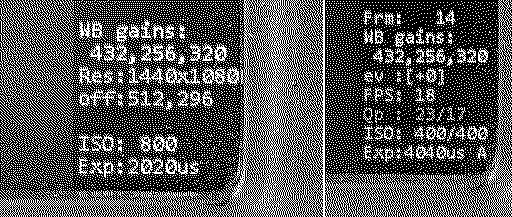
Version 7.7 for Type A, B and C (and stock FW recovery for D users.) So nothing for Type D yet, at least now unit can be recovered if the wrong firmware is installed. New to v7.7 - stats and controllable field are written off the video image (bottom right corner.) - there is now an ISO Max control, supporting 100,200 & 400 ISO settings. Defaults to 100. The code has had a lot of clean up, to it is get easier for other to start contributing. github: https://github.com/0dan0/4reels Donations: This project of reverse engineering a consumer product is in the grey area legally, but it shouldn't be. We own this hardware, we should be free to modify it as we want, and share those modifications without any concern. A charity that I donate to every year, Electronic Frontier Foundation (EFF), deals with customer rights like these. So if you want support projects like this one, please donate to the EFF. You can thank me in your donation via: https://supporters.eff.org/donate/tribute Use this contact info.
Liked by Mac84,WowIndescribable,sdezegoand 4 others |
|
Roderick New Tinkerer -------- Joined: Jan 2, 2026 Posts: 1 Likes: 0 |
Today at 3:51 PM - #144
Hello Everyone
I too am very impressed by this very activ Forum, which inspired me to order a Kodak reel. I am based in Europe and sadly I received a D-Typ yesterday. (H2825148BKxxxxx). So I guess I will have to wait a while till I can install the new Firmware, is that correct? Also after unpacking I noticed that the 8mm to super8mm handle was stuck about 1/2 cm under the opening and also the SD card reader was not aligned with the slit of the cover. After opening everything, I could shift the loose mechanics into the correct position. It works all fine now, but has anyone had the same issue? Best Regards Roderick
|
|
ThePhage Tinkerer -------- Joined: Oct 30, 2024 Posts: 41 Likes: 34 |
19 minutes ago - #145
@0dan0, thanks for the v7.7 update. It seems to be working well on my Type C scanner.
I like having the stats/settings over on the right side, to not obscure the scan preview - well done! ISO Max setting works well. As you you had mentioned previously, the ISO does not exceed 400 during encoding, but I do find it slightly curious that during preview it will register ad high as 800. Not sure if that's intentional or useful. I might suggest setting the preview mode ISO to be consistent with the encoding process (do not exceed 400, unless the max setting is lower). Another minor suggestion is to move the ev setting down in the list, below the Qp since that would fit better with the other exposure-related settings. Finally, I will report one instance after an appropriate auto-stop where the interface appeared frozen and non-functional, but after potentially 15 seconds, it eventually returned to the Home screen and my previous button presses quickly "caught up." I power cycled and haven't had the issue recur since. I will note that I did do a power cycle *after* the update had completed. For everyone else, here's a quick plug for the User Guide I continue to revise alongside 0Dan0's firmware updates. |
| << First | < Prev | Page 8 of 8 |
| Home | Forums | What's New | Search | Bookmarks | RSS | Original | Settings |
| XenForo Retro Proxy by TinkerDifferent.com |