|
* TinkerDifferent *
Retro Computing Community |
| Home | Forums | What's New | Search | Settings |
| Getting an Amiga online in 2025 |
Forums > Vintage Commodore > Amiga
|
patters Tinkerer -------- Joined: Feb 3, 2025 Posts: 52 Likes: 42 |
Sep 23, 2025 - #1
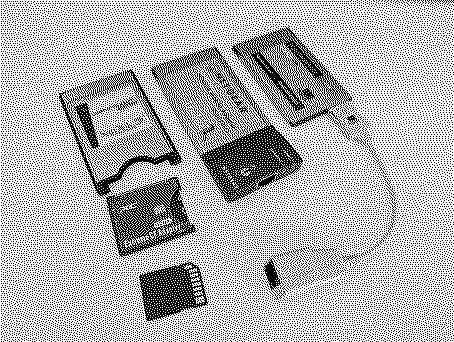
Part One - Obtaining a Network CardThe first challenge is finding a NIC without paying way over the odds. Most sellers have discovered they can scalp Amiga owners for GBP50 for a compatible PCMCIA NIC. I ruled out wireless network cards on the basis that none of the Amiga compatible ones will have 802.11n radios, and that WPA2 encryption in software, although added to the prism2 driver, will be pretty unusable on unaccelerated machines. Consequently for PCMCIA Amigas (A600/A1200) you're essentially going to be limited to wired Ethernet cards supported by one of two drivers:
The next big problem is that even once you've found a cheap supported 16-bit PCMCIA card, the odds are that it will be missing its dongle. One strategy is to pick a slightly bulkier card from the cnet.device compatibility list that includes a moulded RJ45 connector (e.g. a Netgear FA411 which I was lucky enough to find for around GBP10). Another option is to find a 3Com 3C589 card with an XJACK flip-out RJ45 connector, but these tend to be expensive (GBP40-50). The proprietary dongles will be almost impossible to find, but the 3Com ones were manufactured and sold separately in sufficient numbers that you may get lucky. There are some caveats though. The dongles are not all interchangeable. Despite sharing a common card connector, the pinouts are divided into two categories: the 10Mb-only 3C589/562/563 design (single link LED), and the Fast Ethernet 10/100Mb 3C572/574/575 design (dual 10/100 link LEDs) which are not Amiga compatible cards. I bought a cheap bare 3Com card which I suspected had an XJACK connector because the backside label featured an XJACK trademark, but it turned out to be a regular 3CCE589ET requiring a dongle. However, I was able to acquire this separately (for around another GBP10) by carefully searching for these part numbers below, which I gathered from many sources including auction photos. I've listed them all out here to help others... Useful Part NumbersSupported 3Com XJACK PCMCIA cards (no dongle needed):
10Mb Combo Coax/RJ45 dongle for 3C589/562/563 (very bulky):
10Mb 8ft Cat5 cable for 3C589/562/563 (neatest option):
10Mb RJ45 dongle for 3C589/562/563:
10/100Mb RJ45 dongle for 3C572/574/575 (not Amiga compatible!):
The 15pin connector to RJ45 dongles for the following NE2000-based NICs are all interchangeable:
This long defunct web page was a very useful source of information. It contains pinout details which will allow adventurous tinkerers to directly wire some Cat5 cable to the card, in the event you have a cheap card and can't be bothered to wait for a dongle. Additional confusion: the Amiga requires 16-bit PCMCIA devices and there are 16-bit variants of the 3C574 (with XJACK even), but unfortunately these are not supported by the 3c589.device driver. Additional additional confusion: Be aware that the link light on these 3C589 cards can mislead. Since I now have both Netgear and 3Com PCMCIA NICs, I noticed that the Netgear will report its link status from the moment the card is inserted and powered. The 3Com on the other hand only reports its link status via the LED when the driver successfully initialises. When I was flapping around trying to get a working TCP/IP stack (more on that in a subsequent post) I had started to suspect it might be broken, or that a 10Mb link is now so old a spec that my switch was refusing to negotiate, but this is the normal behaviour for these 3Com cards it seems.
Liked by museandKai Robinson |
|
patters Tinkerer -------- Joined: Feb 3, 2025 Posts: 52 Likes: 42 |
Sep 23, 2025 - #2
Part Two - Selecting and Configuring a TCP/IP StackLet's set some expectations: an Amiga browsing the modern Web is going to be pretty horrendous. If, like me, you have an unaccelerated A600 the only real purpose of getting online is just out of curiosity, but it's also nice to be able to directly fetch stuff from Aminet. Bootstrapping if you will. With that in mind, my aim was to install the absolute minimum of software on my Workbench to achieve this. The CandidatesThe principal Amiga TCP/IP stacks, if we ignore specialised/licensed descendants, are:
Selection LogicMy selection process was to try Roadshow demo which worked on a basic connectivity level (DHCP, DNS, ping) though the timeout was annoying. However I couldn't seem to connect an application, specifically an FTP client session using ncftp (illegal instruction error, I think).I suspected that Roadshow's bsdsocket.library is not compiled for 68000 and indeed there is a mention in the version 1.15 release notes about a compact 68000 version 'available on request' presumably to paying customers, which implies that the regular version is not 68000 compatible. I already spent EUR50 on AmigaOS 3.2 (mainly to replace my A600's bugged Kickstart 37.299 that can't boot from IDE) so this was fast getting too expensive to justify. I ruled out Miami owing to the additional packages I'd have to install. Amiga software, as a rule, can't easily be uninstalled if later you change your mind. ...Which left AmiTCP. This is nice and self-contained and, although it doesn't have DHCP, it works perfectly well on 68000. I followed the guide linked above, and simplified things further since I'll never use dialup. My AmiTCP ConfgI don't want the TCP/IP stack to run every startup, since usually I don't have the network card inserted and I usually have all 8MB of my Fast RAM expansion enabled (which blocks PCMCIA). I use the a608mcfg tool too switch to 4MB only. I'm fine with running 'startnet' from a shell, so I commented that part out. I will not host services so I don't care about inetd or login.S:user-startup
I also want the interface to be called eth0 to align with modern convention. AmiTCP:bin/startnet
I want the option of switching between my two NICs so I'll leave both definitions here, with the unused one commented out. AmiTCP:db/interfaces
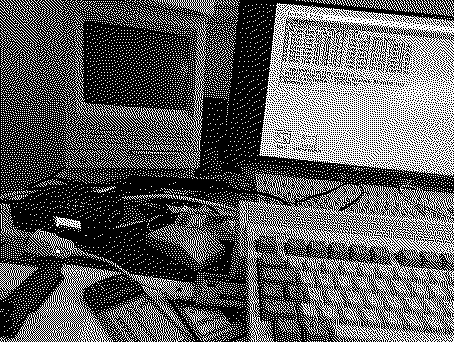
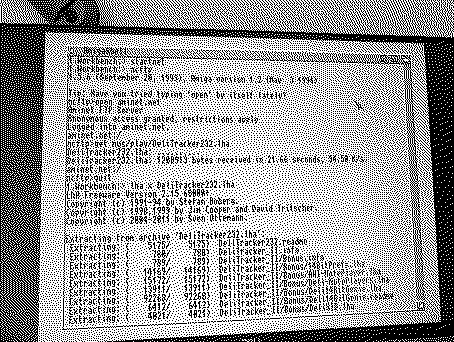
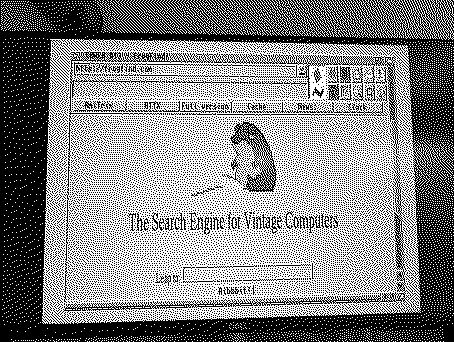
We Have Lift-Off! [rocket]I didn't at first notice that AmiTCP already includes an older version of ncftp which doesn't need the ixemul library, unlike the standalone version on Aminet. This means that a standard AmiTCP install enables all I wanted to be able to do: to use the Amiga to download its own software! As I do with Macintosh Garden, I can use my phone to browse Aminet, and once I know the URL of the file I want, I can FTP get it using the Amiga. I scratched around looking for 68000 builds of browsers and although a 68000 build of AWeb Lite 3.5 exists, it's reckoned to be very slow. Apparently you copy these binaries over the top of a regular install of AWeb 3.5. I tried out the AWeb 3.2 demo instead which is leaner, compiled for 68000, and seems to run ok even without the stated requirement of ClassAct. The newer Web standards support which v3.5 offered has long since become irrelevant. I mean it's cool to have got the browser up, but I'll probably just stick to command-line FTP transfers in future. Still, tinkering is what this hobby is all about.
Liked by muse |
|
ClassicHasClass Tinkerer -------- Joined: Aug 30, 2022 Posts: 386 Likes: 215 |
Sep 24, 2025 - #3
My A4000T has a Zorro Ariadne card. It's not a particularly fast card, but it works.
There is an 68K Amiga build of NetSurf you might try. It's slow even on this 68060, but it works, and you can access a lot more sites with it. |
| Page 1 of 1 |
| Home | Forums | What's New | Search | Bookmarks | RSS | Original | Settings |
| XenForo Retro Proxy by TinkerDifferent.com |