* TinkerDifferent *
Retro Computing Community
Home | Forums | What's New | Search | Settings
G5 pro. Chime, no display

Forums > Vintage Apple > Macintosh > PowerPC G3, G4 & G5 (New World ROM) > PowerMac G5 & iMac G5

Celotine
New Tinkerer
--------
Joined: Nov 28, 2024
Posts: 30
Likes: 10
Feb 14, 2025 - #1
Quick preface. I know exactly 2 things about Macs, jack and squat, and Jack left town. So here I am lol. I got this machine today. Got it cheap and has no peripherals. It chimes but put nothing to my monitor. It could be the monitor, cable or the graphics card. Anything else it might be? Something quirky about Macs, like not booting if the clock battery is dead?

Liked by Kai Robinson

eric
Administrator
MN
--------
Joined: Sep 2, 2021
Posts: 1,151
Likes: 1,935
Feb 14, 2025 - #2
Bad RAM can many times be a culprit - Try disconnecting everything (drives, PCI cards except video) and pulling all the ram but 2 sticks in matching banks cycle through them. Battery is normally not required (or at least wasn't for mine, I only have one)

Liked by KingDingus

phunguss
Active Tinkerer
Stillwater, MN
--------
Joined: Dec 24, 2023
Posts: 513
Likes: 441
Feb 14, 2025 - #3
Try power up, hold down Command+Option+P+R and wait for 3 full chime loops. If you don't see any video life by then, release and hold down the option key for a good few minutes. What type of external video ports are on the video card?

Celotine
New Tinkerer
--------
Joined: Nov 28, 2024
Posts: 30
Likes: 10
Feb 14, 2025 - #4
>> phunguss said:
Try power up, hold down Command+Option+P+R and wait for 3 full chime loops. If you don't see any video life by then, release and hold down the option key for a good few minutes. What type of external video ports are on the video card? Click to expand...
Ah, no keyboard. When I get one, I can try that. But the video ports are DVI

ClassicHasClass
Tinkerer
--------
Joined: Aug 30, 2022
Posts: 386
Likes: 215
Feb 14, 2025 - #5
Depending on the G5 model, there are also diagnostic LEDs on the logic board towards the front that could be helpful.

Liked by KingDingus

Celotine
New Tinkerer
--------
Joined: Nov 28, 2024
Posts: 30
Likes: 10
Feb 14, 2025 - #6
>> eric said:
Bad RAM can many times be a culprit - Try disconnecting everything (drives, PCI cards except video) and pulling all the ram but 2 sticks in matching banks cycle through them. Battery is normally not required (or at least wasn't for mine, I only have one) Click to expand...
I'll do that. I'm waiting for a dvi to HDMI dongle to come (it'll be here later today) to be sure it's not my cable or monitor

phunguss
Active Tinkerer
Stillwater, MN
--------
Joined: Dec 24, 2023
Posts: 513
Likes: 441
Feb 14, 2025 - #7
>> Celotine said:
Ah, no keyboard. When I get one, I can try that. But the video ports are DVI Click to expand...
You can use any windows USB keyboard. Use the keys Windows+CTRL+P+R. If that does not do it, try Windows+ALT+P+R.

Liked by eric

Celotine
New Tinkerer
--------
Joined: Nov 28, 2024
Posts: 30
Likes: 10
Feb 15, 2025 - #8
>> phunguss said:
You can use any windows USB keyboard. Use the keys Windows+CTRL+P+R. If that does not do it, try Windows+ALT+P+R. Click to expand...
Is there a key on a Windows keyboard to open the disc tray?

phunguss
Active Tinkerer
Stillwater, MN
--------
Joined: Dec 24, 2023
Posts: 513
Likes: 441
Feb 15, 2025 - #9
>> Celotine said:
Is there a key on a Windows keyboard to open the disc tray? Click to expand...
No, but you can do it manually.

Here is an external reference shot with the optical drive door assembly on the outside of a G5 model so you can compare... The door slides downward. Look at the gap on the left green zone... you have to put an extended paperclip through the holes to push the eject button. Paperclip has to be inserted approximately 3/4 of an inch. You should be able to feel the bubble button.

So you will be inserting the paperclip on the green zone on the right (above), choose one of these holes to feel around with the paperclip (below). You may have to angle up or down a bit to find the sweet spot. You are looking for the big square eject button, NOT the tiny pinhole to manually force an eject. Now, remember that the door slides downward, so as soon as you press that button, yank out your paperclip so the downward door does not jam and the cd fails to open.
Attachments:
mpg5-eject1.jpg [View]
mpg5-eject2.jpg [View]

Celotine
New Tinkerer
--------
Joined: Nov 28, 2024
Posts: 30
Likes: 10
Feb 15, 2025 - #10
>> phunguss said:
No, but you can do it manually. Here is an external reference shot with the optical drive door assembly on the outside of a G5 model so you can compare... The door slides downward. Look at the gap on the left green zone... you have to put an extended paperclip through the holes to push the eject button. Paperclip has to be inserted approximately 3/4 of an inch. You should be able to feel the bubble button. View attachment 20174 So you will be inserting the paperclip on the green zone on the right (above), choose one of these holes to feel around with the paperclip (below). You may have to angle up or down a bit to find the sweet spot. You are looking for the big square eject button, NOT the tiny pinhole to manually force an eject. Now, remember that the door slides downward, so as soon as you press that button, yank out your paperclip so the downward door does not jam and the cd fails to open. View attachment 20175 Click to expand...
Ah, I'll wait till the real keyboard comes. Can I boot it from USB? I might just install Linux instead of the original recovery disc

Celotine
New Tinkerer
--------
Joined: Nov 28, 2024
Posts: 30
Likes: 10
Feb 15, 2025 - #11
>> phunguss said:
No, but you can do it manually. Here is an external reference shot with the optical drive door assembly on the outside of a G5 model so you can compare... The door slides downward. Look at the gap on the left green zone... you have to put an extended paperclip through the holes to push the eject button. Paperclip has to be inserted approximately 3/4 of an inch. You should be able to feel the bubble button. View attachment 20174 So you will be inserting the paperclip on the green zone on the right (above), choose one of these holes to feel around with the paperclip (below). You may have to angle up or down a bit to find the sweet spot. You are looking for the big square eject button, NOT the tiny pinhole to manually force an eject. Now, remember that the door slides downward, so as soon as you press that button, yank out your paperclip so the downward door does not jam and the cd fails to open. View attachment 20175 Click to expand...
Ok I removed the hard drive and all the RAM but 2 sticks in dimm 1 and 2 on one of the boards. I mixed them around and tried the top slot and bottom, no change. I think the video card might be toast. Also I moved the video card to a different slot and used a different monitor, a dvi to HDMI instead of DVI to VGA.

Celotine
New Tinkerer
--------
Joined: Nov 28, 2024
Posts: 30
Likes: 10
Feb 15, 2025 - #12
>> eric said:
Bad RAM can many times be a culprit - Try disconnecting everything (drives, PCI cards except video) and pulling all the ram but 2 sticks in matching banks cycle through them. Battery is normally not required (or at least wasn't for mine, I only have one) Click to expand...
Did this now, no change. I cycled through the 6 sticks on the 2 ram cards. Swapped the cards around too. Maybe a bum video card. Even moved the video card to a different slot and tried a different monitor with DVI to HDMI instead of the DVI to VGA that I was using

Certificate of Excellence
Active Tinkerer
United Sates
--------
Joined: Nov 1, 2021
Posts: 765
Likes: 530
Feb 15, 2025 - #13
>> Celotine said:
Ok I removed the hard drive and all the RAM but 2 sticks in dimm 1 and 2 on one of the boards. I mixed them around and tried the top slot and bottom, no change. I think the video card might be toast. Also I moved the video card to a different slot and used a different monitor, a dvi to HDMI instead of DVI to VGA. Click to expand...
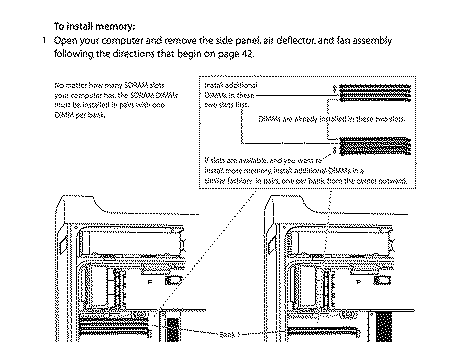
The ram should be matched in dimm 1 of each ram bank, meaning if you run matched pairs in dimm 1 & 2 of one ram bank, the machine will not work. Here's a visual that should help orient where your first matched pair of ram should be placed.

Another way to think about it is when you are inside your powermac g5 with the fan removed, along the upper right hand corner of each ram slot, the slot will be numbered 1,2,3,4 etc. Stick the first matched pair of ram in the slots numbered one (there should be a single slot labeled 1 in each ram bank), slot 2 for the second matched pair etc. This is how you install ram into a Powermac g5. I hope this gets you up and running.

Good luck.

.
.
.
.

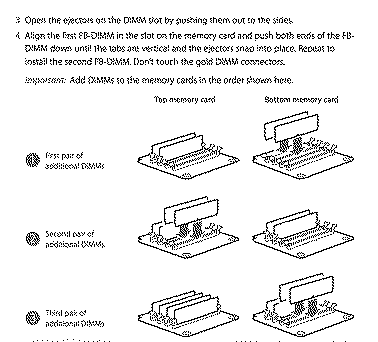
Oh I just realized you said "boards" in your previous post - as in memory riser cards possibly? The name of your thread is confusing as it has parts of two (internally) very different machines. How many cdrom slots are on the front of the mac? One slot will be a Powermac G5 (PowerPC) which correlates to my initial instruction above. Two slots will be Classic Mac Pro (Intel) which are different machines. To install ram into cMP, follow these instructions.


Use this instruction to ensure your ram is correctly installed before moving forward.

Good luck! :)
Attachments:
PowerMacG5 ram slots.jpg [View]
cMacPro Ram slots.jpg [View]

Liked by phungussanderic

Celotine
New Tinkerer
--------
Joined: Nov 28, 2024
Posts: 30
Likes: 10
Feb 15, 2025 - #14
>> Certificate of Excellence said:
The ram should be matched in dimm 1 of each ram bank, meaning if you run matched pairs in dimm 1 & 2 of one ram bank, the machine will not work. Here's a visual that should help orient where your first matched pair of ram should be placed. View attachment 20179 Another way to think about it is when you are inside your powermac g5 with the fan removed, along the upper right hand corner of each ram slot, the slot will be numbered 1,2,3,4 etc. Stick the first matched pair of ram in the slots numbered one (there should be a single slot labeled 1 in each ram bank), slot 2 for the second matched pair etc. This is how you install ram into a Powermac g5. I hope this gets you up and running. Good luck. . . . . Oh I just realized you said "boards" in your previous post - as in memory riser cards possibly? The name of your thread is confusing as it has parts of two (internally) very different machines. How many cdrom slots are on the front of the mac? One slot will be a Powermac G5 (PowerPC) which correlates to my initial instruction above. Two slots will be Classic Mac Pro (Intel) which are different machines. To install ram into cMP, follow these instructions. View attachment 20180 Use this instruction to ensure your ram is correctly installed before moving forward. Good luck! Click to expand...
Yeah that's what I got. 2 slots on front and the riser cards inside. I have them as 2 stick in each now, in a lot 1 and 2 in each. Still nothing. No lights on any of the cards either. Before I had a light on one card, I suppose indicating a bad stick, that stick isn't in the computer anymore. Also something I failed to mention, the fan on the video card goes to 100% as soon as I power on, it stays on for 2 or 3 minutes then goes silent.

Liked by phungussandCertificate of Excellence

phunguss
Active Tinkerer
Stillwater, MN
--------
Joined: Dec 24, 2023
Posts: 513
Likes: 441
Feb 15, 2025 - #15
>> Celotine said:
Yeah that's what I got. 2 slots on front and the riser cards inside. I have them as 2 stick in each now, in a lot 1 and 2 in each. Still nothing. No lights on any of the cards either. Before I had a light on one card, I suppose indicating a bad stick, that stick isn't in the computer anymore. Also something I failed to mention, the fan on the video card goes to 100% as soon as I power on, it stays on for 2 or 3 minutes then goes silent. Click to expand...
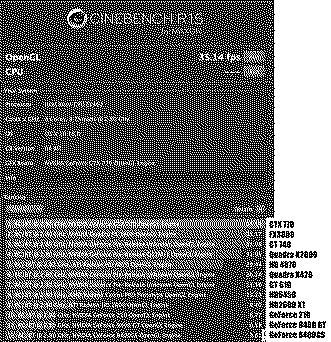
Ok, so now that we know it is an INTEL vs G5, there are lots of cheap options for video cards. Check out this thread on some confirmed PC cards that are not flashed to mac, but video shows up once the OS boots. OCLP can give you a boot picker screen with these cards (NOT an EFI picker ie the option key).

I also did some recent testing with other PC cards, nothing formally compiled, but here is a quick list:
9500 GT
9600 GT
GT 730
Quadro K600
Quadro K4200
RX 460
RX 560
RX 580

Those that require power will need either the special mini-mobo connectors or some sort of SATA/MOLEX adapters.
Attachments:
CB15-cards.jpg [View]

Certificate of Excellence
Active Tinkerer
United Sates
--------
Joined: Nov 1, 2021
Posts: 765
Likes: 530
Feb 15, 2025 - #16
Ok, what cMP do you have exactly? You can figure this out on the sticker on the back of the mac below the PCIe card slots.


In relation to your ram, you want to make sure the sticks are equally sized pairs - so two 512mb for exmaple and NOT a 512mb and a 1gb as an installed pair. Your cMP accepts 512Mb, 1GB or 2GB FB-DIMMs. Check to make sure they are identical. Their spec is below:

667 MHz, FB-DIMMS
72-bit wide, 240-pin modules
36 devices maximum per DIMM
Error-correcting code (ECC)

If you are satisfied that your ram is correct and in good order, move forward.
Attachments:
Mac+Pro+Serial+Number+Model+Number.jpg [View]

Liked by phunguss

phunguss
Active Tinkerer
Stillwater, MN
--------
Joined: Dec 24, 2023
Posts: 513
Likes: 441
Feb 15, 2025 - #17
>> Certificate of Excellence said:
Ok, what cMP do you have exactly? You can figure this out on the sticker on the back of the mac below the PCIe card slots. In relation to your ram, you want to make sure the sticks are equally sized pairs - so two 512mb for exmaple and NOT a 512mb and a 1gb as an installed pair. Your cMP accepts 512Mb, 1GB or 2GB FB-DIMMs. Check to make sure they are identical. Their spec is below: 667 MHz, FB-DIMMS 72-bit wide, 240-pin modules 36 devices maximum per DIMM Error-correcting code (ECC) Click to expand...
Also be wary that there are some glitchy results from any sticks less than 2GB, as reported by @HrutkayMods
Attachments:
Mac+Pro+Serial+Number+Model+Number.jpg [View]

Certificate of Excellence
Active Tinkerer
United Sates
--------
Joined: Nov 1, 2021
Posts: 765
Likes: 530
Feb 15, 2025 - #18
>> phunguss said:
Also be wary that there are some glitchy results from any sticks less than 2GB , as reported by @HrutkayMods Click to expand...
Right, taking the slow bus as OP states he knows exactly nothing about his new acquisition.

Celotine
New Tinkerer
--------
Joined: Nov 28, 2024
Posts: 30
Likes: 10
Feb 24, 2025 - #19
>> phunguss said:
Ok, so now that we know it is an INTEL vs G5, there are lots of cheap options for video cards. Check out this thread on some confirmed PC cards that are not flashed to mac, but video shows up once the OS boots. OCLP can give you a boot picker screen with these cards (NOT an EFI picker ie the option key). View attachment 20182 I also did some recent testing with other PC cards, nothing formally compiled, but here is a quick list: 9500 GT 9600 GT GT 730 Quadro K600 Quadro K4200 RX 460 RX 560 RX 580 Those that require power will need either the special mini-mobo connectors or some sort of SATA/MOLEX adapters. Click to expand...
A friend came over yesterday with known working Mac video cards. Still no display. [face-with-open-mouth][dash-symbol]

phunguss
Active Tinkerer
Stillwater, MN
--------
Joined: Dec 24, 2023
Posts: 513
Likes: 441
Feb 24, 2025 - #20
Three questions:
1. Did you still get boot chimes for every variation of RAM swaps you did?
2. Did you still get boot chimes with every GPU you tried?
3. PCI slots 1 and 2 are x16 and 3 and 4 are x4. Did you try a GPU in a different slot?

Maybe the bottom PCIe slot is damaged?

Page 1 of 2 | Next > | Last >>

Home | Forums | What's New | Search | Bookmarks | RSS | Original | Settings
XenForo Retro Proxy by TinkerDifferent.com