|
* TinkerDifferent *
Retro Computing Community |
| Home | Forums | What's New | Search | Settings |
| DOS on Mac |
Forums > Vintage Apple > Add-ons, Peripherals & Networking
|
V.Yakob Tinkerer Syktyvkar -------- Joined: Sep 6, 2023 Posts: 129 Likes: 46 |
Oct 28, 2025 - #1
Hi folks,
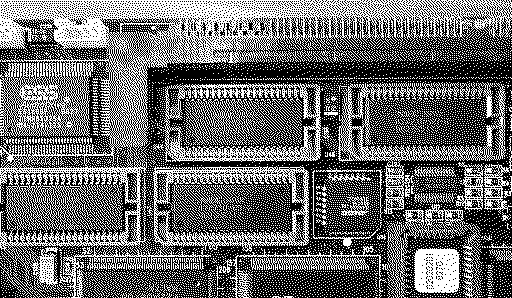
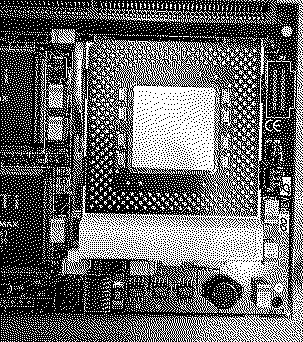
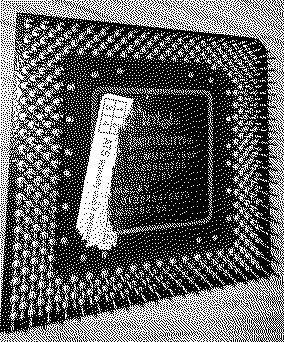
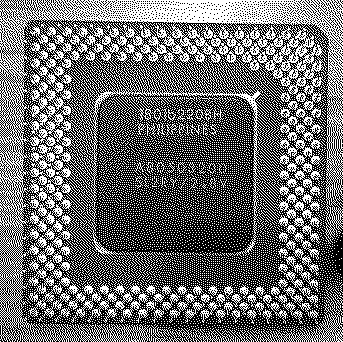
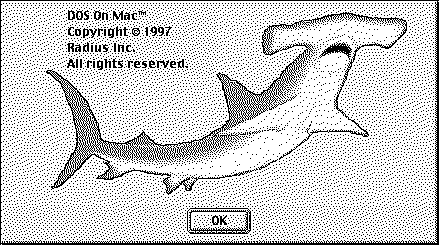
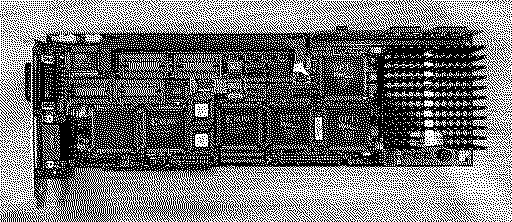
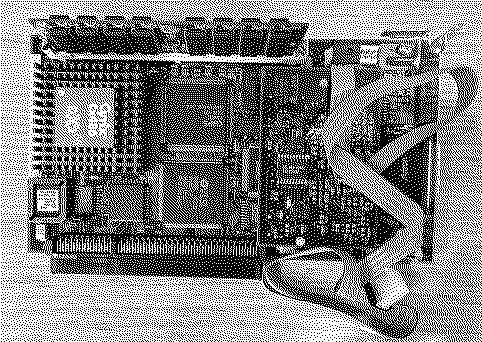
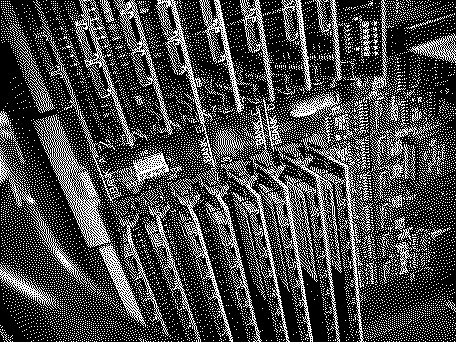
Last week I received the long-awaited Reply (Radius) Dos On Power Mac card. There is potential for upgrading: add video memory, replace a processor with support for up to 200 Mhz, and replace the L2 cache card. In this regard, I have a question for the experts of this forum. On the reverse side, there are memory chips, do I understand correctly that these are chips (NEC 424210-60-G) of video memory that I can install in sockets? Now Pentium 133 Mhz is installed here. Who has had experiments with replacing the processor on similar cards? What is better to install to get the best experience? L2 processor cache for 256 KB is also installed here, I have never seen such boards and did not know about their existence. Can someone show me the lots on ebay or somewhere else so that I can understand what to look for? Surprisingly, the card turned out to be new, but at first it seemed to me that it did not work, because the standard PC Setup (1.6.4 and 2.1.7) did not identify this card. It uses its own application. And also, as you can see from the application, you can't allocate memory from Mac, only setting the memory stick. This was installed on Mac OS 9.2.2 in Power Macintosh G3 MiniTower without any problems. I'll probably have to use Mac OS 8.1 to test the network. As I understand it, this application requires OT 1.x, but it will not work with 2.x. I haven't tried it yet, but maybe someone has already tried it. Will Windows 98 work on this card? I also plan to change the computer ID with "Wish I Were" on Power Macintosh 9500 to try PC Setup again.
Liked by JDW,Certificate of Excellenceanderic |
|
V.Yakob Tinkerer Syktyvkar -------- Joined: Sep 6, 2023 Posts: 129 Likes: 46 |
Oct 31, 2025 - #2
I continue to experiment with this card...
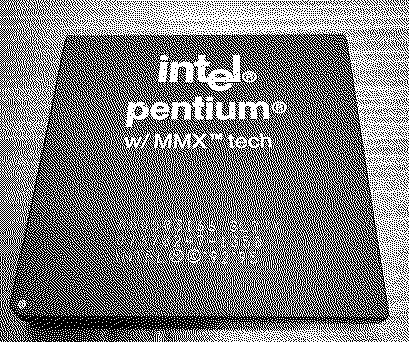
Windows 95 is installed and works fine, but here, as you can see, you can share the network interface in the application. That's what I did. I tried to do it myself without instructions, studied the instructions, tried again and again -- it doesn't work. Whenever the DOMODI.EXE driver is loaded from autoexec.bat, it hangs. In Device Manager, the network card driver is marked with an exclamation mark, there is also another sound device that requires attention, but again, nothing can be done about it. I conducted an additional experiment -- the DOS on MAC installer can only detect OpenTransport 1.1.1 and 1.1.2, if you install 1.3 or 1.3.1, the absence of OT is reported. There is nothing to do, you will have to take out the card and install it in the Power Macintosh 9500, if this card is made in the likeness of Apple, then you may need older network controllers on the motherboard. After installing the card and booting Mac OS -- freezing. Reboot and booting Mac OS -- freezing again. Reboot, reset PRAM and booting Mac OS -- freezing again. Freezes in random places. It may seem that everything is fine, and then it freezes. I had to install the native 604e 200 Mhz processor instead of the installed G4 350 Mhz (NewerTech). I'll also try to use NewerTech without extensions, maybe it will help. Now I couldn't get to it because of constant freezes. Success, Mac OS works fine and I was able to safely download the Win95 disk image from AFP share, which was prepared earlier on G3MT. I deleted the network settings, added DOMODI.EXE to autoexec.bat -- the network works!! Voila! [grinning-face-with-o] Apparently, in order to use this card fully, using a remote network adapter, you will have to leave it in PM9500. As a result, it will be a machine capable of running Mac OS 7.5.2 - 9.1, DOS/Windows 3.1x/Windows 95 and BeOS. Maybe +Rhapsody? The body PM9500 was damaged as usual during disassembly. :( I also noticed that there are no images of floppy disks from this card in the garden, I will definitely add them later.
|
|
Byte Knight Tinkerer -------- Joined: Oct 21, 2021 Posts: 133 Likes: 116 |
Nov 2, 2025 - #3
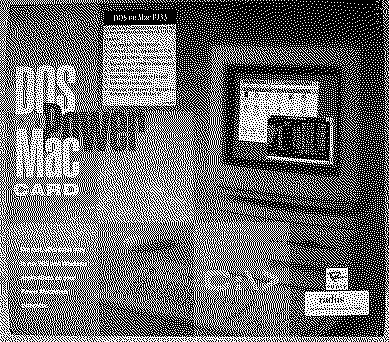
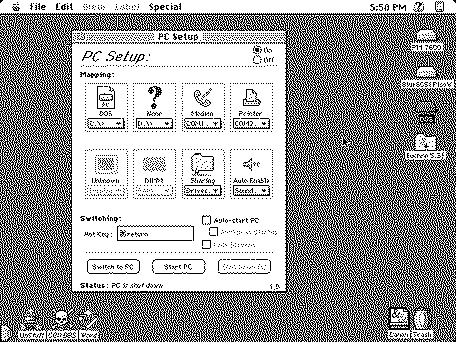
I've got one of these Reply DOS on a PowerMac Card w/Pentium 133 MHz Processor that was new open-box and put it in my 7600. It came with two PC Compatibility Card CD's - Mac OS Software and PC Utilities, both v1.5. I see that Macintosh Garden has v1.6 here. My PC Setup screen looks a little different:
It also came with the following floppy disks: Microsoft MS-DOS v6.22 (3 floppies), a Reply PC Compatibility Card PC Software Rev A, and a PCI DIMMS Patch v2.0.
|
|
NJRoadfan New Tinkerer -------- Joined: Feb 6, 2022 Posts: 75 Likes: 21 |
Nov 3, 2025 - #4
That's Apple's stock PC Setup software that shipped with their cards. Its likely the 3rd party PC Setup 2.0.1 will work with this card. It adds native Windows 95 drivers for storage and CD-ROM.
|
|
Byte Knight Tinkerer -------- Joined: Oct 21, 2021 Posts: 133 Likes: 116 |
Nov 3, 2025 - #5
It looks like there's a patch for the OT issue here.
How exactly did you get networking to work in Windows 95? The DOS on Power Mac manual has me installing the NetWare Client software (which version of the client I don't know because it wasn't included with the card) and then selecting a Power Macintosh 6100 Ethernet Adapter which isn't even an option...
|
|
V.Yakob Tinkerer Syktyvkar -------- Joined: Sep 6, 2023 Posts: 129 Likes: 46 |
Nov 3, 2025 - #6
They probably sold different PC/DOS cards under the Reply/Radius brand.
On this card, as you can see, can install the L2 cache of the processor, but there is no such slot on Apple cards. The kit has a driver on 6 floppy disks. After installing the drivers, files for the LSL.EXE and DOMODI.EXE network appear in the C:\Radius directory, which are also registered in autoexec.bat. I haven't scanned the user guide yet, but see the attachment photos of the pages about setting up the network in win3.11 and win95. I ordered NEC 424210-60-G chips and a Pentium MMX 200 Mhz processor for this card, so I will soon be able to compare performance. All that remains is to find a benchmark for win95 so that I can take a screenshot instead of taking a photo of the monitor.
Liked by Byte Knight |
|
V.Yakob Tinkerer Syktyvkar -------- Joined: Sep 6, 2023 Posts: 129 Likes: 46 |
Nov 3, 2025 - #7
I also have one Reply "Dos on Mac" board designed for PM6100. But I have it installed in Quadra 950 and it works. Works only with a built-in video card. In any case, with this GrandVImage the system immediately freeze after starting PC Setup.
This kit includes Reply floppy disks, but actually contain a driver from Apple PC Setup v1.0.3a8. The newer version found in the garden 1.0.7 also works. But the newer version 1.6.4 causes the PC to freeze at the initialization stage. Maybe 1.6.4 already doesn't work well on 68k, I don't know. According to the photos I saw, this card is no different from those sold by Apple. Maybe the configuration was different: there is a license for MS-DOS, a license for Windows 3.1, Doom. I have to adjust the sound here, but I don't know what this strange connector is called "Audio connector". I also saw somewhere special boards for taking the mind card behind the body, I admit that I don't like that it goes inside the case. I didn't set up the network here, to be honest, I don't know if it's possible. The user manual says that you can connect a compatible modem, but there is nothing about the network.
|
|
Byte Knight Tinkerer -------- Joined: Oct 21, 2021 Posts: 133 Likes: 116 |
Nov 3, 2025 - #8
[Image: IMG_8120.jpg] [Image: IMG_8119.jpg] I'm assuming that Radius bought out Reply at one point?
|
|
V.Yakob Tinkerer Syktyvkar -------- Joined: Sep 6, 2023 Posts: 129 Likes: 46 |
Nov 3, 2025 - #9
According to Wikipedia, Radius bought Reply in 1997. Liked by Byte Knight |
|
V.Yakob Tinkerer Syktyvkar -------- Joined: Sep 6, 2023 Posts: 129 Likes: 46 |
Nov 3, 2025 - #10
@Byte Knight Do you have LSL.EXE and MACODI.COM files in C:\NWCLIENT?
In the same directory where MACODI.COM is located, you need to create NET.CFG with the content that is in the instructions. Also need to create C:\STARTNET.BAT This should bind ODI to a remote network card, as far as I understand. |
|
NJRoadfan New Tinkerer -------- Joined: Feb 6, 2022 Posts: 75 Likes: 21 |
Nov 3, 2025 - #11
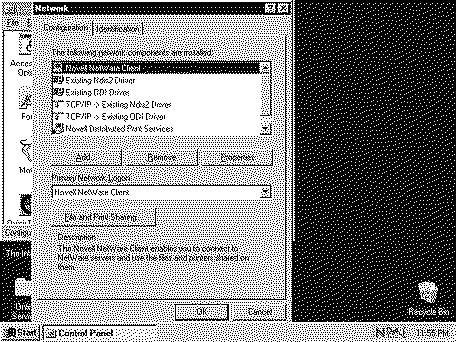
Windows 95 can use a real mode ODI driver with its native network stack. The "Existing ODI Driver" is the stub driver you need to load. You shouldn't need the Netware client at all. The built-in TCP/IP stack and Microsoft SMB client should work as-is.
|
|
Byte Knight Tinkerer -------- Joined: Oct 21, 2021 Posts: 133 Likes: 116 |
Nov 4, 2025 - #12
|
|
V.Yakob Tinkerer Syktyvkar -------- Joined: Sep 6, 2023 Posts: 129 Likes: 46 |
Nov 4, 2025 - #13
Try to add it to STARTNET.BAT
C:\Windows\LSL.EXE C:\Apple\MACODI.COM But please note that NET.CFG should be located in the same place as MACODI.COM. Most likely, the path to the file can be passed as an argument, but these experiments can be left for later. Try it, maybe it will work. Liked by Byte Knight |
|
Byte Knight Tinkerer -------- Joined: Oct 21, 2021 Posts: 133 Likes: 116 |
Nov 4, 2025 - #14
Ok, making some progress - after setting up all the config and batch files, everything seems to load up properly at boot. I upgraded to PC Setup 1.6.4 too .
[Image: IMG_8125.jpg] Still a no-go on the Windows 95 side of things though. In Windows 95 TCP/IP, do I need to Specify an IP address or Obtain an IP address automatically? [Image: PICT.BMP (Converted).jpg]
|
|
NJRoadfan New Tinkerer -------- Joined: Feb 6, 2022 Posts: 75 Likes: 21 |
Nov 4, 2025 - #15
"Obtain IP Address Automatically" is DHCP and should work. One thing to try is changing the TCP/IP connection in Open Transport to something else, like MacIP, just as long as it isn't the network adapter you are using with the DOS card. If that works, it lines up with what I vaguely remember years ago about the two sides conflicting.
Liked by Byte Knight |
|
Byte Knight Tinkerer -------- Joined: Oct 21, 2021 Posts: 133 Likes: 116 |
Nov 5, 2025 - #16
Success (finally)! I had to manually specify the IP address, subnet mask, and DNS in Windows 95.
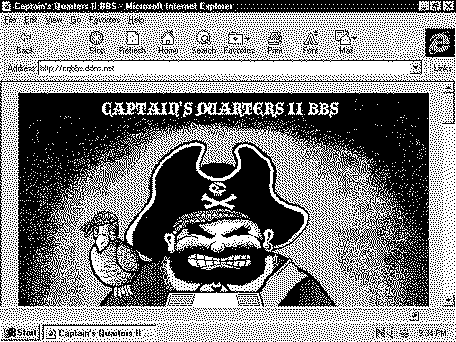
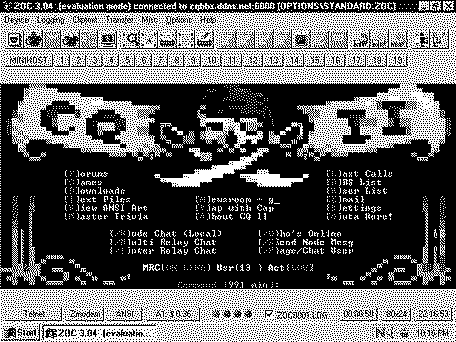
I was even able to find a much older version of my favorite modern Telnet terminal program Zoc and get on my BBS! BTW, the clipboard function between the two machines works slick for taking Windows 95 screenshots. Just hit Print Screen (F13) while in Windows 95, switch to Mac, and then using the GraphicsConverter app do New -> Image with Clipboard. You can then save your screenshot in PNG, JPEG, or GIF format right to your file server. Now, is there any way for this to get on my netatalk server?
Liked by ClassicHasClass,Scorpio_nyandV.Yakob |
|
NJRoadfan New Tinkerer -------- Joined: Feb 6, 2022 Posts: 75 Likes: 21 |
Nov 5, 2025 - #17
Technically yes if you can find an old copy of PCMacLan that works on Windows 95. COPSTalk was also available as well.
Also, if running Windows 95, PC Setup 2.1.7 may be of interest as it has native storage drivers for Windows 95: https://web.archive.org/web/20030127064829/http://www.pcsetup2x.com/ Liked by Byte KnightandScorpio_ny |
|
V.Yakob Tinkerer Syktyvkar -------- Joined: Sep 6, 2023 Posts: 129 Likes: 46 |
Dec 3, 2025 - #18
Yesterday I finally received NEC 424210-60-G memory chips from China.
I installed it, now there are 4 MB of video memory! :cool: I also wanted to change the processor to Pentium MMX 200 Mhz, but something went wrong. After replacing the processor and changing the position of the Mac jumpers does not turn on, the power supply protection is triggered. The processor contacts are in place and even, there seems to be no problems with it. Until I understand what could be the matter here. :unsure: P.S. I posted the software and instructions in the garden.
|
|
V.Yakob Tinkerer Syktyvkar -------- Joined: Sep 6, 2023 Posts: 129 Likes: 46 |
Dec 6, 2025 - #19
Everything became clear.
I tore off the sticker on the marking and found out that "FV80503200" refers to embedded systems. Some sellers on eBay indicate it.
Well, I didn't know that and found another Pentium MMX 200 Mhz (SL2RY) in a ceramic case that should definitely work here. I was probably lucky that I didn't spoil this DOS On Mac card.
|
|
V.Yakob Tinkerer Syktyvkar -------- Joined: Sep 6, 2023 Posts: 129 Likes: 46 |
Dec 20, 2025 - #20
In general, bad news.
I bought another 200 Mhz and 166 Mhz processor, and exactly the same behavior. Jumpers are definitely installed correctly. I started looking for the reasons, including conveying the symptoms of GPT -- I don't know how true it is, but GPT talks about VRM problems. The reason is that for 30 years, tantalum capacitors have consumed their resource and a short circuit at a load of yes, and therefore the PSU goes into protection. I don't know if this is really the case, whether it's worth taking care of buying new tantalum capacitors, and finding someone who can replace it for me, because I don't have enough experience to replace it in this case without damaging or spoiling neighboring components. How to choose these capacitors correctly, use the same denominations, or take a little more?
|
| Page 1 of 2 | Next > | Last >> |
| Home | Forums | What's New | Search | Bookmarks | RSS | Original | Settings |
| XenForo Retro Proxy by TinkerDifferent.com |







![[Image: IMG_8120.jpg]](/proxy_image?url=https://tinkerdifferent.com/data/attachments/24/24501-44a622b8b4368ff96aabd44f005baf68.jpg)
![[Image: IMG_8119.jpg]](/proxy_image?url=https://tinkerdifferent.com/data/attachments/24/24502-ef5643c220ea1fdc47137f3d66c3c156.jpg)


![[Image: IMG_8125.jpg]](/proxy_image?url=https://tinkerdifferent.com/data/attachments/24/24530-3863b5212732b8120af88dae5c981913.jpg)
![[Image: PICT.BMP (Converted).jpg]](/proxy_image?url=https://tinkerdifferent.com/data/attachments/24/24531-394ab549197d1b54e41514051fbb0217.jpg)