|
* TinkerDifferent *
Retro Computing Community |
| Home | Forums | What's New | Search | Settings |
| Doing something silly, dangerous, and potentially useful with BlueSCSI |
|
eric Administrator MN -------- Joined: Sep 2, 2021 Posts: 1,152 Likes: 1,935 |
Feb 25, 2024 - #1
If you didn't know BlueSCSI v2 has a "RAW" mode that is generally used as a crutch if you're migrating an SD Card from scs2sd to a BlueSCSI - you can enter those partition offsets into the ini file and get the partitions from your old SD card exposed as drives.
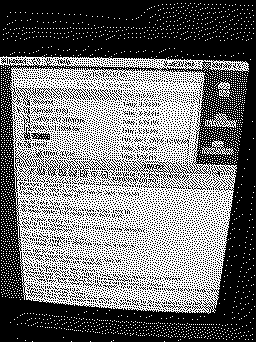
BlueSCSI also falls back to raw mode if no images are found - exposing the entire SD card as a drive to the computer. Again kind of useful if you just want a 4gb SD card to be a 4gb SCSI drive. Which kind of got me thinking - many vintage computers can understand FAT32 - AND if your image file is not fragmented (meaning the FAT32 file system is bypassed) - couldn't you have both? Both images exposed as drives AND the SD card exposed as a drive? Surely nothing could go wrong with the BlueSCSI firmware AND the vintage OS accessing the SD card at the same time.. right... right?! Well it seems it's not as dangerous (so far) as I thought! Here is a photo of my 9600 things to note:
What could go wrong? I have no idea if the File Allocation Table is synced/refreshed between the Host machine and the BlueSCSI firmware - since the log.txt is open actively appended to (not much when debug is off) I suppose it could overwrite some parts of a file you put on there if it's not in sync. What happens if you delete the HD00_512 20MB.hda file wile mounted? Nothing good - I havent tried. What happens if you mount the HD00_512 20MB.hda inside MacOS while it's also mounted on the SCSI bus? Nothing good - I havent tried. CD's would be interesting - you could use Virtual CD to mount files that are on the SD card, which is a bit silly as BlueSCSI can already mount them and you can use the BlueSCSI toolbox to switch em around. What do I do with this weird experiment? I don't know. Could/should I put it behind a ini file option that says "ThereBeDragonsAndIMightLooseMyDataButMountTheSDCardAnyways=1"? :) Actually if you really wanted to potentially lose your data ... err i mean try this out you could do add this section to your bluescsi.ini file:
If it is stupid but it works, it isn't stupid.
Liked by rdmark,Elemenoh,rikerjoeand 7 others |
|
Androda TinkerDifferent Board Secretary 2023 USA, Western -------- Joined: Sep 25, 2021 Posts: 523 Likes: 581 |
Feb 26, 2024 - #2
|
|
reukiodo New Tinkerer -------- Joined: Aug 30, 2023 Posts: 7 Likes: 1 |
Mar 13, 2024 - #3
What about "DataLossDangerExposeFullSDCard=1" ?
I think this ability is neat in that I can put (and mount) a TON of CD images on there without needing to use the CD change utility or eject them 1-by-1 to switch to the correct image. In this case, the fullSD will still use a SCSI ID, but I can use it for the full SD instead of just a CD drive, and have all CD images I want mounted all at once. This seems kind of silly to use to manage HD images, unless booted from another device and all HD images are unmounted. That would surely cause corruption. Would exposing the full SD allow firmware updates from within the PC? For instance, if I could download the firmware updates from iCab and then just place it on the exposed full SD and reboot to update? This would be great for avoiding disassembling the PowerBook over and over again each time there is another update! |
|
ScutBoy Administrator Northfield, MN USA -------- Joined: Sep 2, 2021 Posts: 356 Likes: 342 |
Mar 14, 2024 - #4
I can't find the exact quote, but something along the lines of "We do things by the book to avoid trying something stupid. The book, though, is a collection of stupid things that worked".
Liked by Androdaanderic |
| Page 1 of 1 |
| Home | Forums | What's New | Search | Bookmarks | RSS | Original | Settings |
| XenForo Retro Proxy by TinkerDifferent.com |