|
* TinkerDifferent *
Retro Computing Community |
| Home | Forums | What's New | Search | Settings |
| BlueSCSI Wi-FI DaynaPort issue |
|
Brutus75 New Tinkerer -------- Joined: Aug 15, 2025 Posts: 11 Likes: 1 |
Aug 28, 2025 - #1
Hi There,
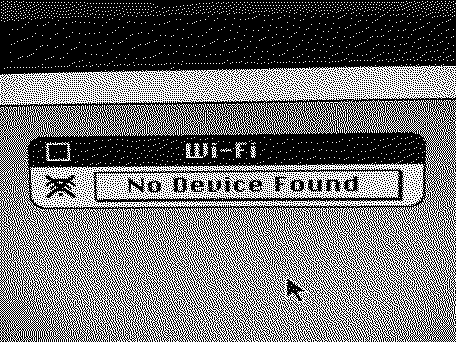
I have a Desktop BlueSCSI V2 - 2023.10a with a Pico W. It is working with my Quadra 650 and I can now browse the internet using the BlueSCSI Wi-Fi, but I have a funny issue. When I open the Apple menu item "Wi-Fi" it opens but then says "No Device found". I have the Daynaport driver installed (I did a custom install and choose the SCSI/Link driver). I have tried it in System 7.1 and 7.5.3 with the same result. I have included a screenshot of the error.
|
|
Garrett Tinkerer South Carolina -------- Joined: Oct 31, 2021 Posts: 144 Likes: 139 |
Aug 28, 2025 - #2
Do you have the HDA and INI file for the network adapter on your SD card? In a tool like SCSI Probe, you should see "Processor" or "Dayna Processor" as one of your SCSI IDs.
|
|
Brutus75 New Tinkerer -------- Joined: Aug 15, 2025 Posts: 11 Likes: 1 |
Aug 28, 2025 - #3
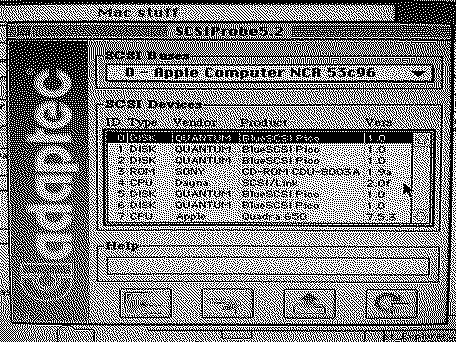
Yes I have both files and it does show up under SCSIProbe. I can browse the internet fine I just get that error in the Wi-Fi app. I have attached a pic. It is SCSI ID 4.
|
|
Brutus75 New Tinkerer -------- Joined: Aug 15, 2025 Posts: 11 Likes: 1 |
Aug 29, 2025 - #4
|
|
V.Yakob Tinkerer Syktyvkar -------- Joined: Sep 6, 2023 Posts: 129 Likes: 46 |
Aug 29, 2025 - #5
I faced a similar problem, I didn't study it thoroughly, but it wasn't like that at first glance
Connected to BSv2 0 Disk 1 Disc 2 Disk 3 CD 4 Disk 5 Disk 6 Wi-Fi SCSI on another channel is connected 3 CD 5 ZIP The Wi-Fi app can't find the device. I remove several disks in BlueSCSI, and Wi-Fi app working normally. Now I don't fill it out completely and I don't face it anymore. |
|
iQQator New Tinkerer -------- Joined: Apr 12, 2025 Posts: 3 Likes: 0 |
Sep 28, 2025 - #6
Hello, I have problems with Dayna :(
0) Bought BlueSCSI for powerbook, version with WiFi 1) Driver DaynaPORT SCSI/Link installed 2) NE4.hda is exist and mount, no HD40 or CD40 exist in folders 3) in log I see: Clock set to: 200MHz Initialization complete! Disabling status LED Successfully connected to Wi-Fi SSID "MyWiFi" INFO: Pico Voltage: 3.365V. 3) SCSIProbe 4.3 shown: | 4 | CPU | BlueSCSI | Virtual HD | 2.0 | My ini file in attach Where I was miss? Any help would be appreciated
|
|
V.Yakob Tinkerer Syktyvkar -------- Joined: Sep 6, 2023 Posts: 129 Likes: 46 |
Sep 29, 2025 - #7
Successfully connected to Wi-Fi SSID "MyWiFi" -- Reports that BlueSCSI has connected to the "MyWiFi" network, you can see it on the router.
Now you need to install the driver in System Software / Mac OS 7, and select Alternative Ethernet in the network settings. |
|
iQQator New Tinkerer -------- Joined: Apr 12, 2025 Posts: 3 Likes: 0 |
Sep 29, 2025 - #8
But when install driver quick variant show me that no device found, but when select custom mode, I can install it. |
|
robin-fo Tinkerer Switzerland -------- Joined: Feb 17, 2022 Posts: 157 Likes: 76 |
Sep 29, 2025 - #9
Liked by ericandiQQator |
|
robin-fo Tinkerer Switzerland -------- Joined: Feb 17, 2022 Posts: 157 Likes: 76 |
Sep 29, 2025 - #10
Best create you config with this: https://ini.bluescsi.com/
|
|
eric Administrator MN -------- Joined: Sep 2, 2021 Posts: 1,149 Likes: 1,926 |
Sep 29, 2025 - #11
|
|
iQQator New Tinkerer -------- Joined: Apr 12, 2025 Posts: 3 Likes: 0 |
Sep 29, 2025 - #12
Yeah, I fixed now, move hdd to [SCSI1] and [SCSI5] parts, some cleanup and voila, all work like a charm ;)
Thx for help. |
| Page 1 of 1 |
| Home | Forums | What's New | Search | Bookmarks | RSS | Original | Settings |
| XenForo Retro Proxy by TinkerDifferent.com |