|
* TinkerDifferent *
Retro Computing Community |
| Home | Forums | What's New | Search | Settings |
| BLAZING. FAST. MAC. The Performer PDS 68030 Accelerator by MacEffects! |
Forums > Vintage Apple > Macintosh > Compact Macs
|
Ron's Computer Videos Active Tinkerer -------- Joined: Oct 15, 2021 Posts: 199 Likes: 278 |
Oct 16, 2024 - #1
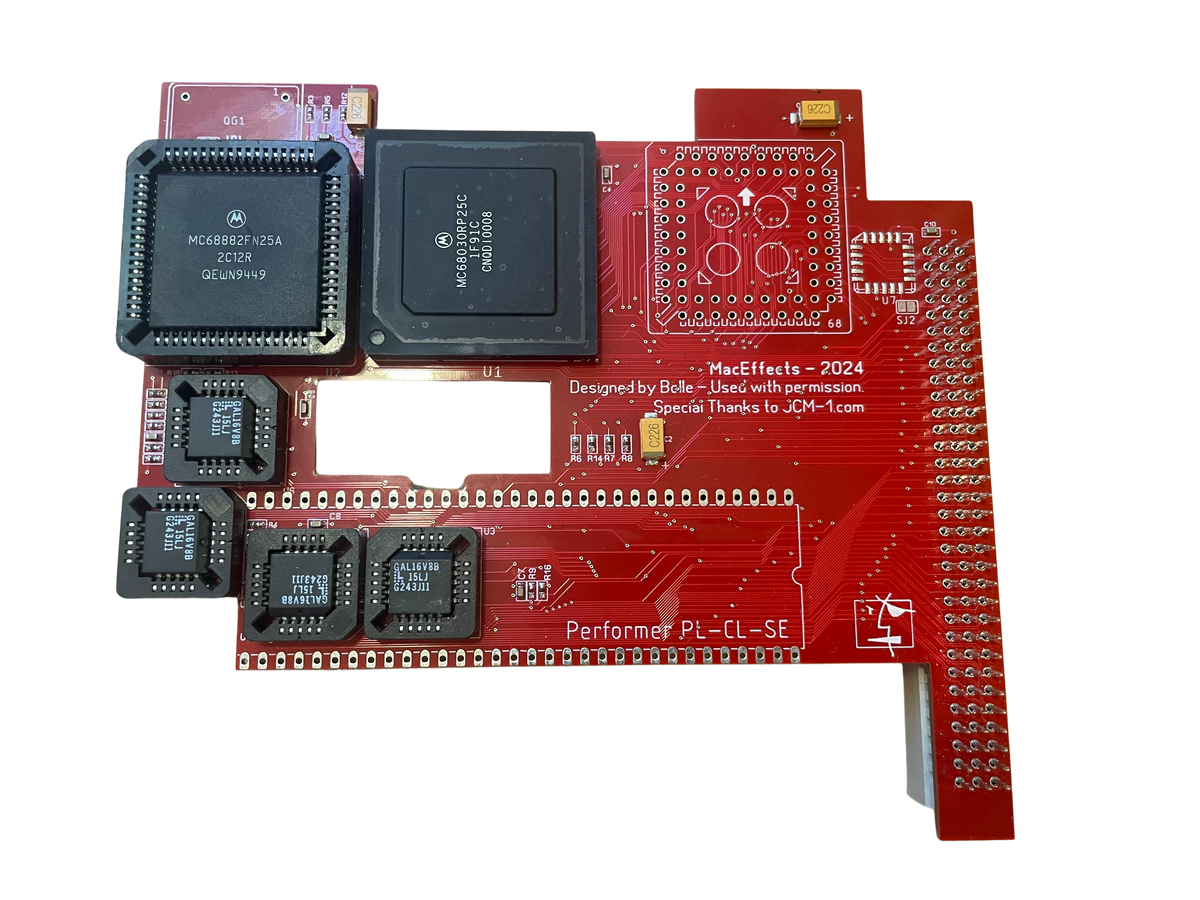
I'm pretty impressed with MacEffect new accelerator for the Macintosh SE. Clocks in at roughly the same speed as a Macintosh II... and shows actual speed improvements in programs (not just in artificial benchmarks). Plus, it looks amazing in my new SE-Mini!
I made a short video showing off the card and doing some benchmarking. Check it out: MacEffects Performer PDS 68030 Accelerator for Apple Macintosh SEMacEffects Performer accelerator is the perfect hardware upgrade for your Macintosh SE. The Performer accelerator features a 68030 clocked to 16mhz and a 68882 FPU (math coprocessor) to speed up CPU performance and math calculations. With the Performer accelerator you can enjoy a new level of...
[Image: maceffects.com]
maceffects.com
Liked by AlexMac,svenvendetta,Byte Knightand 2 others |
|
Garrett Tinkerer South Carolina -------- Joined: Oct 31, 2021 Posts: 144 Likes: 139 |
Oct 16, 2024 - #2
On the original Performer card, the FPU will run at 16MHz unless a separate 25MHz oscillator is installed. Not sure if MacEffects is claiming the FPU is running faster than the 68030, but based on the photos on their site, it's going to be 16MHz. Either way, a great improvement to a stock SE!
|
|
JDW Administrator Japan -------- Joined: Sep 2, 2021 Posts: 2,535 Likes: 1,983 |
Dec 3, 2024 - #3
I also have a Performer-SE from MacEffects and have been testing it on my SE, both with and without an optional Crystal Oscillator. Results are as follows, inline with the results from @Ron's Computer Videos :
JDW's TESTSJDW's Speedometer 3.23 Test (No FPU XTAL, stock 16MHz operation): LEFT: 33MHz FPU XTAL | RIGHT: no XTAL (16MHz FPU) (I saved the Machine Record on my Mac SE but later opened it on my modern Mac within Basilisk II, which is why the bars above are color.) Norton System Info: With & Without 33MHz XTAL: Daystar Power Demo app shows 16MHz for both CPU and FPU, even with 33MHz XTAL installed! The XTAL I installed: Ron's TESTS(extracted from his nice video and straightened)Ron's Speedometer 3.23 Test (No FPU XTAL): CONCLUSIONS:
I ordered my 33MHz TCXO (Temperature Compensated Crystal Oscillator) from this AliExpress seller. I told them I wanted 33MHz instead of 25MHz, and they made the change for a few bucks extra. Liked by BeigeBoxSC,YMKandRon's Computer Videos |
|
YMK Active Tinkerer -------- Joined: Nov 8, 2021 Posts: 408 Likes: 343 |
Dec 3, 2024 - #4
This is a very neat product! Quite cost effective as well.
@JDW, your FPU benchmarks are in line with what I've seen, doubling FPU speed on an SE/30: Liked by JDW |
|
JDW Administrator Japan -------- Joined: Sep 2, 2021 Posts: 2,535 Likes: 1,983 |
Dec 3, 2024 - #5
Liked by YMK |
|
JDW Administrator Japan -------- Joined: Sep 2, 2021 Posts: 2,535 Likes: 1,983 |
Dec 4, 2024 - #6
NEW BENCHMARKSI ran Speedometer 3.23 on my stock SE/30 just now, since my Machine Record file didn't have SE/30 scores. Stock SE/30:Stock SE/30 (left) versus Performer-SE (no XTAL added, CPU=FPU=16MHz):Stock SE/30 (left) versus Performer-SE (with 33MHz FPU XTAL):CONCLUSIONS
So how does the Performer-SE "feel" versus a stock SE/30?Well, that's where the Graphics performance comes into play, I think. I base the "feel" on how I work in the Finder, doing things like opening Windows and clicking on pull-down menus. The time it takes for a menu to drop down when clicked is faster on the SE/30. No need to time it, I just feel the difference. Ditto for opening windows by double-click. It's faster on a stock SE/30. CPU performance plays a role in this too.Does the Performer-SE feel faster than a stock 8MHz Mac SE?Yes, but graphics performance probably comes into play there too because if you check my earlier post, we see the Speedometer 3.32 score for Graphics is 1.88 on the Performer and 1.00 on the SE. Plus the CPU is 3.32x faster than a stock SE too. So overall, yes, you will feel the difference if you use a Performer versus a stock SE. It just doesn't feel as fast as a stock SE/30, and the benchmarks also explain why that is. So you should buy the Performer-SE with that in mind.DISCLAIMER: This is my objective look at the Performer. It doesn't seek to excessively praise it or tear it down. Now it's your turn!If anyone else out there has a Performer-SE, please share you Speedometer 3.23 scores and experiences, with or without an FPU Crystal Oscillator added.
Liked by YMK |
|
phipli Tinkerer -------- Joined: Sep 23, 2021 Posts: 309 Likes: 215 |
Dec 4, 2024 - #7
So, these cards are electrically identical to the Total Systems Mercury - I have one, but not set up. I could compare your performance. @JDW What driver software are you using? Can I recommend installing GEMStart and seeing what difference that makes to your FPU scores? Find it... here : https://macintoshgarden.org/apps/accelerator-card-drivers Install version 3 for System 7 Liked by BeigeBoxSC |
|
phipli Tinkerer -------- Joined: Sep 23, 2021 Posts: 309 Likes: 215 |
Dec 4, 2024 - #8
Further to my previous post, I had a look in my phone for photos of old benchmarks I've run. In the following "Upgraded Macintosh SE" is an SE with the Total Systems Mercury fitted - as mentioned, this is electrically identical to the card your card is a clone of. Different brands, same card.
I can't remember for absolute certain if this (Upgraded Macintosh SE) Norton FPU benchmark score is from when I was running the FPU at 16MHz, or 20MHz, but I suspect it is 16MHz, it is very close to the performance of an SE/30. The reason I suspect it is 16MHz is because from neighboring photos, I know for a fact that "Current System" 14.7, was another, different accelerator with a 20MHz FPU. For interest, note that (14.7/20MHz)*16MHz = 11.76. I don't have this on hand at the moment - this is a 2 year old photo. Like I said, try GemStart and see where that gets you! Also, yes, my desktop is covered in all the different driver versions I was testing at the time :ROFLMAO: Edit - For interest, here is my card (after I fitted a 20MHz clock) :
|
|
YMK Active Tinkerer -------- Joined: Nov 8, 2021 Posts: 408 Likes: 343 |
Dec 4, 2024 - #9
These are integer tests, so they don't involve the FPU.
This probably has to do with the BBU's interleaved CPU/video sharing of DRAM that was designed around 68000 timing.
The reason here is probably also memory bandwidth.
Liked by ClassicHasClass |
|
phipli Tinkerer -------- Joined: Sep 23, 2021 Posts: 309 Likes: 215 |
Dec 4, 2024 - #10
Again, I'd suggest installing GemStart and re-running benchmarks. Edit - Here is a summary of the scores for my card.
|
|
phipli Tinkerer -------- Joined: Sep 23, 2021 Posts: 309 Likes: 215 |
Dec 4, 2024 - #11
|
|
JDW Administrator Japan -------- Joined: Sep 2, 2021 Posts: 2,535 Likes: 1,983 |
Dec 4, 2024 - #12
@phipli
I installed the official Control Panel and Extension shown on the MacEffects Performer page. I will give your recommended drivers a try later today and report back with Speedometer 3.23 benchmark results at that time. @YMK There is indeed a huge memory bandwidth difference, and I forgot about the impact the BBU might have. Thanks also for the tip about Integer tests which don't use the FPU. Mark Jozaitis told me that clocking the "CPU" (not FPU) higher requires a reprogramming of the GAL chips, and that is beyond his technical capability. But of course, that would result in a bigger performance boost to the card than overlocking the FPU alone. (FPU overclocking can be done without touching the GALs, apparently. |
|
phipli Tinkerer -------- Joined: Sep 23, 2021 Posts: 309 Likes: 215 |
Dec 4, 2024 - #13
Liked by JDW |
|
phipli Tinkerer -------- Joined: Sep 23, 2021 Posts: 309 Likes: 215 |
Dec 4, 2024 - #14
@JDW...
Just a thought... but I've worked out part of what is going on. You removed the blob of solder? So if you break the connection between pin 8 (Output) on the clock, and the FPU itself... how is the FPU clock meant to see the signal from your 33MHz clock? I think there has been a misunderstanding here and people have been given instructions that disconnect the socket, instead of disconnect the other clock. Is there another jumper somewhere for disconnecting the onboard 16MHz clock? Where did you get those renders from? Can you share them? I might be able to say where you need to cut with a knife (or if there is another place to disconnect the signal path) to isolate the FPU from the 16MHz built in clock, because it looks like... perhaps... the jumper was put on the wrong signal.
|
|
JDW Administrator Japan -------- Joined: Sep 2, 2021 Posts: 2,535 Likes: 1,983 |
Dec 5, 2024 - #15
Yes, as per the instructions. Similar photo showing solder blob appears on @Bolle 's Github page. On that same Github page, the following text appears (I added clarity in brackets):
All PCB files and renders at shown at Bolle's Github. I simply dropped the files into the Gerber viewer at JLCPCB to see the board layout, and that was what I used to create the screenshots in my earlier post. I cannot explain anything technical about the card beyond what I've already stated because Micromac designed the card and Bolle recreated it. Joe at Joe's Computer Museum played some role as well based on the silkscreen text: As to the proper orientation of my TCXO XTAL, it is correct. Pin-1 corresponds to the sharper edge part of my XTAL:
|
|
phipli Tinkerer -------- Joined: Sep 23, 2021 Posts: 309 Likes: 215 |
Dec 5, 2024 - #16
By following those instructions you DISCONNECT the socket from the FPU. But... I don't just mean put it back, because then you would have two clocks at once. I was asking about where you got the diagrams so I could see both sides of the board and follow traces. |
|
JDW Administrator Japan -------- Joined: Sep 2, 2021 Posts: 2,535 Likes: 1,983 |
Dec 5, 2024 - #17
And it seems I need to expand the file named "gemstart3.sit": Very interesting... It uses the same icon as the v2.2.1 Control Panel I am using now... I must assume that means we must use the file named "gemstart.sit" with System 6?
|
|
phipli Tinkerer -------- Joined: Sep 23, 2021 Posts: 309 Likes: 215 |
Dec 5, 2024 - #18
You get to watch the silly startup animation. But the main issue here is that you never actually clock the FPU faster. Stick a frequency meter on the FPU clock pin if you can - you'll find it is always just under 16MHz. Not sure why your graphics were slow though. Liked by JDW |
|
JDW Administrator Japan -------- Joined: Sep 2, 2021 Posts: 2,535 Likes: 1,983 |
Dec 5, 2024 - #19
I have very limited time today, time that will be used only to test your recommended control panel. Tomorrow will be very busy for me as well, but if I can check the frequency tomorrow, I will try. Otherwise, that must wait for Monday. Even so, what you are suggesting is that the documentation on Github is wrong. All I did was follow those instructions very strictly, while consulting with @MacEffects . |
|
phipli Tinkerer -------- Joined: Sep 23, 2021 Posts: 309 Likes: 215 |
Dec 5, 2024 - #20
Combine that with the fact that the weird behavior you're seeing would be exactly explained by this - the speed doesn't change when you add a fast clock... almost like it isn't connected? Here is a good test - remove your clock, just unplug it from the socket. If the FPU still runs, it is connected to the 16MHz, not the socket, which it shouldn't be if you're trying to use the socket. If things are wired correctly, the FPU will not work with the clock removed. That's a nice, definitive and quick and easy test :) |
| Page 1 of 2 | Next > | Last >> |
| Home | Forums | What's New | Search | Bookmarks | RSS | Original | Settings |
| XenForo Retro Proxy by TinkerDifferent.com |
![[Image: maceffects.com]](/proxy_image?url=http://maceffects.com/cdn/shop/files/IMG_3460-removebg_1200x1200.png?v=1726852580)
![[Image: maceffects.com]](/proxy_image?url=https://maceffects.com/cdn/shop/files/favicon_32x32.jpg?v=1613556218)


![[Image: 1733217545975.png]](/proxy_image?url=https://tinkerdifferent.com/data/attachments/18/18826-652afe063bdda94f42e23e4f8dbfa148.jpg)
![[Image: 1733279640946.png]](/proxy_image?url=https://tinkerdifferent.com/data/attachments/18/18828-e6d3fee2266e4c3eac826a7ceb648b0e.jpg)


