|
* TinkerDifferent *
Retro Computing Community |
| Home | Forums | What's New | Search | Settings |
| AppleVision 850AV Repair |
Forums > Vintage Other > Monitors > CRT
|
Elemenoh Active Tinkerer Bay Area -------- Joined: Oct 18, 2021 Posts: 428 Likes: 415 |
Nov 6, 2022 - #1
I was lucky enough to find an AppleVision 850AV 20" display in nice condition. It does power up, but only kind of works at 1024x768 @ 60Hz. Most other resolutions or sync rates that it's supposed to support result in a distorted narrow raster. Hopefully it's just some electrolytic capacitors on the main deflection board. My plan is to focus on the caps in the secondary side of the power supply and the vertical deflection circuit rather than replacing everything, since there are so many.
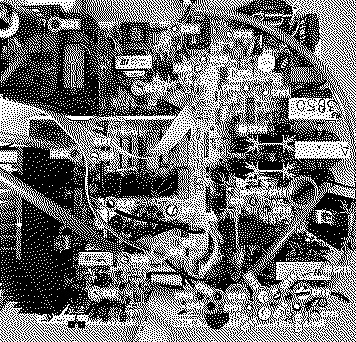
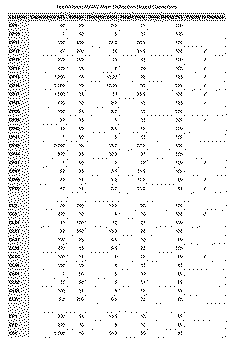
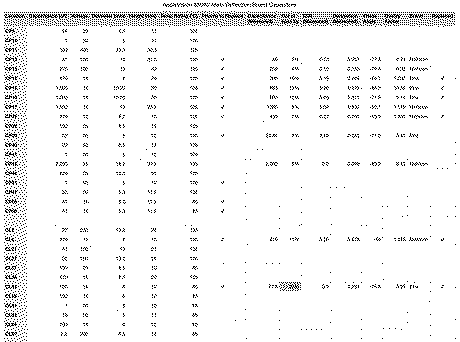
Here it is at 1024x768 @ 60 Hz. After taking this screen shot I realized the monitor's ADB cable needs to be plugged into the Mac for it to be fully identifiable by the host as a 850AV display. But it didn't make a difference to the symptom. Most of the other higher resolutions or sync rates look like this: Taking the display apart unfortunately lead to some broken plastic. The top cover, various latches and the screw covers all shattered. Hopefully some Sugru and 3D printed parts will make it mostly unnoticeable. Anyway, here's the main deflection board and a basic map of the caps. Here's a list of every electrolytic capacitor with a column of things I plan to replace first. EDIT: Corrected C42 from 220uF to 2,200uF. Liked by kaoshonenanderic |
|
LeadedSolder New Tinkerer Western Canada -------- Joined: Oct 27, 2021 Posts: 45 Likes: 8 |
Nov 6, 2022 - #2
That is a massive display. Poor 4400 having to hold all those pixels up.
|
|
Elemenoh Active Tinkerer Bay Area -------- Joined: Oct 18, 2021 Posts: 428 Likes: 415 |
Nov 6, 2022 - #3
The secondary power caps all tested fine. I replaced those I had in sock while I wait for the others.
I did find that CL43 (a bypass cap on the QL20 emitter pin) in the horizontal circuit was 22% out of spec. Not sure if that's enough to cause this problem but replaced that and CL6. I measured all of the other specs too. I don't have good heuristics to pass/fail based on things like Dissipation, Phase Angle and Quality Factor. Do any of you have advice about how to read those or see any others that stick out as possible problems?
|
|
3lectr1c Active Tinkerer the United States -------- Joined: May 15, 2022 Posts: 668 Likes: 336 |
Nov 7, 2022 - #4
Thanks for making this great list of caps for the monitor! Do you mind if I add it and the image to my website's capacitor reference library? I'm attempting to make it as complete as possible, but I can't get all this info myself.
As for the monitor, I've heard these are really unreliable and were subject to many recalls and repair programs at the time, so I doubt that caps are the issue here. Unfortunately I read about this (along with the details on what actually broke on these that I've since forgotten) on a reddit thread on r/vintageapple from several months ago, and it was one that just happened to have the monitor in the image next to a computer that the poster was showing (the title didn't mention the monitor), so good luck finding it. Edit: Found that thread after a bit of searching! https://www.reddit.com/r/VintageApple/comments/stomid Unfortunately, it didn't make mention of anything failing beyond the "controller board" so I don't think it will be of much help :( And it's the 1710, not the 850 but they were probably very similar. |
|
Elemenoh Active Tinkerer Bay Area -------- Joined: Oct 18, 2021 Posts: 428 Likes: 415 |
Nov 7, 2022 - #5
|
|
3lectr1c Active Tinkerer the United States -------- Joined: May 15, 2022 Posts: 668 Likes: 336 |
Nov 7, 2022 - #6
Thanks a bunch! Good luck getting it fixed, I do quite like the aesthetics of this one. They look rather goofy, yet somehow it just works. The Multiple Scan 15AV on the other hand...
|
|
Elemenoh Active Tinkerer Bay Area -------- Joined: Oct 18, 2021 Posts: 428 Likes: 415 |
Nov 7, 2022 - #7
I put the monitor back together enough to test and the symptom didn't change. So CL43 being a bit out of spec wasn't the issue. I have more caps on order and will be testing and/or replacing some of the transistors in the horizontal circuit next.
|
|
Elemenoh Active Tinkerer Bay Area -------- Joined: Oct 18, 2021 Posts: 428 Likes: 415 |
Nov 8, 2022 - #8
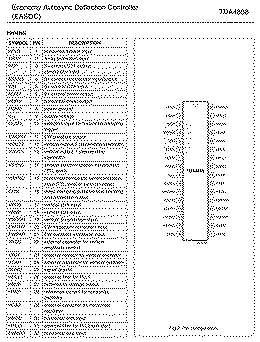
At @techknight 's suggestion, I opened up the neck board to see if there was some controller logic there. There's a lot going on here, but he suggested checking B+ on the sync processor TDA4858. I soldered some 24AWG wires to pins 3-6 and put the neck assembly back together.
I connected a multimeter to each wire and ran through various resolutions and sync rates. Sure enough, no changes were observed. So perhaps the chip is bad or it is not getting source current to drive the comparator. I've ordered some replacement TDA4858's and will be checking upstream from it to see if it's just a cracked joint somewhere.
|
|
misterg33 New Tinkerer -------- Joined: Oct 10, 2022 Posts: 61 Likes: 14 |
Nov 8, 2022 - #9
Make sure the ADB cable from the display is connected to the computer. This allows you to use the Monitors & Sounds control panel to adjust the display width and helps this monitor to sync correctly. I also recommend installing the last version of Apple Displays software available for the version of Mac OS you are using.
Apple Displays Software - Macintosh GardenRequires: North American English Mac OS 8.0, 8.1, 8.5, or 8.5.1 and any Apple monitor, including Apple Studio Displays, ColorSync Displays, AppleVision Displays and other Multiple Scan monitors. Note - any references to AppleVision Displays also apply to ColorSync Displays.
[Image: macintoshgarden.org]
macintoshgarden.org
If that makes no difference, have you checked the service source troubleshooting for this display? This series of monitors (17" and 20") have a weird calibration stored in on-board flash memory. When you walk through the color calibration in Monitors and Sound, the values for ambient light, etc are stored in the monitor. You can reset this calibration by holding command-option-A-V at startup. This forces the display to load the previous (backup) calibration from the flash storage. But sometimes this makes things worse if those values are also messed up. When the flash memory settings are hosed, the display draws incorrectly, or with the brightness turned all the way down. I don't think that's what's wrong based on the images you uploaded though.
|
|
Elemenoh Active Tinkerer Bay Area -------- Joined: Oct 18, 2021 Posts: 428 Likes: 415 |
Nov 8, 2022 - #10
|
|
Elemenoh Active Tinkerer Bay Area -------- Joined: Oct 18, 2021 Posts: 428 Likes: 415 |
Nov 10, 2022 - #11
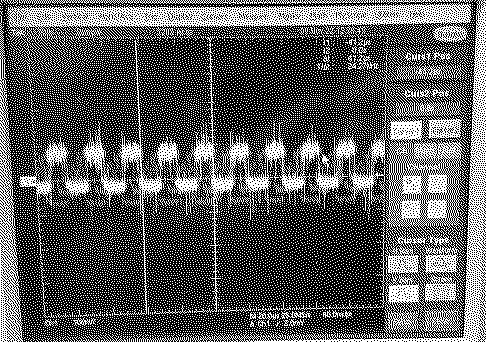
While I wait on the replacement sync processor, I decided to take a look a the neck board B+ pins on the scope.
Pin 3 (B+ control OTA output; comparator input): Goes to about 1V when high voltage kicks in then quickly settles back to 0V Pin 4 (B+ control comparator input/output): Has a steady wavy 220kHz ~1V signal always. Pin 5 (B+ control OTA input): Starts at 2-3V and slowly climbs to about 3.5V Pin 6 (B+ control driver output): messy ~48.5khz square wave once high voltage kicks in None of these change when switching resolution or sync rates. Pin 4: Pin 6:
|
|
Elemenoh Active Tinkerer Bay Area -------- Joined: Oct 18, 2021 Posts: 428 Likes: 415 |
Apr 10, 2023 - #12
I spent some more time on this with a friend and have some updates from troubleshooting done since the last post.
Replacing the sync processor and all 100uF caps on the neck board made no change. We went through the data sheet for the sync processor and noticed that it can used B+ as reference or a pulse from the flyback transformer. We looked at the neck board under a bright light and found no connection to any of the B+ pins. Whatever I was seeing on those pins before must have just been some minor internal activity from the chip itself. I connected some wires to the following pins 07: Horizontal Driver Output, shown in green 08: GND 09: Supply voltage was about 10V which is OK 15: Horizontal sync input (TTL level or sync-on-video), shown in yellow Edit: The frequencies on these pins change with the resolution/refresh rate set in the OS, despite the deflection being wonky. So the conclusion is the sync processor seems to be doing its thing. It's taking in a reasonable looking input and producing a reasonable output. The next step will be to test a bunch of components in the Horizontal circuit of the analog board.
Liked by retr01 |
|
marmotta New Tinkerer -------- Joined: Jan 18, 2024 Posts: 2 Likes: 0 |
Jan 18, 2024 - #13
Hi! Any news with your tests? This days I tried to fix my Colorsync 1710/750 with a very similar issue. The problem is the logic board on the neck, more in deep is the colorsync part... if you replace the 93c66 eprom with a new blank one, the colorsync go on disable state and the monitor work good (this makes this monitor as normal vga). The real issue is a mistery... |
|
Elemenoh Active Tinkerer Bay Area -------- Joined: Oct 18, 2021 Posts: 428 Likes: 415 |
Jan 21, 2024 - #14
Not really. I did test a lot of stuff in the horizontal section of the analog board but didn't find any culprits. Your symptom looks the same as mine? Do you have a thread going about it already? If not it'd be great to see some photos or videos.
|
|
marmotta New Tinkerer -------- Joined: Jan 18, 2024 Posts: 2 Likes: 0 |
Jan 21, 2024 - #15
I not have a photos, but I can confirm the logical board is the guilty. This board control all parameters of the monitor, voltages includes. If the logical part (cpu and eprom) going crazy, all monitor work bad. Now my monitor is fine! Before the fix, the monitor are very mad! Random distortion, random color changes, and only 640x480 work (upper resolution have a your defect or not sync at all). I have changed the capacitors of the digital part and the eprom, and (is important) I have fix the software part on macos. Now is good ;-)
|
| Page 1 of 1 |
| Home | Forums | What's New | Search | Bookmarks | RSS | Original | Settings |
| XenForo Retro Proxy by TinkerDifferent.com |